- iOS 教程
- iOS - 主页
- iOS - 入门指南
- iOS - 环境设置
- iOS - Objective-C 基础
- iOS - 创建第一个 iPhone 应用程序
- iOS - 操作和控件
- iOS - 委托
- iOS - UI 元素
- iOS - 加速度计
- iOS - 通用应用程序
- iOS - 相机管理
- iOS - 定位处理
- iOS - SQLite 数据库
- iOS - 发送电子邮件
- iOS - 音频和视频
- iOS - 文件处理
- iOS - 访问地图
- iOS - 应用内购买
- iOS - iAd 集成
- iOS - GameKit
- iOS - 故事板
- iOS - 自动布局
- iOS - Twitter 和 Facebook
- iOS - 内存管理
- iOS - 应用程序调试
- iOS 实用资源
- iOS - 快速指南
- iOS - 实用资源
- iOS - 讨论
iOS - 按钮
按钮使用
按钮用于处理用户操作。它会截取触摸事件并向目标对象发送消息。
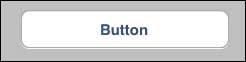
圆角矩形按钮
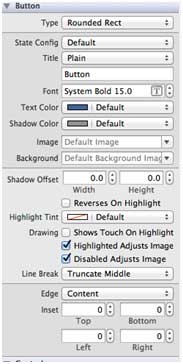
xib 中的按钮属性
你可以在工具区域(窗口右侧)的属性检查器中更改 xib 中的按钮属性。
按钮类型
- UIButtonTypeCustom
- UIButtonTypeRoundedRect
- UIButtonTypeDetailDisclosure
- UIButtonTypeInfoLight
- UIButtonTypeInfoDark
- UIButtonTypeContactAdd
重要属性
- imageView
- titleLabel
重要方法
+ (id)buttonWithType:(UIButtonType)buttonType
- (UIImage *)backgroundImageForState:(UIControlState)state
- (UIImage *)imageForState:(UIControlState)state
- (void)setTitle:(NSString *)title forState:(UIControlState)state
- (void)addTarget:(id)target action:(SEL)action forControlEvents: (UIControlEvents) controlEvents
添加自定义方法 addDifferentTypesOfButton
-(void)addDifferentTypesOfButton {
   // A rounded Rect button created by using class method
   UIButton *roundRectButton = [UIButton buttonWithType:
   UIButtonTypeRoundedRect];
   [roundRectButton setFrame:CGRectMake(60, 50, 200, 40)];

   // sets title for the button
   [roundRectButton setTitle:@"Rounded Rect Button" forState:
   UIControlStateNormal];
   [self.view addSubview:roundRectButton];

   UIButton *customButton = [UIButton buttonWithType: UIButtonTypeCustom];
   [customButton setBackgroundColor: [UIColor lightGrayColor]];
   [customButton setTitleColor:[UIColor blackColor] forState:
   UIControlStateHighlighted];

   //sets background image for normal state
   [customButton setBackgroundImage:[UIImage imageNamed:
   @"Button_Default.png"]
   forState:UIControlStateNormal];

   //sets background image for highlighted state
   [customButton setBackgroundImage:[UIImage imageNamed:
   @"Button_Highlighted.png"]
   forState:UIControlStateHighlighted];
   [customButton setFrame:CGRectMake(60, 100, 200, 40)];
   [customButton setTitle:@"Custom Button" forState:UIControlStateNormal];
   [self.view addSubview:customButton];

   UIButton *detailDisclosureButton = [UIButton buttonWithType:
   UIButtonTypeDetailDisclosure];
   [detailDisclosureButton setFrame:CGRectMake(60, 150, 200, 40)];
   [detailDisclosureButton setTitle:@"Detail disclosure" forState:
   UIControlStateNormal];
   [self.view addSubview:detailDisclosureButton];

   UIButton *contactButton = [UIButton buttonWithType:
   UIButtonTypeContactAdd];
   [contactButton setFrame:CGRectMake(60, 200, 200, 40)];
   [self.view addSubview:contactButton];

   UIButton *infoDarkButton = [UIButton buttonWithType:
   UIButtonTypeInfoDark];
   [infoDarkButton setFrame:CGRectMake(60, 250, 200, 40)];
   [self.view addSubview:infoDarkButton];

   UIButton *infoLightButton = [UIButton buttonWithType:
   UIButtonTypeInfoLight];
   [infoLightButton setFrame:CGRectMake(60, 300, 200, 40)];
   [self.view addSubview:infoLightButton];
}
注意 -
我们必须向我们的项目添加两张名为“Button_Default.png”和“Button_Highlighted.png”的图片,我们可以将这些图片拖拽到我们的导航器区域,其中列出了我们的项目文件。
如下所示,更新 ViewController.m 中的 viewDidLoad
(void)viewDidLoad {
   [super viewDidLoad];

   //The custom method to create our different types of button is called
	[self addDifferentTypesOfButton];
	//Do any additional setup after loading the view, typically from a nib
}
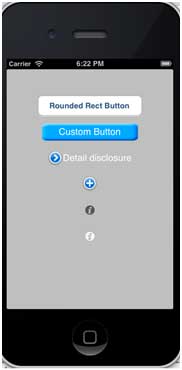
输出
当我们运行该应用程序时,我们将会获得以下输出 -
ios_ui_elements.htm
广告
© .
All rights reserved.