
- Meteor 教程
- Meteor - 首页
- Meteor - 概述
- Meteor - 环境设置
- Meteor - 第一个应用程序
- Meteor - 模板
- Meteor - 集合
- Meteor - 表单
- Meteor - 事件
- Meteor - 会话
- Meteor - 跟踪器
- Meteor - 包
- Meteor - 核心 API
- Meteor - 检查
- Meteor - Blaze
- Meteor - 定时器
- Meteor - EJSON
- Meteor - HTTP
- Meteor - 邮件
- Meteor - 资源
- Meteor - 安全性
- Meteor - 排序
- Meteor - 账户
- Meteor - 方法
- Meteor - Package.js
- Meteor - 发布与订阅
- Meteor - 结构
- Meteor - 部署
- Meteor - 在移动设备上运行
- Meteor - 待办事项应用程序
- Meteor - 最佳实践
- Meteor 有用资源
- Meteor - 快速指南
- Meteor - 有用资源
- Meteor - 讨论
Meteor - 账户
此包允许完整的用户身份验证功能。您可以在命令提示符窗口中运行以下代码来添加它。
C:\Users\username\Desktop\meteorApp>meteor add accounts-password
身份验证示例
此示例将显示基本身份验证。我们将创建注册、登录和主页模板。如果存在currentUser(如果用户已成功注册或登录),则将显示主页模板。如果不存在currentUser,则注册和登录模板将可见。
meteorApp.html
<head>
   <title>meteorApp</title>
</head>

<body>
   {{#if currentUser}}
      {{> home}}
      {{else}}
      {{> register}}
      {{> login}}
   {{/if}}
</body>

<template name = "register">
   <h2>REGISTER:</h2>
   <form>
      <input type = "email" name = "registerEmail"><br>
      <input type = "password" name = "registerPassword"><br>
      <input type = "submit" value = "Register"><br>
   </form>
</template>

<template name = "login">
   <h2>LOGIN:</h2>
   <form>
      <input type = "email" name = "loginEmail"><br>
      <input type = "password" name="loginPassword"><br>
      <input type = "submit" value = "Login"><br>
   </form>
</template>

<template name = "home">
   <p>You're logged in.</p>
   <button class = "logout">Logout</button>
</template>
首先,我们需要创建一个注册事件。此函数将读取注册输入,创建一个新用户并将其存储到数据库中。
第二个事件是登录。这次,该函数将读取登录模板中的输入,如果电子邮件和密码有效,则登录用户,或者如果无效则返回错误。
最后,注销事件将用于注销用户,一旦单击按钮。
meteorApp.js
if (Meteor.isClient) {

   Template.register.events({
      'submit form': function(event) {
         event.preventDefault();

         var registerData = {
            email: event.target.registerEmail.value,
            password: event.target.registerPassword.value
         }

         Accounts.createUser(registerData, function(error) {

            if (Meteor.user()) {
               console.log(Meteor.userId());
            } else {
               console.log("ERROR: " + error.reason);
            }
         });
      }
   });

   Template.login.events({

      'submit form': function(event) {
         event.preventDefault();
         var myEmail = event.target.loginEmail.value;
         var myPassword = event.target.loginPassword.value;

         Meteor.loginWithPassword(myEmail, myPassword, function(error) {

            if (Meteor.user()) {
               console.log(Meteor.userId());
            } else {
               console.log("ERROR: " + error.reason);
            }
         });
      }
   });

   Template.home.events({

      'click .logout': function(event) {
         event.preventDefault();

         Meteor.logout(function(error) {

            if(error) {
               console.log("ERROR: " + error.reason);
            }
         });
      }
   });
}
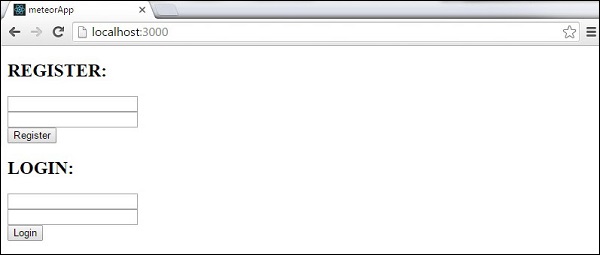
应用程序启动后,我们将获得以下页面。
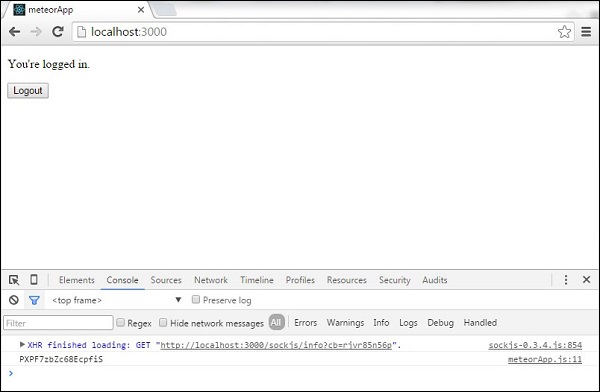
在注册表单中输入电子邮件和密码后,我们可以注册和登录新用户。我们将看到控制台记录用户的id,并且呈现主页模板。
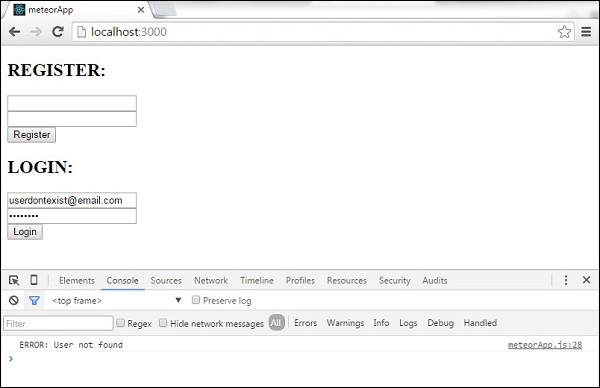
登录事件将检查数据库并登录用户,如果电子邮件和密码正确。否则,控制台将记录错误。
如果用户单击注销按钮,应用程序将注销用户并显示注册和登录模板。
广告