
- MFC 教程
- MFC - 首页
- MFC - 概述
- MFC - 环境设置
- MFC - VC++ 项目
- MFC - 入门指南
- MFC - Windows 基础
- MFC - 对话框
- MFC - Windows 资源
- MFC - 属性表
- MFC - 窗口布局
- MFC - 控件管理
- MFC - Windows 控件
- MFC - 消息与事件
- MFC - ActiveX 控件
- MFC - 文件系统
- MFC - 标准 I/O
- MFC - 文档/视图
- MFC - 字符串
- MFC - CArray
- MFC - 链表
- MFC - 数据库类
- MFC - 序列化
- MFC - 多线程
- MFC - Internet 编程
- MFC - GDI
- MFC - 库
- MFC 有用资源
- MFC - 快速指南
- MFC - 有用资源
- MFC - 讨论
MFC - 树控件
树形视图控件是一个显示项目分层列表的窗口,例如文档中的标题、索引中的条目或磁盘上的文件和目录。每个项目都包含一个标签和一个可选的位图图像,并且每个项目都可以有一系列与其关联的子项目。通过单击某个项目,用户可以展开和折叠关联的子项目列表。它由CTreeCtrl类表示。
让我们通过创建一个新的基于 MFC 对话框的项目来了解一个简单的示例。
步骤 1 - 项目创建后,您将看到 TODO 行,它是文本控件的标题。删除标题并将 ID 设置为 IDC_STATIC_TXT。
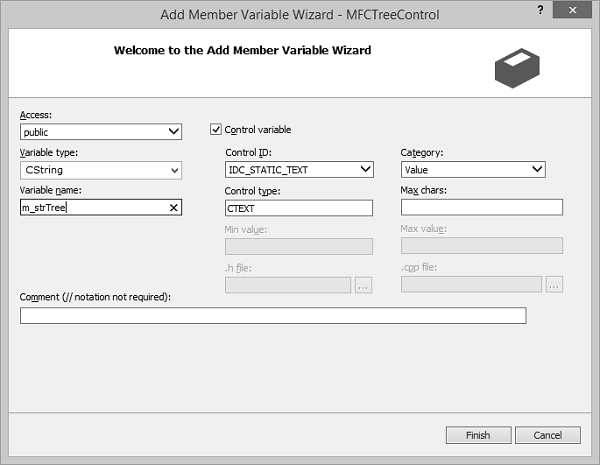
步骤 2 - 为静态文本控件添加一个值变量 m_strTree。
步骤 3 - 从控件工具箱中拖动树形控件。
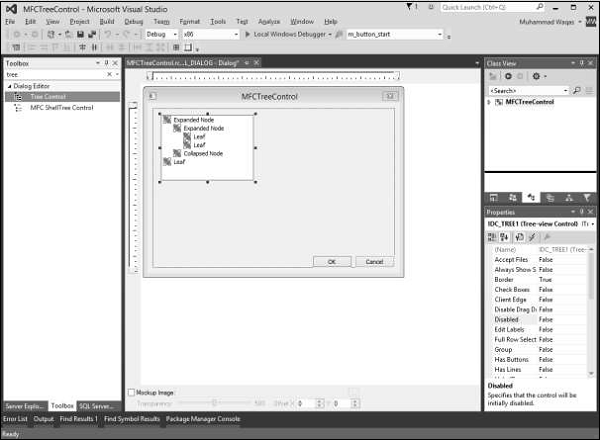
步骤 4 - 在对话框上,单击树形控件以将其选中。在“属性”窗口中,将“具有按钮”、“具有线条”、“根节点处的线条”、“客户端边缘”和“模态框架”属性设置为“True”。
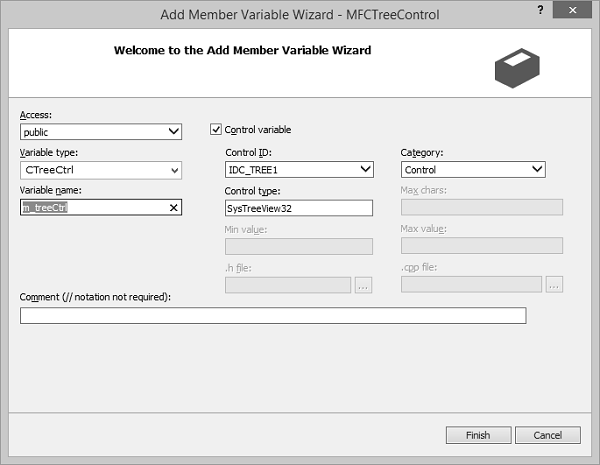
步骤 5 - 为树形控件添加一个控件变量 m_treeCtrl。
步骤 6 - 这是在 OnInitDialog() 中初始化树形控件的代码
BOOL CMFCTreeControlDlg::OnInitDialog() {
   CDialogEx::OnInitDialog();

   // Set the icon for this dialog. The framework does this automatically
   // when the application's main window is not a dialog
   SetIcon(m_hIcon, TRUE);            // Set big icon
   SetIcon(m_hIcon, FALSE);            // Set small icon

   // TODO: Add extra initialization here
   HTREEITEM hItem, hCar;
   hItem = m_treeCtrl.InsertItem(L"Car Listing", TVI_ROOT);
   hCar = m_treeCtrl.InsertItem(L"Economy", hItem);
   m_treeCtrl.InsertItem(L"BH-733", hCar);
   m_treeCtrl.InsertItem(L"SD-397", hCar);
   m_treeCtrl.InsertItem(L"JU-538", hCar);
   m_treeCtrl.InsertItem(L"DI-285", hCar);
   m_treeCtrl.InsertItem(L"AK-830", hCar);
   hCar = m_treeCtrl.InsertItem(L"Compact", hItem);
   m_treeCtrl.InsertItem(L"HG-490", hCar);
   m_treeCtrl.InsertItem(L"PE-473", hCar);
   hCar = m_treeCtrl.InsertItem(L"Standard", hItem);
   m_treeCtrl.InsertItem(L"SO-398", hCar);
   m_treeCtrl.InsertItem(L"DF-438", hCar);
   m_treeCtrl.InsertItem(L"IS-833", hCar);
   hCar = m_treeCtrl.InsertItem(L"Full Size", hItem);
   m_treeCtrl.InsertItem(L"PD-304", hCar);
   hCar = m_treeCtrl.InsertItem(L"Mini Van", hItem);
   m_treeCtrl.InsertItem(L"ID-497", hCar);
   m_treeCtrl.InsertItem(L"RU-304", hCar);
   m_treeCtrl.InsertItem(L"DK-905", hCar);
   hCar = m_treeCtrl.InsertItem(L"SUV", hItem);
   m_treeCtrl.InsertItem(L"FE-948", hCar);
   m_treeCtrl.InsertItem(L"AD-940", hCar);
   hCar = m_treeCtrl.InsertItem(L"Truck", hItem);
   m_treeCtrl.InsertItem(L"HD-394", hCar);

   return TRUE; // return TRUE unless you set the focus to a control
}
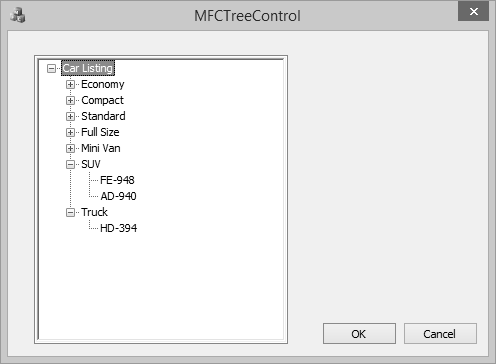
步骤 7 - 编译并执行上述代码后,您将看到以下输出。
mfc_windows_controls.htm
广告