
 数据结构
数据结构 网络
网络 关系数据库管理系统
 操作系统
操作系统 Java
Java MS Excel
 iOS
iOS HTML
HTML CSS
CSS Android
 Python
 C 编程
C 编程 C++
C++ C#
C# MongoDB
 MySQL
MySQL Javascript
 PHP
PHP 物理学
物理学 化学
化学 生物学
生物学 数学
数学 英语
英语 经济学
经济学 心理学
心理学 社会学
社会学 时尚研究
时尚研究 法律研究
法律研究如何在 OpenCV Python 中使用 Sobel 和 Laplacian 导数查找图像梯度?
使用 Sobel 算子,我们可以计算水平和垂直方向的图像梯度。梯度是针对灰度图像计算的。拉普拉斯算子使用二阶导数计算梯度。
语法
以下语法用于使用 Sobel 和 Laplacian 导数计算图像梯度:
cv2.Sobel(img, ddepth, xorder, yorder, ksize)
cv2.Laplacian(img, ddepth)
参数
img − 原始输入图像。
ddepth − 输出图像的所需深度。它包含有关输出图像中存储的数据类型的信息。我们使用 cv2.CV_64F 作为 ddepth。它是一个 64 位浮点 OpenCV。
xorder − 水平方向(X 方向)的导数阶数。对于 X 方向的一阶导数,设置 xorder=1,yorder=0。
yorder − 垂直方向(Y 方向)的导数阶数。对于 Y 方向的一阶导数,设置 xorder=0,yorder=1。
ksize − 核大小。对于 5×5 核大小,设置 ksize=5。
步骤
您可以使用以下步骤使用 Sobel 和 Laplacian 导数查找图像梯度:
导入所需的库。在以下所有 Python 示例中,所需的 Python 库是 OpenCV。确保您已安装它。
import cv2
使用 cv2.imread() 读取输入图像作为灰度图像。
img = cv2.imread('lines.jpg',0)
使用 cv2.Sobel() 或 cv2.Laplacian() 计算 Sobel 或 Laplacian 导数。此导数指的是图像梯度。
sobelx = cv2.Sobel(img,cv2.CV_64F,1,0,ksize=5)
使用 cv2.imshow() 方法显示图像梯度。
cv2.imshow("Sobel X", sobelx)
cv2.waitKey(0)
cv2.destroyAllWindows()
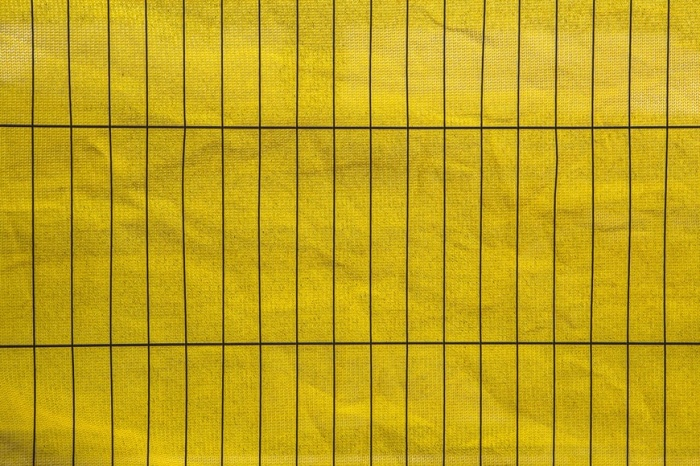
我们将在以下示例中使用此图像作为输入文件。
示例 1
在下面的 Python 程序中,我们使用 X 和 Y 方向(分别为水平和垂直)的一阶 Sobel 导数计算图像梯度。我们使用 5×5 的核大小。
# import required libraries
import cv2
import numpy as np
from matplotlib import pyplot as plt

# read the input image as a grayscale image
img = cv2.imread('lines.jpg',0)

# compute the 1st order Sobel derivative in X-direction
sobelx = cv2.Sobel(img,cv2.CV_64F,1,0,ksize=5)

# compute the 1st order Sobel derivative in Y-direction
sobely = cv2.Sobel(img,cv2.CV_64F,0,1,ksize=5)

# display sobelx and sobely
cv2.imshow("Sobel X", sobelx)
cv2.waitKey(0)
cv2.imshow("Sobel Y", sobely)
cv2.waitKey(0)
cv2.destroyAllWindows()
输出
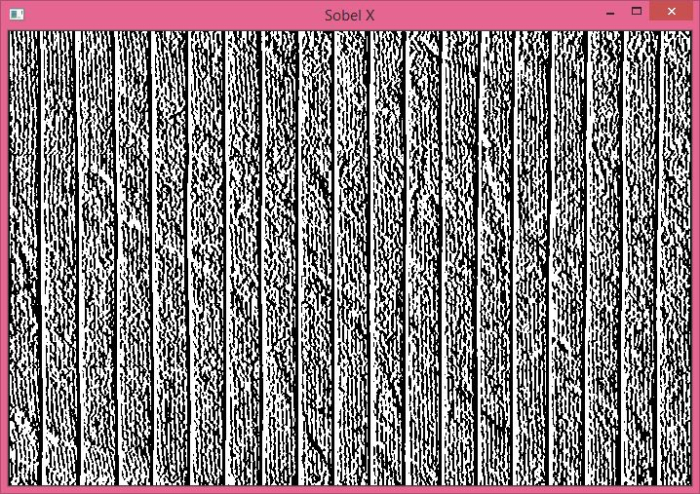
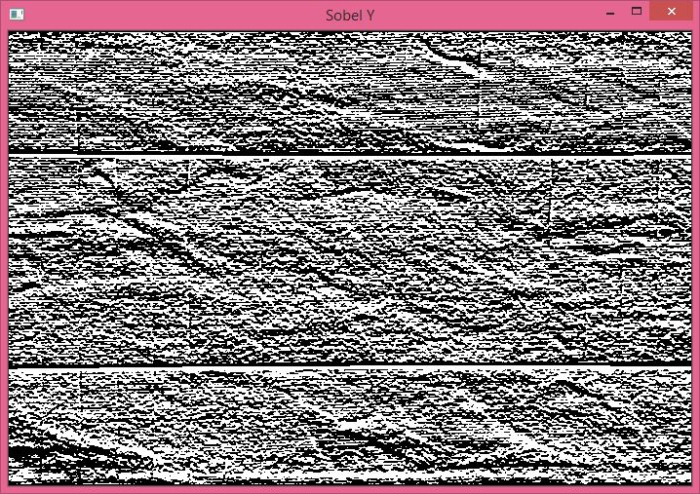
运行上述程序时,它将生成以下两个输出窗口。Sobel X 窗口显示 X 方向(水平)的导数,Sobel Y 窗口显示 Y 方向(垂直)的导数。
示例 2
在下面的 Python 程序中,我们使用 Laplacian 导数计算图像梯度。
# import required libraries
import cv2
import numpy as np
from matplotlib import pyplot as plt

# read the input image as a grayscale image
img = cv2.imread('lines.jpg',0)

# compute Laplacian derivative of the input image
laplacian = cv2.Laplacian(img,cv2.CV_64F)

# display the laplacian
cv2.imshow("Laplacian", laplacian)
cv2.waitKey(0)
cv2.destroyAllWindows()
输出
运行上述程序时,它将生成以下输出窗口。


2K+ 浏览量
