
 数据结构
数据结构 网络化
网络化 RDBMS
RDBMS 操作系统
操作系统 Java
Java MS Excel
 iOS
iOS HTML
HTML CSS
CSS 安卓
安卓 Python
 C 编程
C 编程 C++
C++ C#
C# MongoDB
 MySQL
MySQL Javascript
 PHP
PHP 物理
物理 化学
化学 生物
生物 数学
数学 英语
英语 经济
经济 心理学
心理学 社会学
社会学 时尚研究
时尚研究 法律研究
法律研究HTML DOM 输入月 required 属性
HTML DOM 输入月 required 属性返回并更改是否必须在提交表单之前填写输入月字段。
语法
以下是语法 −
1. 返回 required
object.required
2. 修改 required
object.required = true | false
示例
我们来看一个 HTML DOM 输入月 required 属性的示例 −
<!DOCTYPE html>
<html>
<head>
<style>
   html{
      height:100%;
   }
   body{
      text-align:center;
      color:#fff;
      background: linear-gradient(62deg, #FBAB7E 0%, #F7CE68 100%)
      center/cover no-repeat;
      height:100%;
   }
   p{
      font-weight:700;
      font-size:1.1rem;
   }
   input{
      display:block;
      width:35%;
      border:2px solid #fff;
      background-color:transparent;
      color:#fff;
      font-weight:bold;
      padding:8px;
      margin:1rem auto;
   }
   .btn{
      background:#0197F6;
      border:none;
      height:2rem;
      border-radius:2px;
      width:35%;
      margin:2rem auto;
      display:block;
      color:#fff;
      outline:none;
      cursor:pointer;
   }
   .show{
      font-size:1.5rem;
      color:#db133a;
      font-weight:bold;
   }
</style>
</head>
<body>
<h1>DOM Input month required property Demo</h1>
<form action="">
<p>Hi, Select your month of birth?</p>
<input type="month" class="monthInput" required>
<input type="submit" onclick="checkInput()">
</form>
<div class="show"></div>
<script>
   function checkInput() {
      var monthInput = document.querySelector(".monthInput");
      if(monthInput.value === ''){
         document.querySelector(".show").innerHTML="Please Select";
      }
   }
</script>
</body>
</html>
输出
这将生成以下输出 −
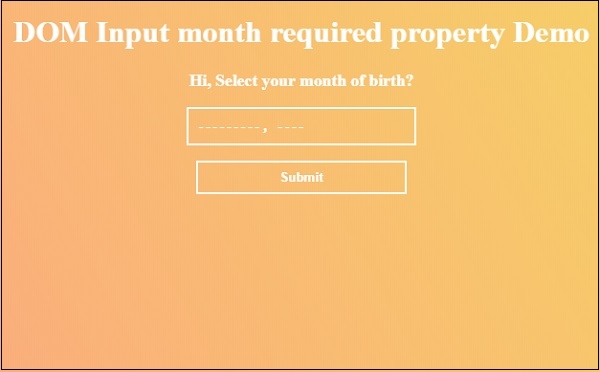
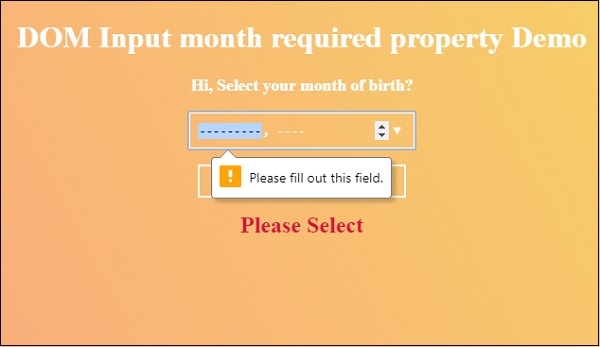
现在点击“提交”按钮而不选择任何月份,查看 required 属性如何工作。

更新于: 30-7 月-2019
77 次浏览

广告