
- HTML 教程
- HTML - 首页
- HTML - 路线图
- HTML - 简介
- HTML - 历史与演变
- HTML - 编辑器
- HTML - 基本标签
- HTML - 元素
- HTML - 属性
- HTML - 标题
- HTML - 段落
- HTML - 字体
- HTML - 块
- HTML - 样式表
- HTML - 格式化
- HTML - 引用
- HTML - 注释
- HTML - 颜色
- HTML - 图片
- HTML - 图片地图
- HTML - 内联框架
- HTML - 短语元素
- HTML - 元标签
- HTML - 类
- HTML - ID
- HTML - 背景
- HTML 表格
- HTML - 表格
- HTML - 表格标题与说明
- HTML - 表格样式
- HTML - 表格 Colgroup
- HTML - 嵌套表格
- HTML 列表
- HTML - 列表
- HTML - 无序列表
- HTML - 有序列表
- HTML - 定义列表
- HTML 链接
- HTML - 文本链接
- HTML - 图片链接
- HTML - 邮件链接
- HTML 颜色名称与值
- HTML - 颜色名称
- HTML - RGB
- HTML - HEX
- HTML - HSL
- HTML 表单
- HTML - 表单
- HTML - 表单属性
- HTML - 表单控件
- HTML - 输入属性
- HTML 多媒体
- HTML - 视频元素
- HTML - 音频元素
- HTML - 嵌入多媒体
- HTML 页眉
- HTML - Head 元素
- HTML - 添加 Favicon
- HTML - Javascript
- HTML 布局
- HTML - 布局
- HTML - 布局元素
- HTML - 使用 CSS 进行布局
- HTML - 响应式设计
- HTML - 符号
- HTML - 表情符号
- HTML - 样式指南
- HTML 图形
- HTML - SVG
- HTML - Canvas
- HTML API
- HTML - 地理位置 API
- HTML - 拖放 API
- HTML - Web Workers API
- HTML - WebSocket
- HTML - Web 存储
- HTML - 服务器发送事件
- HTML 杂项
- HTML - 文档对象模型 (DOM)
- HTML - MathML
- HTML - 微数据
- HTML - IndexedDB
- HTML - Web 消息传递
- HTML - Web CORS
- HTML - Web RTC
- HTML 演示
- HTML - 音频播放器
- HTML - 视频播放器
- HTML - 网页幻灯片
- HTML 工具
- HTML - Velocity Draw
- HTML - 二维码
- HTML - Modernizer
- HTML - 验证
- HTML - 颜色拾取器
- HTML 参考
- HTML - 速查表
- HTML - 标签参考
- HTML - 属性参考
- HTML - 事件参考
- HTML - 字体参考
- HTML - ASCII 码
- ASCII 码表查找
- HTML - 颜色名称
- HTML - 实体
- MIME 媒体类型
- HTML - URL 编码
- 语言 ISO 代码
- HTML - 字符编码
- HTML - 已弃用标签
- HTML 资源
- HTML - 快速指南
- HTML - 有用资源
- HTML - 颜色代码生成器
- HTML - 在线编辑器
HTML - 布局元素
HTML 布局元素是用于定义网页不同部分的各种**语义**元素,用于使其视觉上更具吸引力且用户友好。
布局结构的视觉表示
下图说明了典型网页布局的设计方式。大多数网页都有标题部分、导航栏、索引部分、内容部分和页脚部分,可以使用<header>、<nav>、<section>、<article>和<footer>标签分别定义。
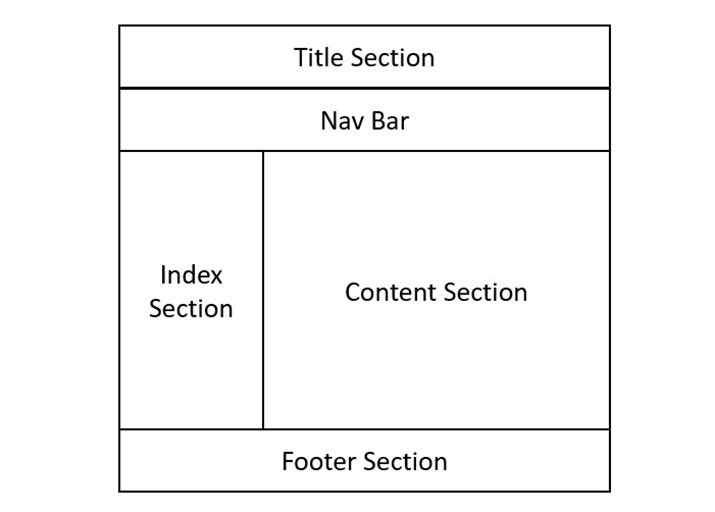
每个元素都有特定的含义和功能,并且可以使用属性和样式进行自定义。它们描述了它们包含的内容,而不仅仅是网页的外观。
HTML 布局元素列表
HTML 布局的 Header 元素
<header> 元素用于在 HTML 网页中添加页眉部分。它用作页面介绍和导航部分的容器。此标签内的所有内容都将位于网页顶部。为您的网页提供页眉部分有助于搜索引擎轻松理解您的内容并相应地对页面进行排名。
以下是一个简单的代码,展示了如何在网页中使用页眉元素。
<!DOCTYPE html>
<html lang="en">

<head>
      <title>Tutorialspoint</title>
</head>

<body>
   <header>
   <div>
      <h1>Tutorialspoint</h1>
      <h3>Simply easy learning!</h3>
   </div>
   </header>
</body>

</html>
HTML 布局的 Nav 元素
HTML <nav> 元素表示网页内页面的一部分,其中包含指向页面内其他页面或部分的超链接(就像菜单栏一样)。它通常包含在 <header> 元素或 <section> 元素内。以下代码在页眉标签内定义了一个导航部分。
<!DOCTYPE html>
<html lang="en">

<head>
      <title>Tutorialspoint</title>
</head>

<body>
   <header>
   <div>
      <h1>Tutorialspoint</h1>
      <h3>Simply easy learning!</h3>
   </div>
   <div>
      <nav>
         <ul>
            <li>
               <a href="#">
                  Home
               </a>
            </li>
            <li>
               <a href="#">
                  HTML
               </a>
            </li>
            <li>
               <a href="#">
                  CSS
               </a>
            </li>
            <li>
               <a href="#">
                  Python
               </a></li>
            <li>
               <a href="#">
                  JavaScript
               </a>
            </li>
         </ul>
      </nav>
   </div>
</header>
</body>

</html>
HTML 布局的 Section 元素
HTML <section> 定义网页的主要部分,其中将显示所有重要内容。一个页面可以有多个部分。
<!DOCTYPE html>
<html lang="en">

<head>
      <title>Tutorialspoint</title>
</head>

<body>
      <header>
         <h1>Tutorialspoint</h1>
         <h3>Simply easy learning!</h3>
         <nav>navigation bar</nav>
      </header>
      <section>Section 1</section>
      <section>Section 2</section>
      <section>Section 2</section>
</body>

</html>
HTML 布局的 Footer 元素
<footer> 标签定义网页的页脚部分。此部分包含版权信息、社交媒体链接和其他重要详细信息。它将始终位于网页底部。
<!DOCTYPE html>
<html lang="en">

<head>
   <title>Footer Example</title>
   <style>
      body {
         display: flex;
         flex-direction: column;
         min-height: 100vh;
         margin: 0;
      }
      .content {
         flex: 1;
      }
      footer {
         background-color: #333;
         color: #fff;
         text-align: center;
         padding: 20px 0;
      }
      footer .social-media a {
         color: #fff;
         margin: 0 10px;
         text-decoration: none;
      }
      footer .social-media a:hover {
         color: #ddd;
      }
   </style>
</head>

<body>
   <div class="content">
      <h2>Footer Element of HTML Layout</h2>
      <p>
         The footer tag defines the footer section of
         the webpage. This section contains copyright
         information, social media links, and other
         important details. It will be always at the
         bottom of the webpage.
      </p>
   </div>
   <footer>
      <p>©
         2024 Tutorialspoint. All rights reserved.
      </p>
      <div class="social-media">
         <a href="#">Facebook</a>
         <a href="#">Twitter</a>
         <a href="#">Instagram</a>
         <a href="#">LinkedIn</a>
      </div>
   </footer>
</body>

</html>
HTML 布局的 Article 元素
HTML <article> 标签指定一个独立的自包含内容,例如论坛帖子、杂志、任何博客文章等等。当 HTML article 元素嵌套时,内部元素表示与外部元素相关的文章。例如,社交媒体帖子上的评论可以是嵌套在表示社交媒体帖子的文章中的文章元素。它主要用于论坛帖子、杂志或报纸文章、博客文章、产品卡片等。
<!DOCTYPE html>
<html lang="en">

<head>
   <title>Article Example</title>
   <style>
      article {
         background: #fff;
         margin: 20px 0;
         padding: 20px;
      }
   </style>
</head>

<body>
   <header>
      <h1>My Blog</h1>
   </header>

   <main>
      <article>
         <h2>Understanding the HTML Article Tag</h2>
         <p>
            Posted on <time datetime="2024-06-20">
            June 20, 2024</time> by Farhan
         </p>
         <p>
            The article tag is commonly used for content
            such as blog posts, news articles, and user
            comments.
         </p>
         <p>
            Lorem ipsum dolor sit amet, consectetuer a
            cing elit. Aenean commodo ligula eget dolor.
            Aenean massa. Cum sociis natoque penatib
            magnis dis parturient montes, nascet
            mus. Donec quam felis, ultric
      </article>
   </main>

</body>
</html>
HTML 布局中的 Aside 元素
HTML <aside> 标签指定与主要内容直接或间接相关的内容部分(如侧边栏)。如果您从网页中删除 aside 内容,则主要内容不会受到影响,因为 aside 内容是页面中一个独立的、可选的组件。此标签通常用于广告。
<!DOCTYPE html>
<html lang="en">
<head>
   <title>Aside Tag Example</title>
   <style>
      body {
         display: flex;
         flex-direction: column;
         background-color: #f4f4f4;
      }

      main {
         display: flex;
         flex: 1;
         padding: 20px;
      }
      article {
         flex: 3;
         background: #fff;
         padding: 20px;
         margin-right: 20px;
      }
      aside {
         flex: 1;
         background: #fff;
         padding: 20px;
         border-radius: 8px;
      }

   </style>
</head>

<body>
   <header>
      <h1>My Blog</h1>
   </header>
   <main>
      <article>
         <h3>Articles...</h3>
      </article>

      <aside>
         <h2>Related Articles</h2>
         <ul>
            <li>
               <a href="/html/index.htm">
                  HTML Tutorial
               </a></li>
            <li>
               <a href="/css/index.htm">
                  CSS Tutorial
               </a></li>
            <li>
               <a href="/python/index.htm">
                  Python Tutorial
               </a></li>
         </ul>
      </aside>
   </main>
</body>

</html>
创建 HTML 布局 - 使用布局元素
语义元素有助于提高网页的可读性和可访问性,以及其 SEO(搜索引擎优化)性能。在以下 HTML 代码中,我们将借助上述语义元素创建一个简单的网页布局。
<!DOCTYPE html>
<html>

<head>
   <title>Layout structure of HTML</title>
   <style>
      * {
         box-sizing: border-box;
      }
      header {
         font-size: 25px;
         color: whitesmoke;
         padding: 1px;
         text-align: center;
         background-color: lightslategray;
      }
      nav {
         float: left;
         width: 20%;
         height: 350px;
         background: lightgray;
         padding: 20px;
      }
      nav ul {
         padding: 1px;
      }
      article {
         float: left;
         padding: 20px;
         width: 80%;
         background-color: lightyellow;
         height: 350px;
      }
      footer {
         background-color: lightslategray;
         padding: 10px;
         text-align: center;
         color: white;
         padding-top: 20px;
         padding-bottom: 10px;
      }
      footer a {
         margin: 10px;
      }
      footer p {
         margin-top: 30px;
      }
   </style>
</head>

<body>
   <!--header segment-->
   <header>
      <div>
         <p>Tutorialspoint</p>
         <p>Simply easy learning!</p>
      </div>
   </header>
   <section>
      <!--Menu Navigation segment-->
      <nav>
         <ul>
            <li>
               <a href="#">Home</a>
            </li>
            <li>
               <a href="#">Jobs</a>
            </li>
            <li>
               <a href="#">Library</a>
            </li>
            <li>
               <a href="#">Articles</a>
            </li>
            <li>
               <a href="#">Certification</a>
            </li>
         </ul>
      </nav>
      <!--Content segment-->
      <article>
         <h1>Welcome to Tutorials point</h1>
         <p>
            Tutorialspoint.com is a dedicated page
            to provide quality online education in
            domains of Computer Science and other
            Technology, Programming Languages, and
            other Engineering subjects.
         </p>
      </article>
   </section>
   <!--Footer segment-->
   <footer>
      <h2>Tutorialspoint</h2>
      <div>
         <a href="#"> About us </a>
         <a href="#"> Refund policy </a>
         <a href="#"> Terms of use </a>
         <a href="#"> Privacy policy </a>
         <a href="#"> FAQ's </a>
         <a href="#"> Affiliates </a>
         <a href="#"> Contact </a>
      </div>
      <div>
         <p>
            Copyrights © TUTORIALS POINT (INDIA)
            PRIVATE LIMITED. All rights reserved.
         </p>
      </div>
   </footer>
</body>

</html>
要了解有关HTML 布局 的更多信息,请参阅附加的链接文章。