
- Mobile Angular UI 教程
- Mobile Angular UI - 首页
- Mobile Angular UI - 概述
- Mobile Angular UI - 安装
- Mobile Angular UI - 项目设置
- Mobile Angular UI - 我的第一个应用
- Mobile Angular UI - 布局
- Mobile Angular UI - 组件
- Mobile Angular UI - 下拉菜单
- Mobile Angular UI - 手风琴
- Mobile Angular UI - 标签页
- Mobile Angular UI - 拖放
- Mobile Angular UI - 可滚动区域
- Mobile Angular UI - 表单
- Mobile Angular UI - 滑动手势
- Mobile Angular UI - 切换开关
- Mobile Angular UI - 段落
- Mobile Angular UI - 核心细节
- Mobile Angular UI - 触摸事件
- Mobile Angular UI - PhoneGap & Cordova
- Mobile Angular UI - 创建 APK 文件
- Mobile Angular UI - 应用开发
- Mobile Angular UI - 示例
- Mobile Angular UI 资源
- Mobile Angular UI - 快速指南
- Mobile Angular UI - 有用资源
- Mobile Angular UI - 讨论
Mobile Angular UI - 应用开发
在本章中,我们将讨论使用 AngularJS 和 Ionic 进行应用开发。
Ionic 是一个用于开发移动应用程序的开源框架。它提供构建具有原生外观和感觉的移动 UI 的工具和服务。Ionic 框架需要原生包装器才能在移动设备上运行。
在本章中,我们将学习如何使用 ionic 和 mobile angular UI 开发您的应用程序的基本知识。
有关 ionic 的详细信息,请参考 - https://tutorialspoint.com/ionic/index.htm.
要开始使用 ionic 和 angularjs,我们首先需要安装 cordova。命令如下:
npm install -g cordova
使用 Cordova 创建项目设置
创建一个文件夹 ionic_mobileui/,并在其中使用以下命令创建我们的项目设置:
cordova create ionic-mobileui-angularjs
这里 ionic-mobileui-angularjs 是我们应用的名称。
现在让我们安装项目中需要的软件包。列表如下:
npm install --save-dev angular angular-route mobile-angular-ui @ionic/core
文件已安装,文件夹结构如下所示:
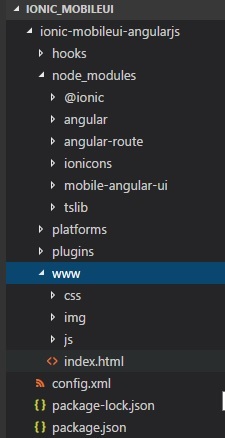
所有 angular 和 ionic 文件都在 node_modules 中。我们将使用 www/ 文件夹。因此,将 angular 和 ionic 的 js 和 css 文件移动到 www/css/ 和 www/js/ 文件夹中。
让我们使用 mobile angular UI 组件修改 index.html,并在 js/ 文件夹中添加 app.js。
index.html
<!DOCTYPE html>
<!--
   Licensed to the Apache Software Foundation (ASF) under one or more contributor license agreements.
   See the NOTICE file distributed with this work for additional information regarding copyright
   ownership. The ASF licenses this file to you under the Apache License, Version 2.0 (the
   "License"); you may not use this file except in compliance with the License. You may obtain a
   copy of the License at

   https://apache.org/licenses/LICENSE-2.0

   Unless required by applicable law or agreed to in writing, software distributed under the License
   is distributed on an "AS IS" BASIS, WITHOUT WARRANTIES OR CONDITIONS OF ANY KIND, either
   express or implied. See the License for the specific language governing permissions and
   limitations under the License.
-->
<html>

   <head>
      <!--
      Customize this policy to fit your own app's needs. For more guidance, see:
         https://github.com/apache/cordova-plugin-whitelist/blob/master/README.md#content-security-policy
      Some notes:
         * gap: is required only on iOS (when using UIWebView) and is needed for JS->native communication
         * https://ssl.gstatic.com is required only on Android and is needed for TalkBack to function properly
         * Disables use of inline scripts in order to mitigate risk of XSS vulnerabilities. To change this:
            * Enable inline JS: add 'unsafe-inline' to default-src
      -->
      <meta http-equiv="Content-Security-Policy" content="default-src 'self' data: gap: https://ssl.gstatic.com 'unsafe-eval'; style-src 'self' 'unsafe-inline'; media-src *; img-src 'self' data: content:;">
      <meta name="format-detection" content="telephone=no">
      <meta name="msapplication-tap-highlight" content="no">
      <meta name="viewport" content="initial-scale=1, width=device-width, viewport-fit=cover">
      <link rel="stylesheet" type="text/css" href="css/index.css">
      <title>Mobile Angular UI Demo</title>
      <meta http-equiv="X-UA-Compatible" content="IE=edge,chrome=1" />
      <meta name="apple-mobile-web-app-capable" content="yes" />
      <meta name="viewport" content="user-scalable=no, initial-scale=1.0, maximum-scale=1.0, minimal-ui" />
      <meta name="apple-mobile-web-app-status-bar-style" content="yes" />
      <link rel="shortcut icon" href="/assets/img/favicon.png" type="image/x-icon" />
      <link rel="stylesheet" href="css/mobile-angular-ui-hover.min.css" /> <link rel="stylesheet" href="css/mobile-angular-ui-base.min.css" />
      <link rel="stylesheet" href="css/mobile-angular-ui-desktop.min.css" />
      <script src="js/angular.min.js"></script>
      <script src="js/angular-route.min.js"></script>
      <script src="js/mobile-angular-ui.min.js"></script>
      <script src="js/ionic.js"></script>
      <link rel="stylesheet" href="css/app.css" />
      <script src="js/app.js"></script>
      </head>
      <body ng-app="myFirstApp" ng-controller="MainController">
         <!-- Sidebars -->
            <div class="sidebar sidebar-left">
               <div class="scrollable">
                  <h1 class="scrollable-header app-name">Tutorials</h1>
                  <div class="scrollable-content"> <div class="list-group" ui-turn-off='uiSidebarLeft'>
                  <a class="list-group-item" href="/">Home Page </a>
                  <a class="list-group-item" href="#/academic"><i class="fa fa-caret-right"></i>Academic Tutorials </a>
                  <a class="list-group-item" href="#/bigdata"><i class="fa fa-caret-right"></i>Big Data & Analytics </a>
                  <a class="list-group-item" href="#/computerProg"><i class="fa fa-caret-right"></i>Computer Programming </a>
                  <a class="list-group-item" href="#/computerscience"><i class="fa fa-caret-right"></i>Computer Science </a>
                  <a class="list-group-item" href="#/databases"><i class="fa fa-caret-right"></i>Databases </a> <a class="list-group-item" href="#/devops"><i class="fa fa-caret-right"></i>DevOps </a>
               </div>
            </div>
         </div>
      </div>
      <div class="sidebar sidebar-right">
         <div class="scrollable">
            <h1 class="scrollable-header app-name">eBooks</h1>
               <div class="scrollable-content">
                  <div class="list-group" ui-toggle="uiSidebarRight">
                     <a class="list-group-item" href="#/php"><i class="fa fa-caret-right"></i>PHP </a>
                     <a class="list-group-item" href="#/Javascript"><i class="fa fa-caret-right"></i>Javascript </a>
                  </div>
               </div>
            </div>
      </div>

      <div class="app">
         <div class="navbar navbar-app navbar-absolute-top">
            <div class="navbar-brand navbar-brand-center" ui-yield-to="title">
               TutorialsPoint
            </div>
            <div class="btn-group pull-left">
               <div ui-toggle="uiSidebarLeft" class="btn sidebar-left-toggle">
                  <i class="fa fa-th-large "></i> Tutorials
               </div>
            </div>
            <div class="btn-group pull-right" ui-yield-to="navbarAction">
               <div ui-toggle="uiSidebarRight" class="btn sidebar-right-toggle">
                  <i class="fal fa-search"></i> eBooks
               </div>
            </div>
         </div>
         <div class="navbar navbar-app navbar-absolute-bottom">
            <div class="btn-group justified">
               <a ui-turn-on="aboutus_modal" class="btn btn-navbar"><i class="fal fa-globe"></i> About us</a>
               <a ui-turn-on="contactus_overlay" class="btn btn-navbar"><i class="fal fa-map-marker-alt"></i> Contact us</a>
            </div>
         </div>

         <!-- App body -->
         <div class='app-body'>
            <div class='app-content'>
               <ng-view></ng-view>
            </div>
         </div>
      </div><!-- ~ .app -->

      <!-- Modals and Overlays -->
      <div ui-yield-to="modals"></div>

      <div class="app">
         <h1>Apache Cordova</h1>
         <div id="deviceready" class="blink">
            <p class="event listening">Connecting to Device</p>
            <p class="event received">Device is Ready</p>
         </div>
      </div>
      <script type="text/javascript" src="cordova.js"></script>
      <script type="text/javascript" src="js/index.js"></script>
   </body>
</html>
所有 js 和 css 文件都添加到 head 部分。模块和控制器在 app.js 中创建,如下所示:
/* eslint no-alert: 0 */

'use strict';
//
// Here is how to define your module
// has dependent on mobile-angular-ui
// var app=angular.module('myFirstApp', [
   'ngRoute',
   'mobile-angular-ui'
]);
app.config(function($routeProvider, $locationProvider) {
   $routeProvider
   .when("/", {
      templateUrl : "home/home.html"
   });
   $locationProvider.html5Mode({enabled:true, requireBase:false});
});
app.directive('dragItem', ['$drag', function($drag) {
   return {
      controller: function($scope, $element) {
         $drag.bind($element,
            {
               transform: $drag.TRANSLATE_BOTH,
               end: function(drag) {
                  drag.reset();
               }
            },
            {
               sensitiveArea: $element.parent()
            }
         );
      }
   };
}]);
app.controller('MainController', function($rootScope, $scope, $routeParams) {
   $scope.msg="Welcome to Tutorialspoint!";
});
在 www/ 文件夹中创建 home/home.html 文件。以下是 home.html 中的详细信息。
<div class="list-group text-center">
   <div class="list-group-item list-group-item-home">
      <h1>{{msg}}</h1>
   </div>
</div>
要使用 cordova 运行应用,请执行以下命令:
cordova platform add browser
接下来,执行以下命令在浏览器中测试应用:
cordova run
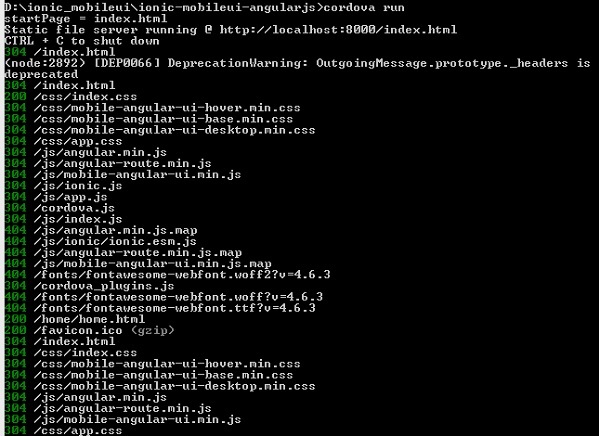
在浏览器中访问 url:https://:8000 以测试应用。
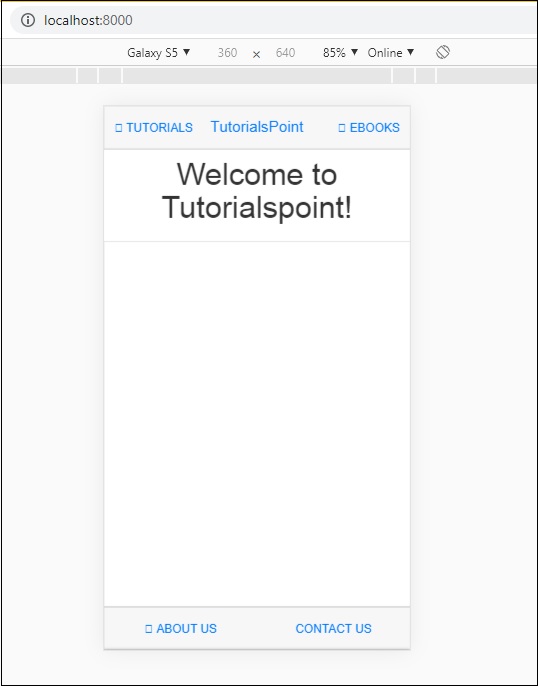
将 Ionic 组件添加到 Mobile Angular UI 应用
打开 home/home.html,添加以下 ionic 卡片模板:
home/home.html
<ion-card>
   <ion-card-header>
      <ion-card-subtitle>Ionic Card</ion-card-subtitle>
      <ion-card-title>Mobile Angular UI + Ionic</ion-card-title>
   </ion-card-header>

   <ion-card-content>
      Welcome To TutorialsPoint!
   </ion-card-content>
</ion-card>
完成后,停止 cordova 运行并再次运行它。您应该看到如下所示的 ionic 卡片详细信息:
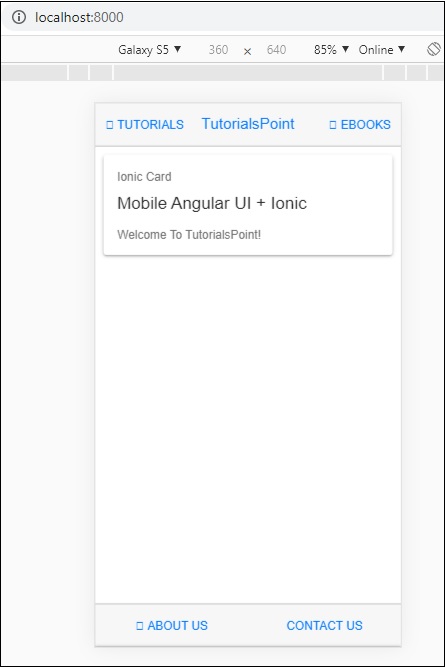
因此,现在您可以使用 AngularJs、Mobile Angular UI 和 Ionic 创建您选择的应用。