
- Python 设计模式教程
- Python 设计模式 - 主页
- 简介
- Python 设计模式 - 概要
- 模型视图控制器模式
- Python 设计模式 - 单例
- Python 设计模式 - 工厂
- Python 设计模式 - 建造者
- Python 设计模式 - 原型
- Python 设计模式 - 外观
- Python 设计模式 - 命令
- Python 设计模式 - 适配器
- Python 设计模式 - 装饰器
- Python 设计模式 - 代理
- 责任链模式
- Python 设计模式 - 观察者
- Python 设计模式 - 状态
- Python 设计模式 - 策略
- Python 设计模式 - 模板
- Python 设计模式 - 享元
- 抽象工厂
- 面向对象
- 面向对象概念实现
- Python 设计模式 - 迭代器
- 字典
- 列表数据结构
- Python 设计模式 - 集合
- Python 设计模式 - 队列
- 字符串和序列化
- Python 中的并发
- Python 设计模式 - 反
- 异常处理
- Python 设计模式资源
- 快速指南
- Python 设计模式 - 资源
- 讨论
Python 设计模式 - 状态
它提供了一个用于状态机的模块,这些状态机使用子类实现,这些子类派生自指定的状态机类。这些方法与状态无关,并会触发使用装饰器声明的转换。
如何实现状态模式?
状态模式的基本实现如下所示 −
class ComputerState(object):

   name = "state"
   allowed = []

   def switch(self, state):
      """ Switch to new state """
      if state.name in self.allowed:
         print 'Current:',self,' => switched to new state',state.name
         self.__class__ = state
      else:
         print 'Current:',self,' => switching to',state.name,'not possible.'

   def __str__(self):
      return self.name

class Off(ComputerState):
   name = "off"
   allowed = ['on']

class On(ComputerState):
   """ State of being powered on and working """
   name = "on"
   allowed = ['off','suspend','hibernate']

class Suspend(ComputerState):
   """ State of being in suspended mode after switched on """
   name = "suspend"
   allowed = ['on']

class Hibernate(ComputerState):
   """ State of being in hibernation after powered on """
   name = "hibernate"
   allowed = ['on']

class Computer(object):
   """ A class representing a computer """

   def __init__(self, model='HP'):
      self.model = model
      # State of the computer - default is off.
      self.state = Off()

   def change(self, state):
      """ Change state """
      self.state.switch(state)

if __name__ == "__main__":
   comp = Computer()
   comp.change(On)
   comp.change(Off)
   comp.change(On)
   comp.change(Suspend)
   comp.change(Hibernate)
   comp.change(On)
   comp.change(Off)
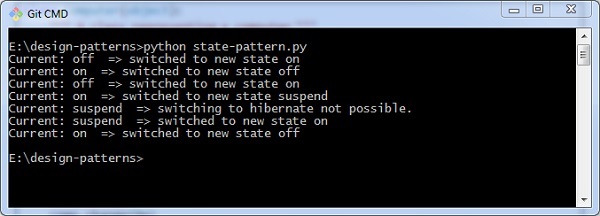
输出
上述程序生成以下输出 −
广告