- Scikit Image 教程
- Scikit Image - 简介
- Scikit Image - 图像处理
- Scikit Image - Numpy图像
- Scikit Image - 图像数据类型
- Scikit Image - 使用插件
- Scikit Image - 图像处理
- Scikit Image - 读取图像
- Scikit Image - 写入图像
- Scikit Image - 显示图像
- Scikit Image - 图像集合
- Scikit Image - 图像堆栈
- Scikit Image - 多图像
- Scikit Image - 数据可视化
- Scikit Image - 使用Matplotlib
- Scikit Image - 使用Plotly
- Scikit Image - 使用Mayavi
- Scikit Image - 使用Napari
Scikit Image - 使用Matplotlib
Matplotlib 是Python中广泛使用的绘图库,它提供各种功能来创建不同类型的图表和可视化效果。它是一个强大的库,能够在Python编程语言中创建静态、动画和交互式可视化效果。
Scikit Image与Matplotlib
在图像处理的背景下可视化图像时,可以将Matplotlib与scikit-image库结合使用以实现各种可视化任务。通常,Scikit-image库提供诸如io.imshow()和io.show()之类的函数来显示图像,但是,我们可以使用Matplotlib的imshow()函数来显示图像,并提供其他选项,例如注释、颜色图、坐标轴配置等等。
此外,它对于在一个图形中创建多个绘图(也就是子图)非常有用,可以用来比较图像的不同版本或显示图像处理工作流程中的中间步骤。
要设置Matplotlib以便与scikit-image一起使用,你需要确保这两个库都已安装并正确配置。建议使用pip或conda之类的包管理器来安装Matplotlib。pip是Python的默认包管理器,而Conda是用于管理Anaconda环境中包的流行选择。
使用pip安装Matplotlib
要使用pip安装Matplotlib,只需在你的命令提示符中运行以下命令:
pip install Matplotlib
这将下载Matplotlib包。
使用Conda安装Matplotlib
如果你的系统中已经使用了Anaconda发行版,那么你可以直接使用conda包管理器来安装Matplotlib。以下为命令:
conda install matplotlib
安装成功后,你就可以直接导入matplotlib.pyplot和skimage库来访问所需的函数,在你的Python脚本或笔记本中执行图像处理任务。
下面是一些基本的Python程序,它们演示了如何有效地使用Matplotlib库以及scikit-image执行数据可视化任务。
示例1
以下示例演示了如何使用Matplotlib显示scikit-image加载的图像。
from skimage import io
import matplotlib.pyplot as plt

# Read an image
image_data = io.imread('Images/logo-w.png')
# Display the image using Matplotlib
plt.imshow(image_data)
plt.title('Logo', fontsize=18)
输出
执行上述程序后,你将获得以下输出:

示例2
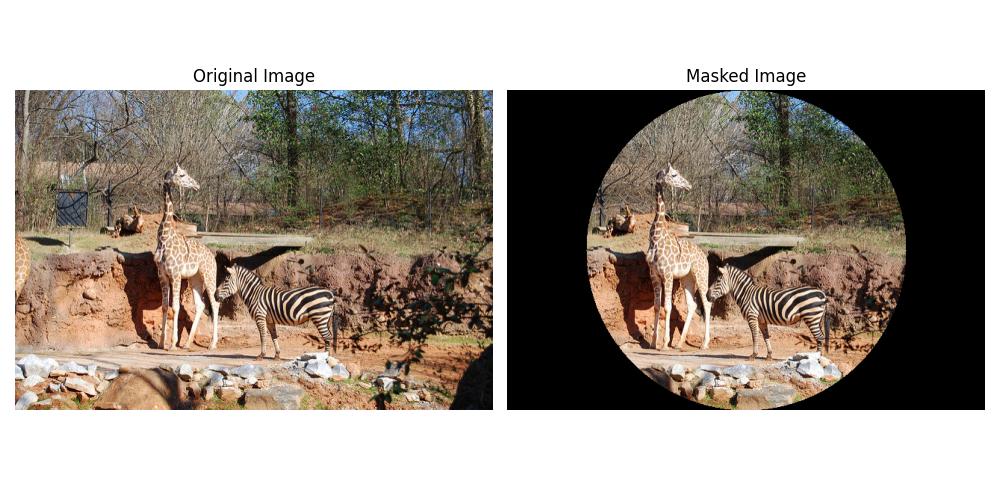
以下示例演示了如何使用scikit-image将圆形遮罩应用于图像,并使用Matplotlib并排显示原始图像和遮罩图像。
import matplotlib.pyplot as plt
from skimage import io
import numpy as np

# Load the image
image_path = 'Images_/Zoo.jpg'
image = io.imread(image_path)
image_copy = np.copy(image)

# Create circular mask
rows, cols, _ = image.shape
row, col = np.ogrid[:rows, :cols]
center_row, center_col = rows / 2, cols / 2
radius = min(rows, cols) / 2
outer_disk_mask = ((row - center_row)**2 + (col - center_col)**2 > radius**2)

# Apply mask to image
image[outer_disk_mask] = 0

# Display the original and masked images using Matplotlib
fig, axes = plt.subplots(nrows=1, ncols=2, figsize=(10, 5))
axes[0].imshow(image_copy)
axes[0].set_title('Original Image')
axes[0].axis('off')
axes[1].imshow(image)
axes[1].set_title('Masked Image')
axes[1].axis('off')
plt.tight_layout()
plt.show()
输出
执行上述程序后,你将获得以下输出: