
- WebAssembly教程
- WebAssembly - 主页
- WebAssembly - 概述
- WebAssembly - 介绍
- WebAssembly - WASM
- WebAssembly - 安装
- WebAssembly - 编译到 WASM 的工具
- WebAssembly - 程序结构
- WebAssembly - Javascript
- WebAssembly - Javascript API
- WebAssembly - 在Firefox中调试WASM
- WebAssembly - “Hello World”
- WebAssembly - 模块
- WebAssembly - 验证
- WebAssembly - 文本格式
- WebAssembly - 将 WAT 转换为 WASM
- WebAssembly - 动态链接
- WebAssembly - 安全
- WebAssembly - 使用 C
- WebAssembly - 使用 C++
- WebAssembly - 使用 Rust
- WebAssembly - 使用 Go
- WebAssembly - 使用 Nodejs
- WebAssembly - 范例
- WebAssembly 实用资源
- WebAssembly - 快速指南
- WebAssembly - 实用资源
- WebAssembly - 讨论
WebAssembly - 在Firefox中调试WASM
现今所有最新的浏览器中都添加了 WebAssembly 支持,例如 Chrome、Firefox。Firefox 版本 54 及以上为您提供了调试 wasm 代码的特殊功能。
要执行此操作,请在调用 wasm 的 Firefox 浏览器中执行代码。例如,考虑以下寻找该数字平方的 C 代码。
C 程序的示例如下 −
#include<stdio.h>
int square(int n) {
   return n*n;
}
我们将利用 WASM 浏览器获取 wasm 代码 −
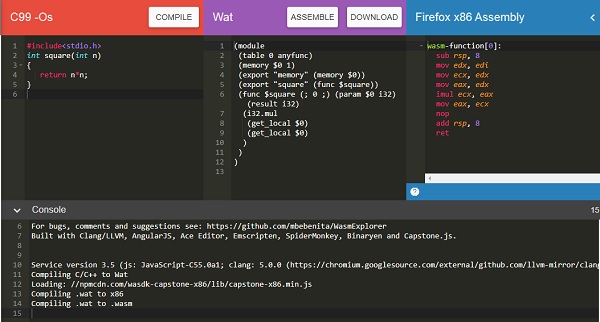
下载 WASM 代码并使用它查看浏览器中的输出。
加载 wasm 的 html 文件如下 −
!doctype html>
<html>
   <head>
      <meta charset="utf-8">
      <title>WebAssembly Square function</title>
      <style>
         div {
            font-size : 30px; text-align : center; color:orange;
         }
      </style>
   </head>
   <body>
      <div id="textcontent"></div>
      <script>
         let square;
         fetch("findsquare.wasm").then(bytes => bytes.arrayBuffer())
            .then(mod => WebAssembly.compile(mod))
            .then(module => {return new WebAssembly.Instance(module) })
            .then(instance => {
            square = instance.exports.square(13);
            console.log("The square of 13 = " +square);
            document.getElementById("textcontent").innerHTML = "The square of 13 = " +square;
         });
      </script>
   </body>
</html>
打开 Firefox 浏览器并加载上述 html 文件,然后打开调试器工具。
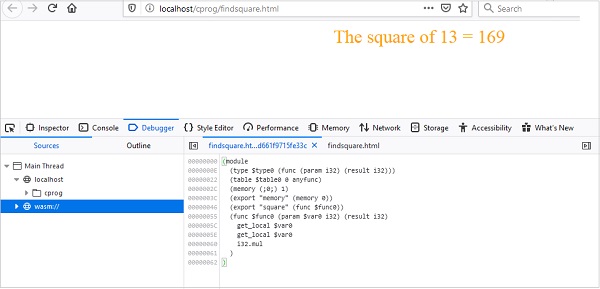
您应该在调试器工具中看到 wasm:// 条目。点击 wasm://,它会显示转换为 .wat 格式的 wasm 代码,如上所示。
您可以查看导出函数的代码,并在出现任何问题时调试此代码。Firefox 还打算添加断点,以便您可以调试代码并检查执行流程。
广告