
- Angular 4 教程
- Angular 4 - 首页
- Angular 4 – 概述
- Angular 4 – 环境设置
- Angular 4 – 项目设置
- Angular 4 – 组件
- Angular 4 – 模块
- Angular 4 – 数据绑定
- Angular 4 - 事件绑定
- Angular 4 – 模板
- Angular 4 – 指令
- Angular 4 – 管道
- Angular 4 – 路由
- Angular 4 – 服务
- Angular 4 – Http 服务
- Angular 4 – 表单
- Angular 4 – 动画
- Angular 4 – 材质设计
- Angular 4 – CLI
- Angular 4 – 示例
- Angular 4 有用资源
- Angular 4 - 快速指南
- Angular 4 - 有用资源
- Angular 4 - 讨论
Angular 4 - 事件绑定
在本章中,我们将讨论事件绑定在 Angular 4 中是如何工作的。当用户以键盘移动、鼠标点击或鼠标悬停的形式与应用程序交互时,会生成一个事件。这些事件需要被处理以执行某种操作。这就是事件绑定发挥作用的地方。
让我们考虑一个例子来更好地理解这一点。
app.component.html
<!--The content below is only a placeholder and can be replaced.-->
<div style = "text-align:center">
   <h1>
      Welcome to {{title}}.
   </h1>
</div>

<div> Months :
   <select>
      <option *ngFor = "let i of months">{{i}}</option>
   </select>
</div>
<br/>

<div>
   <span *ngIf = "isavailable; then condition1 else condition2">
      Condition is valid.
   </span>
   <ng-template #condition1>Condition is valid</ng-template>
   <ng-template #condition2>Condition is invalid</ng-template>
</div>
<button (click)="myClickFunction($event)">
   Click Me
</button>
在app.component.html 文件中,我们定义了一个按钮并使用 click 事件向其添加了一个函数。
以下是定义按钮并向其添加函数的语法。
(click)="myClickFunction($event)"
该函数在.ts 文件中定义:app.component.ts
import { Component } from '@angular/core';

@Component({
   selector: 'app-root',
   templateUrl: './app.component.html',
   styleUrls: ['./app.component.css']
})

export class AppComponent {
   title = 'Angular 4 Project!';
   //array of months.
   months = ["January", "Feburary", "March", "April",
            "May", "June", "July", "August", "September",
            "October", "November", "December"];
   isavailable = true;
   myClickFunction(event) {
      //just added console.log which will display the event details in browser on click of the button.
      alert("Button is clicked");
      console.log(event);
   }
}
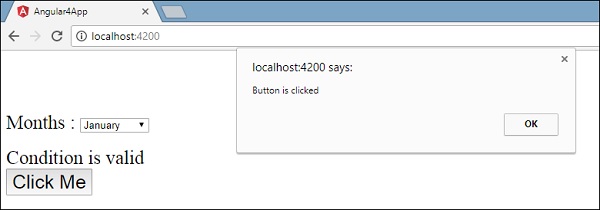
点击按钮后,控制权将进入函数myClickFunction,并显示一个对话框,其中显示按钮被点击,如下面的屏幕截图所示:
现在让我们将 change 事件添加到下拉列表中。
以下代码行将帮助您将 change 事件添加到下拉列表中:
<!--The content below is only a placeholder and can be replaced.-->
<div style = "text-align:center">
   <h1>
      Welcome to {{title}}.
   </h1>
</div>

<div> Months :
   <select (change) = "changemonths($event)">
      <option *ngFor = "let i of months">{{i}}</option>
   </select>
</div>
<br/>

<div>
   <span *ngIf = "isavailable; then condition1 else condition2">
      Condition is valid.
   </span>
   <ng-template #condition1>Condition is valid</ng-template>
   <ng-template #condition2>Condition is invalid</ng-template>
</div>

<button (click) = "myClickFunction($event)">Click Me</button>
该函数在app.component.ts 文件中声明:
import { Component } from '@angular/core';

@Component({
   selector: 'app-root',
   templateUrl: './app.component.html',
   styleUrls: ['./app.component.css']
})

export class AppComponent {
   title = 'Angular 4 Project!';
   //array of months.
   months = ["January", "Feburary", "March", "April",
            "May", "June", "July", "August", "September",
            "October", "November", "December"];
   isavailable = true;
   myClickFunction(event) {
      alert("Button is clicked");
      console.log(event);
   }
   changemonths(event) {
      console.log("Changed month from the Dropdown");
      console.log(event);
   }
}
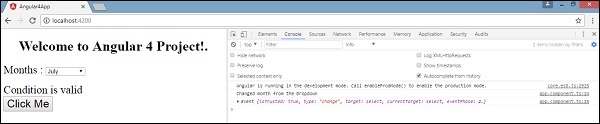
控制台消息“从下拉列表中更改月份”与事件一起显示在控制台中。
让我们在app.component.ts 中添加一个警报消息,当下拉列表中的值更改时,如下所示:
import { Component } from '@angular/core';

@Component({
   selector: 'app-root',
   templateUrl: './app.component.html',
   styleUrls: ['./app.component.css']
})

export class AppComponent {
   title = 'Angular 4 Project!';
   //array of months.
   months = ["January", "February", "March", "April",
            "May", "June", "July", "August", "September",
            "October", "November", "December"];

   isavailable = true;
   myClickFunction(event) {
      //just added console.log which will display the event details in browser
      on click of the button.
      alert("Button is clicked");
      console.log(event);
   }
   changemonths(event) {
      alert("Changed month from the Dropdown");
   }
}
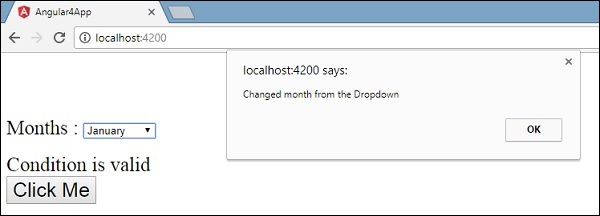
当下拉列表中的值更改时,将出现一个对话框,并显示以下消息:“从下拉列表中更改月份”。
广告