- Angular 4 教程
- Angular 4 - 首页
- Angular 4 – 概述
- Angular 4 – 环境搭建
- Angular 4 – 项目搭建
- Angular 4 – 组件
- Angular 4 – 模块
- Angular 4 – 数据绑定
- Angular 4 – 事件绑定
- Angular 4 – 模板
- Angular 4 – 指令
- Angular 4 – 管道
- Angular 4 – 路由
- Angular 4 - 服务
- Angular 4 - Http 服务
- Angular 4 - 表单
- Angular 4 - 动画
- Angular 4 - 材料设计
- Angular 4 - CLI
- Angular 4 - 例子
- Angular 4 有用资源
- Angular 4 - 快速指南
- Angular 4 - 有用资源
- Angular 4 - 讨论
Angular 4 - 服务
本章将讨论 Angular 4 中的服务。
我们可能会遇到这种情况:我们需要一些代码在页面的任何地方使用。这可能是需要跨组件共享的数据连接等。服务帮助我们实现这一点。通过服务,我们可以访问整个项目中其他组件的 方法和属性。
要创建服务,我们需要使用命令行。相应的命令是:
C:\projectA4\Angular 4-app>ng g service myservice
installing service
   create src\app\myservice.service.spec.ts
   create src\app\myservice.service.ts
   WARNING Service is generated but not provided, it must be provided to be used

   C:\projectA4\Angular 4-app>
文件如下创建在 app 文件夹中:
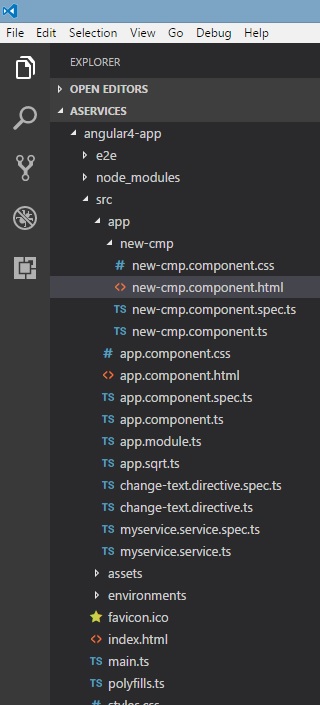
以下是底部创建的文件 - **myservice.service.specs.ts** 和 **myservice.service.ts**。
myservice.service.ts
import { Injectable } from '@angular/core';

@Injectable()
export class MyserviceService {
   constructor() { }
}
这里,Injectable 模块从 **@angular/core** 导入。它包含 **@Injectable** 方法和一个名为 **MyserviceService** 的类。我们将在这个类中创建我们的服务函数。
在创建新服务之前,我们需要在主要的父级 **app.module.ts** 中包含已创建的服务。
import { BrowserModule } from '@angular/platform-browser';
import { NgModule } from '@angular/core';
import { RouterModule} from '@angular/router';
import { AppComponent } from './app.component';

import { MyserviceService } from './myservice.service';
import { NewCmpComponent } from './new-cmp/new-cmp.component';
import { ChangeTextDirective } from './change-text.directive';
import { SqrtPipe } from './app.sqrt';

@NgModule({
   declarations: [
      SqrtPipe,
      AppComponent,
      NewCmpComponent,
      ChangeTextDirective
   ],
   imports: [
      BrowserModule,
      RouterModule.forRoot([
         {
            path: 'new-cmp',
            component: NewCmpComponent
         }
      ])
   ],
   providers: [MyserviceService],
   bootstrap: [AppComponent]
})

export class AppModule { }
我们已经导入了带有类名的服务,并在 providers 中使用了相同的类。现在让我们切换回服务类并创建一个服务函数。
在服务类中,我们将创建一个函数来显示今天的日期。我们可以在主要的父组件 **app.component.ts** 和我们在上一章中创建的新组件 **new-cmp.component.ts** 中使用相同的函数。
现在让我们看看该函数在服务中的外观以及如何在组件中使用它。
import { Injectable } from '@angular/core';
@Injectable()
export class MyserviceService {
   constructor() { }
   showTodayDate() {
      let ndate = new Date();
      return ndate;
   }
}
在上一个服务文件中,我们创建了一个函数 **showTodayDate**。现在我们将返回新创建的 Date()。让我们看看如何在组件类中访问此函数。
app.component.ts
import { Component } from '@angular/core';
import { MyserviceService } from './myservice.service';

@Component({
   selector: 'app-root',
   templateUrl: './app.component.html',
   styleUrls: ['./app.component.css']
})

export class AppComponent {
   title = 'Angular 4 Project!';
   todaydate;
   constructor(private myservice: MyserviceService) {}
   ngOnInit() {
      this.todaydate = this.myservice.showTodayDate();
   }
}
**ngOnInit** 函数在创建的任何组件中都会默认调用。日期如上所示从服务中获取。要获取服务的更多详细信息,我们需要首先在组件 **ts** 文件中包含该服务。
我们将在 **.html** 文件中显示日期,如下所示:
{{todaydate}}
<app-new-cmp></app-new-cmp>
// data to be displayed to user from the new component class.
现在让我们看看如何在创建的新组件中使用服务。
import { Component, OnInit } from '@angular/core';
import { MyserviceService } from './../myservice.service';

@Component({
   selector: 'app-new-cmp',
   templateUrl: './new-cmp.component.html',
   styleUrls: ['./new-cmp.component.css']
})

export class NewCmpComponent implements OnInit {
   todaydate;
   newcomponent = "Entered in new component created";
   constructor(private myservice: MyserviceService) {}

   ngOnInit() {
      this.todaydate = this.myservice.showTodayDate();
   }
}
在我们创建的新组件中,我们需要首先导入我们想要的服务并访问其方法和属性。请参见突出显示的代码。todaydate 在组件 html 中显示如下:
<p>
   {{newcomponent}}
</p>
<p>
   Today's Date : {{todaydate}}
</p>
新组件的选择器用于 **app.component.html** 文件中。来自上面 html 文件的内容将在浏览器中显示如下:
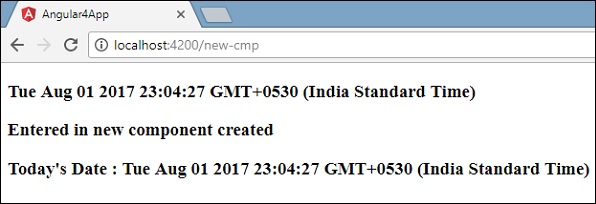
如果更改任何组件中服务的属性,则其他组件中的属性也会更改。现在让我们看看这是如何工作的。
我们将在服务中定义一个变量,并在父组件和新组件中使用它。我们将再次更改父组件中的属性,并将查看在新组件中是否也更改了。
在 **myservice.service.ts** 中,我们创建了一个属性并在其他父组件和新组件中使用了它。
import { Injectable } from '@angular/core';

@Injectable()
export class MyserviceService {
   serviceproperty = "Service Created";
   constructor() { }
   showTodayDate() {
      let ndate = new Date();
      return ndate;
   }
}
现在让我们在其他组件中使用 **serviceproperty** 变量。在 **app.component.ts** 中,我们访问变量的方式如下:
import { Component } from '@angular/core';
import { MyserviceService } from './myservice.service';
@Component({
   selector: 'app-root',
   templateUrl: './app.component.html',
   styleUrls: ['./app.component.css']
})

export class AppComponent {
   title = 'Angular 4 Project!';
   todaydate;
   componentproperty;
   constructor(private myservice: MyserviceService) {}
   ngOnInit() {
      this.todaydate = this.myservice.showTodayDate();
      console.log(this.myservice.serviceproperty);
      this.myservice.serviceproperty = "component created"; // value is changed.
      this.componentproperty = this.myservice.serviceproperty;
   }
}
我们现在将获取变量并处理 console.log。在下一行,我们将变量的值更改为“**组件已创建**”。我们将在 **new-cmp.component.ts** 中执行相同的操作。
import { Component, OnInit } from '@angular/core';
import { MyserviceService } from './../myservice.service';

@Component({
   selector: 'app-new-cmp',
   templateUrl: './new-cmp.component.html',
   styleUrls: ['./new-cmp.component.css']
})

export class NewCmpComponent implements OnInit {
   todaydate;
   newcomponentproperty;
   newcomponent = "Entered in newcomponent";
   constructor(private myservice: MyserviceService) {}
   ngOnInit() {
      this.todaydate = this.myservice.showTodayDate();
      this.newcomponentproperty = this.myservice.serviceproperty;
   }
}
在上面的组件中,我们什么也没有更改,而是直接将属性分配给组件属性。
现在,当您在浏览器中执行它时,服务属性将被更改,因为它的值在 **app.component.ts** 中已更改,并且将在 **new-cmp.component.ts** 中显示相同的值。
更改前也请检查控制台中的值。