
- Aurelia 教程
- Aurelia - 主页
- Aurelia - 概述
- Aurelia - 环境设置
- Aurelia - 第一个应用程序
- Aurelia - 组件
- Aurelia - 组件生命周期
- Aurelia - 自定义元素
- Aurelia - 依赖项注入
- Aurelia - 配置
- Aurelia - 插件
- Aurelia - 数据绑定
- Aurelia - 绑定行为
- Aurelia - 转换器
- Aurelia - 事件
- Aurelia - 事件聚合器
- Aurelia - 表单
- Aurelia - HTTP
- Aurelia - 引用
- Aurelia - 路由
- Aurelia - 历史
- Aurelia - 动画
- Aurelia - 对话框
- Aurelia - 本地化
- Aurelia - 工具
- Aurelia - 捆绑
- Aurelia - 调试
- Aurelia - 社区
- Aurelia - 最佳实践
- Aurelia 实用资源
- Aurelia - 快速指南
- Aurelia - 有用资源
- Aurelia - 讨论
Aurelia - 自定义元素
Aurelia 提供了一种动态添加组件的方式。你可以在应用程序的不同部分重复使用单个组件,而无需多次包含 HTML。在本教程中,你将学习如何实现此目的。
步骤 1 - 创建自定义组件
让我们在 src 文件夹中创建一个新的 components 文件夹。
C:\Users\username\Desktop\aureliaApp\src>mkdir components
在此文件夹中,我们将创建 custom-component.html。此组件将稍后插入 HTML 页面。
custom-component.html
<template>
   <p>This is some text from dynamic component...</p>
</template>
步骤 2 - 创建主组件
我们将在 app.js 中创建简单组件。它将用于在屏幕上呈现 页眉 和 页脚 文本。
app.js
export class MyComponent {
   header = "This is Header";
   content = "This is content";
}
步骤 3 - 添加自定义组件
在我们 app.html 文件中,我们需要 require custom-component.html 才能动态插入它。完成此操作后,我们可以添加一个新元素 custom-component。
app.html
<template>
   <require from = "./components/custom-component.html"></require>

   <h1>${header}</h1>
   <p>${content}</p>
   <custom-component></custom-component>
</template>
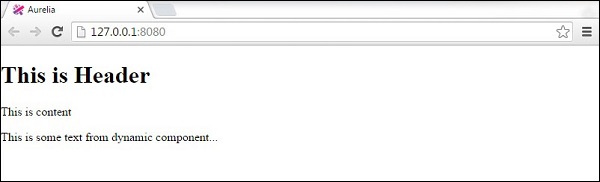
以下是输出。页眉 和 页脚 文本从 app.js 中的 myComponent 中呈现。其他文本从 custom-component.js 中呈现。
广告