
- Aurelia 教程
- Aurelia - 首页
- Aurelia - 概述
- Aurelia - 环境搭建
- Aurelia - 第一个应用程序
- Aurelia - 组件
- Aurelia - 组件生命周期
- Aurelia - 自定义元素
- Aurelia - 依赖注入
- Aurelia - 配置
- Aurelia - 插件
- Aurelia - 数据绑定
- Aurelia - 绑定行为
- Aurelia - 转换器
- Aurelia - 事件
- Aurelia - 事件聚合器
- Aurelia - 表单
- Aurelia - HTTP
- Aurelia - Refs
- Aurelia - 路由
- Aurelia - 历史记录
- Aurelia - 动画
- Aurelia - 对话框
- Aurelia - 本地化
- Aurelia - 工具
- Aurelia - 打包
- Aurelia - 调试
- Aurelia - 社区
- Aurelia - 最佳实践
- Aurelia 有用资源
- Aurelia - 快速指南
- Aurelia - 有用资源
- Aurelia - 讨论
Aurelia - 表单
本章将学习如何在 Aurelia 框架中使用表单。
文本输入
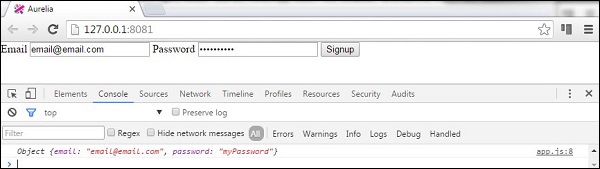
首先,我们将学习如何提交一个输入表单。视图将有两个用于用户名和密码的输入表单。我们将使用value.bind进行数据绑定。
app.html
<template>
   <form role = "form" submit.delegate = "signup()">

      <label for = "email">Email</label>
      <input type = "text" value.bind = "email" placeholder = "Email">

      <label for = "password">Password</label>
      <input type = "password" value.bind = "password" placeholder = "Password">

      <button type = "submit">Signup</button>
   </form>
</template>
signup 函数将从输入中获取用户名和密码值,并将其记录在开发者控制台中。
export class App {
   email = '';
   password = '';

   signup() {
      var myUser = { email: this.email, password: this.password }
      console.log(myUser);
   };
}
复选框
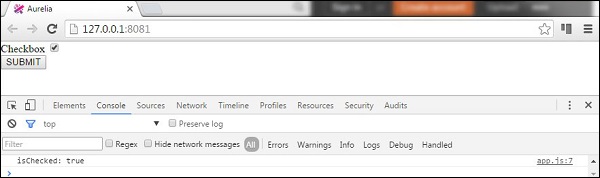
以下示例将演示如何使用 Aurelia 框架提交复选框。我们将创建一个复选框并将checked值绑定到我们的视图模型。
app.html
<template>
   <form role = "form" submit.delegate = "submit()">

      <label for = "checkbox">Checkbox</label>
      <input type = "checkbox" id = "checkbox" checked.bind = "isChecked"><br/>
      <button type = "submit">SUBMIT</button>

   </form>
</template>
表单提交将只在控制台中记录checked值。
app.js
export class App  {
   constructor() {
      this.isChecked = false;
   }
   submit() {
      console.log("isChecked: " + this.isChecked);
   }
}
单选按钮
以下示例将演示如何提交单选按钮。语法repeat.for = "option of options"将遍历对象数组,并为每个对象创建一个单选按钮。这是在 Aurelia 框架中动态创建元素的一种简洁方法。其余部分与之前的示例相同。我们正在绑定model和checked值。
app.html
<template>
   <form role = "form" submit.delegate = "submit()">

      <label repeat.for = "option of options">
         <input type = "radio" name = "myOptions"
            model.bind = "option" checked.bind = "$parent.selectedOption"/>
            ${option.text}
      </label>
      <br/>

      <button type = "submit">SUBMIT</button>
   </form>
</template>
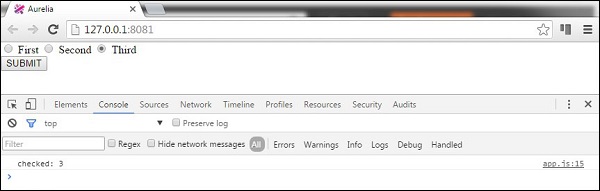
在我们的视图模型中,我们将创建一个对象数组this.options,并指定选中第一个单选按钮。同样,提交按钮将只在控制台中记录哪个单选按钮被选中。
app.js
export class PeriodPanel {
   options = [];
   selectedOption = {};

   constructor() {
      this.options = [
         {id:1, text:'First'},
         {id:2, text:'Second'},
         {id:3, text:'Third'}
      ];
      this.selectedOption = this.options[0];
   }
   submit() {
      console.log('checked: ' + this.selectedOption.id);
   }
}
如果我们选中第三个单选按钮并提交表单,控制台将显示它。
广告