
- Aurelia 教程
- Aurelia - 首页
- Aurelia - 概述
- Aurelia - 环境搭建
- Aurelia - 第一个应用程序
- Aurelia - 组件
- Aurelia - 组件生命周期
- Aurelia - 自定义元素
- Aurelia - 依赖注入
- Aurelia - 配置
- Aurelia - 插件
- Aurelia - 数据绑定
- Aurelia - 绑定行为
- Aurelia - 转换器
- Aurelia - 事件
- Aurelia - 事件聚合器
- Aurelia - 表单
- Aurelia - HTTP
- Aurelia - Refs
- Aurelia - 路由
- Aurelia - 历史记录
- Aurelia - 动画
- Aurelia - 对话框
- Aurelia - 国际化
- Aurelia - 工具
- Aurelia - 打包
- Aurelia - 调试
- Aurelia - 社区
- Aurelia - 最佳实践
- Aurelia 有用资源
- Aurelia - 快速指南
- Aurelia - 有用资源
- Aurelia - 讨论
Aurelia - 国际化
Aurelia 提供了 **i18n** 插件。在本节中,您将学习如何使用此插件本地化您的应用程序。
步骤 1 - 安装插件
打开 **命令提示符** 窗口并运行以下代码以安装 **i18n** 插件。
C:\Users\username\Desktop\aureliaApp>jspm install aurelia-i18n
我们还需要安装后端插件。
C:\Users\username\Desktop\aureliaApp>jspm install npm:i18next-xhr-backend
步骤 2 - 创建文件夹和文件
在项目根文件夹中,我们需要创建一个 **locale** 目录。
C:\Users\username\Desktop\aureliaApp>mkdir locale
在此文件夹中,您需要为所需的任何语言添加新文件夹。我们将创建 **en**,并在其中添加 **translation.js** 文件。
C:\Users\username\Desktop\aureliaApp\locale>mkdir en
C:\Users\username\Desktop\aureliaApp\locale\en>touch translation.json
步骤 3 - 使用插件
您需要使用手动引导才能使用此插件。有关更多信息,请查看配置章节。我们需要将 **i18n** 插件添加到 **main.js** 文件中。
main.js
import {I18N} from 'aurelia-i18n';
import XHR from 'i18next-xhr-backend';

export function configure(aurelia) {
   aurelia.use
   .standardConfiguration()
   .developmentLogging()

   .plugin('aurelia-i18n', (instance) => {
      // register backend plugin
      instance.i18next.use(XHR);

      // adapt options to your needs (see http://i18next.com/docs/options/)
      instance.setup({
         backend: {
            loadPath: '/locales/{{lng}}/{{ns}}.json',
         },

         lng : 'de',
         attributes : ['t','i18n'],
         fallbackLng : 'en',
         debug : false
      });
   });

   aurelia.start().then(a => a.setRoot());
}
步骤 4 - 翻译 JSON 文件
这是您可以设置翻译值的文件。我们将使用官方文档中的示例。**de-DE** 文件夹实际上应该用于翻译成德语,但是为了便于理解,我们将使用英语短语。
translation.json
{
   "score": "Score: {{score}}",
   "lives": "{{count}} life remaining",
   "lives_plural": "{{count}} lives remaining",
   "lives_indefinite": "a life remaining",
   "lives_plural_indefinite": "some lives remaining",
   "friend": "A friend",
   "friend_male": "A boyfriend",
   "friend_female": "A girlfriend"
}
步骤 5 - 设置语言环境
我们只需要导入 **i18n** 插件并将其设置为使用 **de-DE** 文件夹中的 JSON 代码。
app.js
import {I18N} from 'aurelia-i18n';

export class App {
   static inject = [I18N];

   constructor(i18n) {
      this.i18n = i18n;
      this.i18n
      .setLocale('de-DE')

      .then( () => {
         console.log('Locale is ready!');
      });
   }
}
步骤 6 - 视图
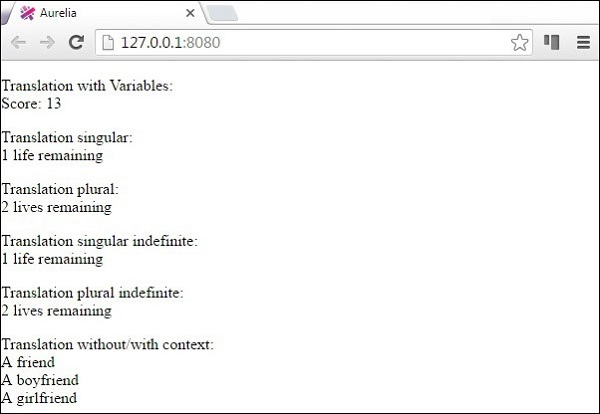
有几种方法可以翻译数据。我们将使用名为 **t** 的自定义 ValueConverter。您可以在以下示例中看到各种格式化数据的方法。将其与 **translation.json** 文件进行比较,您会注意到用于格式化的模式。
<template>
   <p>
      Translation with Variables: <br />
      ${ 'score' | t: {'score': 13}}
   </p>

   <p>
      Translation singular: <br />
      ${ 'lives' | t: { 'count': 1 } }
   </p>

   <p>
      Translation plural: <br />
      ${ 'lives' | t: { 'count': 2 } }
   </p>

   <p>
      Translation singular indefinite: <br />
      ${ 'lives' | t: { 'count': 1, indefinite_article: true  } }
   </p>

   <p>
      Translation plural indefinite: <br />
      ${ 'lives' | t: { 'count': 2, indefinite_article: true } }
   </p>

   <p>
      Translation without/with context: <br />
      ${ 'friend' | t } <br />
      ${ 'friend' | t: { context: 'male' } } <br />
      ${ 'friend' | t: { context: 'female' } }
   </p>

</template>
当我们运行应用程序时,我们将获得以下输出。
广告