
- Aurelia 教程
- Aurelia —— 主页
- Aurelia —— 概览
- Aurelia —— 环境设置
- Aurelia —— 第一个应用程序
- Aurelia —— 组件
- Aurelia —— 组件生命周期
- Aurelia —— 自定义元素
- Aurelia —— 依赖注入
- Aurelia —— 配置
- Aurelia —— 插件
- Aurelia —— 数据绑定
- Aurelia —— 绑定行为
- Aurelia —— 转换器
- Aurelia —— 事件
- Aurelia —— 事件聚合器
- Aurelia —— 表单
- Aurelia —— HTTP
- Aurelia —— 引用
- Aurelia —— 路由
- Aurelia —— 历史
- Aurelia —— 动画
- Aurelia —— 对话框
- Aurelia —— 本地化
- Aurelia —— 工具
- Aurelia —— 捆绑
- Aurelia —— 调试
- Aurelia —— 社区
- Aurelia —— 最佳实践
- Aurelia 实用资源
- Aurelia —— 快速指南
- Aurelia —— 实用资源
- Aurelia —— 讨论
Aurelia —— 事件聚合器
当你的事件需要附加到更多的侦听器或当你需要观察你的应用的一些功能并等待数据更新时,应该使用事件聚合器。
Aurelia 事件聚合器有三个方法。 publish 方法将触发事件,并且可以被多个订阅者使用。为了订阅事件,我们可以使用 subscribe 方法。最后,我们可以使用 dispose 方法来分离订阅者。以下示例对此进行了演示。
我们的视图将只为这三个功能中的每一个提供三个按钮。
app.html
<template>
   <button click.delegate = "publish()">PUBLISH</button><br/>
   <button click.delegate = "subscribe()">SUBSCRIBE</button><br/>
   <button click.delegate = "dispose()">DISPOSE</button>
</template>
我们需要导入 eventAggregator 并注入它,然后才能使用它。
app.js
import {inject} from 'aurelia-framework';
import {EventAggregator} from 'aurelia-event-aggregator';

@inject(EventAggregator)
export class App {
   constructor(eventAggregator) {
      this.eventAggregator = eventAggregator;
   }
   publish() {
      var payload = 'This is some data...';
      this.eventAggregator.publish('myEventName', payload);
   }
   subscribe() {
      this.subscriber = this.eventAggregator.subscribe('myEventName', payload => {
         console.log(payload);
      });
   }
   dispose() {
      this.subscriber.dispose();
      console.log('Disposed!!!');
   }
}
我们需要点击 SUBSCRIBE 按钮来侦听将来发布的数据。一旦订阅者被附加,每当发送新数据时,控制台都会将其记录下来。如果我们点击 PUBLISH 按钮五次,我们将会看到它每次都会记录下来。
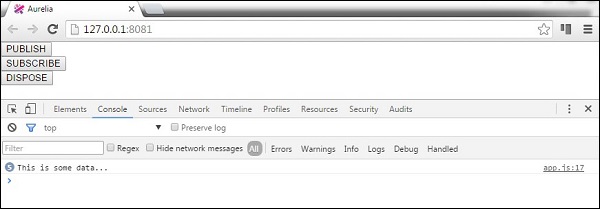
我们还可以通过点击 DISPOSE 按钮来分离我们的订阅者。
广告