
- Aurelia 教程
- Aurelia - 首页
- Aurelia - 概述
- Aurelia - 环境设置
- Aurelia - 第一个应用程序
- Aurelia - 组件
- Aurelia - 组件生命周期
- Aurelia - 自定义元素
- Aurelia - 依赖注入
- Aurelia - 配置
- Aurelia - 插件
- Aurelia - 数据绑定
- Aurelia - 绑定行为
- Aurelia - 转换器
- Aurelia - 事件
- Aurelia - 事件聚合器
- Aurelia - 表单
- Aurelia - HTTP
- Aurelia - 引用
- Aurelia - 路由
- Aurelia - 历史
- Aurelia - 动画
- Aurelia - 对话框
- Aurelia - 本地化
- Aurelia - 工具
- Aurelia - 捆绑
- Aurelia - 调试
- Aurelia - 社区
- Aurelia - 最佳实践
- Aurelia 实用资源
- Aurelia - 快速指南
- Aurelia - 实用资源
- Aurelia - 讨论
Aurelia - HTTP
在本章中,您将了解如何在 Aurelia 框架中使用 HTTP 请求。
第 1 步 - 创建视图
让我们创建四个按钮,用于向我们的 API 发送请求。
app.html
<template>
   <button click.delegate = "getData()">GET</button>
   <button click.delegate = "postData()">POST</button>
   <button click.delegate = "updateData()">PUT</button>
   <button click.delegate = "deleteData()">DEL</button>
</template>
第 2 步 - 创建视模型
为了向服务器发送请求,Aurelia 推荐使用 **fetch** 客户端。我们为需要的每个请求(GET、POST、PUT 和 DELETE)创建函数。
import 'fetch';
import {HttpClient, json} from 'aurelia-fetch-client';

let httpClient = new HttpClient();

export class App {
   getData() {
      httpClient.fetch('http://jsonplaceholder.typicode.com/posts/1')
      .then(response => response.json())
      .then(data => {
         console.log(data);
      });
   }
   myPostData = {
      id: 101
   }
	postData(myPostData) {
      httpClient.fetch('http://jsonplaceholder.typicode.com/posts', {
         method: "POST",
         body: JSON.stringify(myPostData)
      })

      .then(response => response.json())
      .then(data => {
         console.log(data);
      });
   }
   myUpdateData = {
      id: 1
   }
	updateData(myUpdateData) {
      httpClient.fetch('http://jsonplaceholder.typicode.com/posts/1', {
         method: "PUT",
         body: JSON.stringify(myUpdateData)
      })

      .then(response => response.json())
      .then(data => {
         console.log(data);
      });
   }
   deleteData() {
      httpClient.fetch('http://jsonplaceholder.typicode.com/posts/1', {
         method: "DELETE"
      })
      .then(response => response.json())
      .then(data => {
         console.log(data);
      });
   }
}
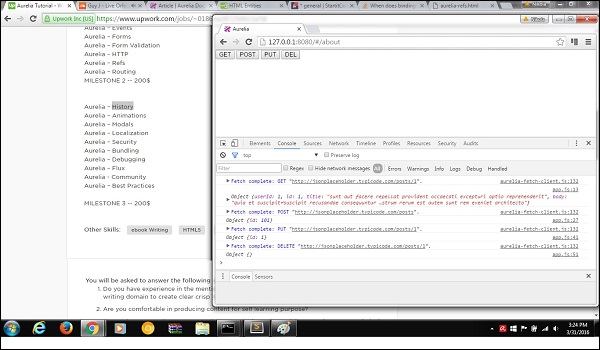
我们可以运行该应用程序,分别单击 **GET**、**POST**、**PUT** 和 **DEL** 按钮。我们可以在控制台中看到每个请求都已成功,并且结果已记录。
广告