
- R 教程
- R - 首页
- R - 概述
- R - 环境设置
- R - 基本语法
- R - 数据类型
- R - 变量
- R - 运算符
- R - 决策
- R - 循环
- R - 函数
- R - 字符串
- R - 向量
- R - 列表
- R - 矩阵
- R - 数组
- R - 因子
- R - 数据框
- R - 包
- R - 数据重塑
R - 正态分布
在从独立来源随机收集的数据中,通常观察到数据的分布是正态的。这意味着,在绘制一个图表,其中变量的值位于横轴上,而值的数量位于纵轴上时,我们得到一个钟形曲线。曲线的中心表示数据集的平均值。在图表中,50% 的值位于平均值的左侧,而另外 50% 的值位于图表的右侧。这在统计学中被称为正态分布。
R 有四个内置函数来生成正态分布。它们在下面描述。
dnorm(x, mean, sd)
pnorm(x, mean, sd)
qnorm(p, mean, sd)
rnorm(n, mean, sd)
以下是上述函数中使用的参数的描述:
x 是一个数字向量。
p 是一个概率向量。
n 是观测值的数量(样本量)。
mean 是样本数据的平均值。其默认值为零。
sd 是标准差。其默认值为 1。
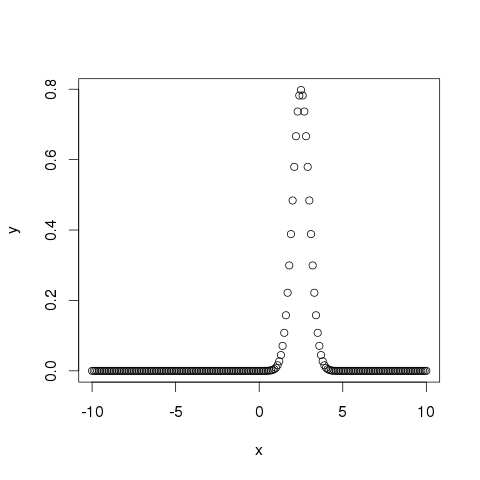
dnorm()
此函数给出了给定均值和标准差下每个点的概率分布的高度。
# Create a sequence of numbers between -10 and 10 incrementing by 0.1.
x <- seq(-10, 10, by = .1)

# Choose the mean as 2.5 and standard deviation as 0.5.
y <- dnorm(x, mean = 2.5, sd = 0.5)

# Give the chart file a name.
png(file = "dnorm.png")

plot(x,y)

# Save the file.
dev.off()
当我们执行以上代码时,它会产生以下结果:
pnorm()
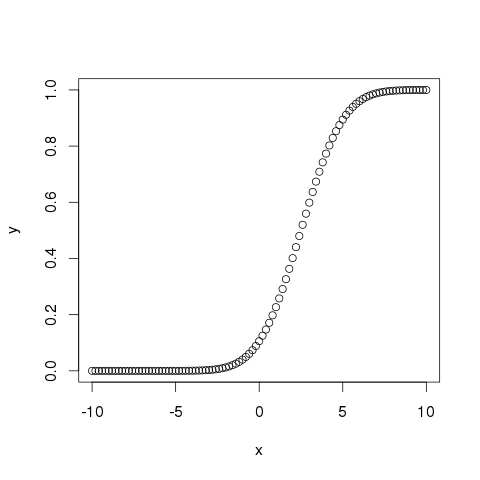
此函数给出了正态分布的随机数小于给定数字的值的概率。它也称为“累积分布函数”。
# Create a sequence of numbers between -10 and 10 incrementing by 0.2.
x <- seq(-10,10,by = .2)

# Choose the mean as 2.5 and standard deviation as 2.
y <- pnorm(x, mean = 2.5, sd = 2)

# Give the chart file a name.
png(file = "pnorm.png")

# Plot the graph.
plot(x,y)

# Save the file.
dev.off()
当我们执行以上代码时,它会产生以下结果:
qnorm()
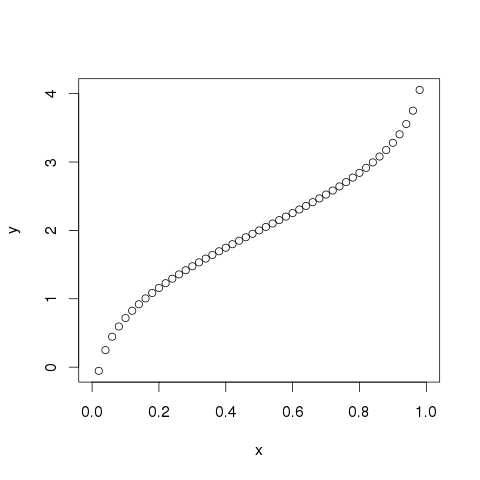
此函数采用概率值并给出一个其累积值与概率值匹配的数字。
# Create a sequence of probability values incrementing by 0.02.
x <- seq(0, 1, by = 0.02)

# Choose the mean as 2 and standard deviation as 3.
y <- qnorm(x, mean = 2, sd = 1)

# Give the chart file a name.
png(file = "qnorm.png")

# Plot the graph.
plot(x,y)

# Save the file.
dev.off()
当我们执行以上代码时,它会产生以下结果:
rnorm()
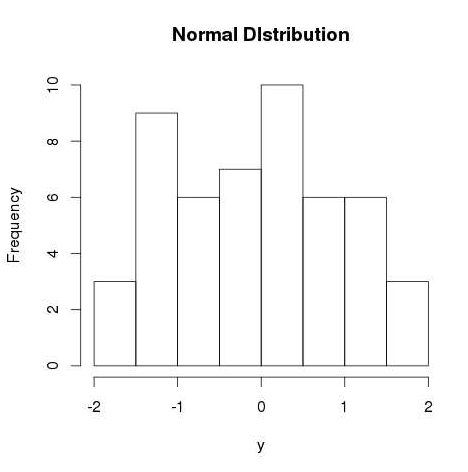
此函数用于生成分布为正态的随机数。它将样本量作为输入并生成那么多随机数。我们绘制一个直方图来显示生成的数字的分布。
# Create a sample of 50 numbers which are normally distributed.
y <- rnorm(50)

# Give the chart file a name.
png(file = "rnorm.png")

# Plot the histogram for this sample.
hist(y, main = "Normal DIstribution")

# Save the file.
dev.off()
当我们执行以上代码时,它会产生以下结果:
广告