
- WPF 教程
- WPF - 主页
- WPF - 概述
- WPF - 环境设置
- WPF - Hello World
- WPF - XAML 概述
- WPF - 元素树
- WPF - 依赖属性
- WPF - 路由事件
- WPF - 控件
- WPF - 布局
- WPF - 布局嵌套
- WPF - 输入
- WPF - 命令行
- WPF - 数据绑定
- WPF - 资源
- WPF - 模板
- WPF - 样式
- WPF - 触发器
- WPF - 调试
- WPF - 自定义控件
- WPF - 异常处理
- WPF - 本地化
- WPF - 交互
- WPF - 二维图形
- WPF - 三维图形
- WPF - 多媒体
- WPF 实用资源
- WPF - 快速入门指南
- WPF - 实用资源
- WPF - 讨论
WPF - 布局嵌套
布局嵌套意味着在另一个布局中使用布局面板,例如在网格中定义堆栈面板。此概念广泛用于在一个应用程序中利用多个布局的优势。在以下示例中,我们将在网格中使用堆栈面板。
让我们看一下以下 XAML 代码。
<Window x:Class = "WPFNestingLayouts.MainWindow"
   xmlns = "http://schemas.microsoft.com/winfx/2006/xaml/presentation"
   xmlns:x = "http://schemas.microsoft.com/winfx/2006/xaml"
   xmlns:d = "http://schemas.microsoft.com/expression/blend/2008"
   xmlns:mc = "http://schemas.openxmlformats.org/markup-compatibility/2006"
   xmlns:local = "clr-namespace:WPFNestingLayouts"
   mc:Ignorable = "d" Title = "MainWindow" Height = "350" Width = "604">

   <Grid Background = "AntiqueWhite">
      <Grid.RowDefinitions>
         <RowDefinition Height = "*" />
         <RowDefinition Height = "*" />
         <RowDefinition Height = "*" />
         <RowDefinition Height = "*" />
         <RowDefinition Height = "*" />
      </Grid.RowDefinitions>

      <Grid.ColumnDefinitions>
         <ColumnDefinition Width = "*" />
      </Grid.ColumnDefinitions>

      <Label Content = "Employee Info" FontSize = "15"
         FontWeight = "Bold" Grid.Column = "0" Grid.Row = "0"/>

      <StackPanel Grid.Column = "0" Grid.Row = "1" Orientation = "Horizontal">
         <Label Content = "Name"  VerticalAlignment = "Center" Width = "70"/>
         <TextBox Name = "txtName" Text = "Muhammad Ali" VerticalAlignment = "Center"
            Width = "200">
         </TextBox>
      </StackPanel>

      <StackPanel Grid.Column = "0" Grid.Row = "2" Orientation = "Horizontal">
         <Label Content = "ID" VerticalAlignment = "Center" Width = "70"/>
         <TextBox Name = "txtCity" Text = "421" VerticalAlignment = "Center"
            Width = "50">
         </TextBox>
      </StackPanel>

      <StackPanel Grid.Column = "0" Grid.Row = "3" Orientation = "Horizontal">
         <Label Content = "Age" VerticalAlignment = "Center" Width = "70"/>
         <TextBox Name = "txtState" Text = "32" VerticalAlignment = "Center"
            Width = "50"></TextBox>
      </StackPanel>

      <StackPanel Grid.Column = "0" Grid.Row = "4" Orientation = "Horizontal">
         <Label Content = "Title" VerticalAlignment = "Center" Width = "70"/>
         <TextBox Name = "txtCountry" Text = "Programmer" VerticalAlignment = "Center"
            Width = "200"></TextBox>
      </StackPanel>

   </Grid>

</Window>
编译并执行上述代码后,将生成以下窗口。
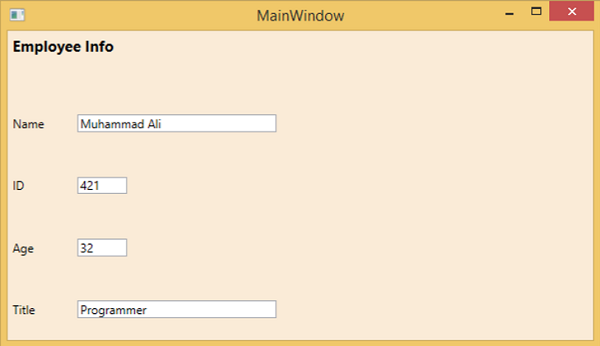
我们建议你执行上述示例代码并尝试其他嵌套布局。
广告