
- XAML 教程
- XAML - 首页
- XAML - 概述
- XAML - 环境设置
- 在 macOS 上编写 XAML 应用程序
- XAML 与 C# 代码
- XAML 与 VB.NET
- XAML - 构建块
- XAML - 控件
- XAML - 布局
- XAML - 事件处理
- XAML - 数据绑定
- XAML - 标记扩展
- XAML - 依赖属性
- XAML - 资源
- XAML - 模板
- XAML - 样式
- XAML - 触发器
- XAML - 调试
- XAML - 自定义控件
- XAML 有用资源
- XAML - 快速指南
- XAML - 有用资源
- XAML - 讨论
XAML - 数据网格 (DataGrid)
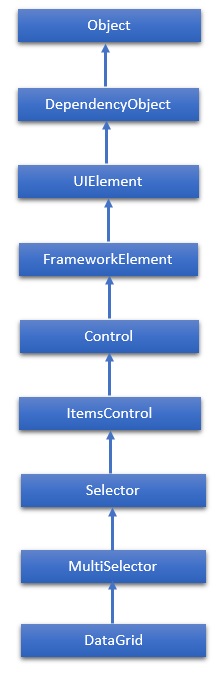
DataGrid 表示一个控件,用于以可自定义的网格显示数据。它提供了一种灵活的方式来以行和列显示数据集合。DataGrid 类的继承层次结构如下:
属性
| 序号 | 属性及描述 |
|---|---|
| 1 | AlternatingRowBackground 获取或设置用于交替行的背景画刷。 |
| 2 | AreRowDetailsFrozen 获取或设置一个值,该值指示行详细信息是否可以水平滚动。 |
| 3 | AutoGenerateColumns 获取或设置一个值,该值指示列是否自动创建。 |
| 4 | CanUserAddRows 获取或设置一个值,该值指示用户是否可以向 DataGrid 添加新行。 |
| 5 | CanUserDeleteRows 获取或设置一个值,该值指示用户是否可以从 DataGrid 删除行。 |
| 6 | CanUserReorderColumns 获取或设置一个值,该值指示用户是否可以通过使用鼠标拖动列标题来更改列显示顺序。 |
| 7 | CanUserResizeColumns 获取或设置一个值,该值指示用户是否可以使用鼠标调整列的宽度。 |
| 8 | CanUserResizeRows 获取或设置一个值,该值指示用户是否可以使用鼠标调整行的高度。 |
| 9 | CanUserSortColumns 获取或设置一个值,该值指示用户是否可以通过单击列标题对列进行排序。 |
| 10 | ColumnHeaderHeight 获取或设置列标题行的高度。 |
| 11 | ColumnHeaderStyle 获取或设置应用于 DataGrid 中所有列标题的样式。 |
| 12 | Columns 获取包含 DataGrid 中所有列的集合。 |
| 13 | ColumnWidth 获取或设置 DataGrid 中列和标题的标准宽度和大小调整模式。 |
| 14 | CurrentCell 获取或设置具有焦点的单元格。 |
| 15 | CurrentColumn 获取或设置包含当前单元格的列。 |
| 16 | CurrentItem 获取绑定到包含当前单元格的行的数据项。 |
| 17 | FrozenColumnCount 获取或设置不可滚动列的数量。 |
| 18 | HorizontalScrollBarVisibility 获取或设置一个值,该值指示如何在 DataGrid 中显示水平滚动条。 |
| 19 | IsReadOnly 获取或设置一个值,该值指示用户是否可以编辑 DataGrid 中的值。 |
| 20 | RowBackground 获取或设置行背景的默认画刷。 |
| 21 | RowHeight 获取或设置所有行的建议高度。 |
| 22 | SelectedCells 获取当前选定的单元格列表。 |
方法
| 序号 | 方法及描述 |
|---|---|
| 1 | BeginEdit 调用 BeginEdit 命令,这将把当前单元格或行置于编辑模式。 |
| 2 | CancelEdit 为当前处于编辑模式的单元格或行调用 CancelEditCommand 命令。 |
| 3 | ClearDetailsVisibilityForItem 清除表示指定数据项的 DataGridRow 的 DetailsVisibility 属性。 |
| 4 | ColumnFromDisplayIndex 获取指定索引处的 DataGridColumn。 |
| 5 | CommitEdit 为当前处于编辑模式的单元格或行调用 CommitEditCommand 命令。 |
| 6 | GenerateColumns 为对象的指定属性生成列。 |
| 7 | GetDetailsVisibilityForItem 获取表示指定数据项的 DataGridRow 的 DetailsVisibility 属性。 |
| 8 | OnApplyTemplate 在派生类中重写时,每当应用程序代码或内部进程调用 ApplyTemplate 时都会调用。(重写 FrameworkElement.OnApplyTemplate()) |
| 9 | ScrollIntoView 垂直滚动 DataGrid 以显示指定数据项的行。 |
| 10 | SelectAllCells 选择 DataGrid 中的所有单元格。 |
| 11 | SetDetailsVisibilityForItem 设置包含指定对象的 DataGridRow 的 DetailsVisibility 属性的值。 |
| 12 | UnselectAllCells 取消选择 DataGrid 中的所有单元格。 |
事件
| 序号 | 事件及描述 |
|---|---|
| 1 | AddingNewItem 在向 DataGrid 添加新项之前发生。 |
| 2 | AutoGeneratedColumns 所有列的自动生成完成后发生。 |
| 3 | AutoGeneratingColumn 自动生成单个列时发生。 |
| 4 | BeginningEdit 行或单元格进入编辑模式之前发生。 |
| 5 | CellEditEnding 在提交或取消单元格编辑之前发生。 |
| 6 | ColumnDisplayIndexChanged 当其中一列的 DisplayIndex 属性更改时发生。 |
| 7 | ColumnHeaderDragCompleted 当用户使用鼠标拖动列标题后释放它时发生。 |
| 8 | ColumnHeaderDragDelta 当用户拖动列标题时,鼠标位置每次更改都会发生。 |
| 9 | ColumnHeaderDragStarted 当用户开始使用鼠标拖动列标题时发生。 |
| 10 | ColumnReordered 当列移动到显示顺序中的新位置时发生。 |
| 11 | ColumnReordering 在列移动到显示顺序中的新位置之前发生。 |
| 12 | CopyingRowClipboardContent 准备默认行内容后发生。 |
| 13 | CurrentCellChanged 当 CurrentCell 属性的值发生更改时发生。 |
| 14 | InitializingNewItem 创建新项时发生。 |
| 15 | LoadingRow 在 DataGridRow 实例化后发生,以便您可以在使用它之前对其进行自定义。 |
| 16 | LoadingRowDetails 将新的行详细信息模板应用于行时发生。 |
| 17 | PreparingCellForEdit 单元格进入编辑模式时发生。 |
| 18 | RowDetailsVisibilityChanged 行详细信息元素的可见性发生更改时发生。 |
| 19 | RowEditEnding 在提交或取消行编辑之前发生。 |
| 20 | SelectedCellsChanged 当 SelectedCells 集合发生更改时发生。 |
| 21 | Sorting 正在对列进行排序时发生。 |
| 22 | UnloadingRow DataGridRow 对象可供重用时发生。 |
| 23 | UnloadingRowDetails 行详细信息元素可供重用时发生。 |
示例
以下示例演示如何在 DataGrid 中显示数据。以下是创建两个具有某些属性和事件的复选框的 XAML 代码。
<Window x:Class = "DataGrid.MainWindow"
   xmlns = "http://schemas.microsoft.com/winfx/2006/xaml/presentation"
   xmlns:x = "http://schemas.microsoft.com/winfx/2006/xaml"
   xmlns:core = "clr-namespace:System;assembly = mscorlib"
   xmlns:local = "clr-namespace:DataGrid"
   Title = "MainWindow" Height = "350" Width = "525">

   <Window.Resources>
      <ObjectDataProvider x:Key = "myEnum" MethodName = "GetValues"
         ObjectType = "{x:Type core:Enum}">

         <ObjectDataProvider.MethodParameters>
            <x:TypeExtension Type = "local:Party" />
         </ObjectDataProvider.MethodParameters>
		</ObjectDataProvider>
   </Window.Resources>

   <Grid>
      <DataGrid Name = "dataGrid" AlternatingRowBackground = "LightBlue"
         AlternationCount = "2" AutoGenerateColumns = "False">

         <DataGrid.Columns>
            <DataGridTextColumn Header = "Name" Binding = "{Binding Name}" />
            <DataGridTextColumn Header = "Title" Binding = "{Binding Title}" >
            <DataGridCheckBoxColumn Header = "ReElected?" Binding = "{Binding WasReElected}"/>

            <DataGridComboBoxColumn Header = "Party"
               SelectedItemBinding = "{Binding Affiliation}"
               ItemsSource = "{Binding Source = {StaticResource myEnum}}" />
         </DataGrid.Columns>
      </DataGrid>
   </Grid>

</Window>
以下是针对两个不同类的 C# 实现。
using System;
using System.Collections.Generic;
using System.Linq;
using System.Text;
using System.Threading.Tasks;

using System.Windows;
using System.Windows.Controls;
using System.Windows.Data;
using System.Windows.Documents;
using System.Windows.Input;
using System.Windows.Media;
using System.Windows.Media.Imaging;
using System.Windows.Navigation;
using System.Windows.Shapes;

namespace DataGrid {
   /// <summary>
      /// Interaction logic for MainWindow.xaml
   /// </summary>

   public partial class MainWindow : Window {
      public MainWindow() {
         InitializeComponent(); dataGrid.ItemsSource = Employee.GetEmployees();
      }
   }
	public enum Party {
      Indepentent, Federalist, DemocratRepublican,
   }
}
以下是 C# 中另一个 Employee 类实现。
public class Employee : INotifyPropertyChanged {
   private string name; public string Name {
      get { return name; }
      set {
         name = value; RaiseProperChanged();
      }
   }
	private string title; public string Title {
      get { return title; }
		set {
         title = value;
         RaiseProperChanged();
      }
   }
	private bool wasReElected;
	public bool WasReElected {
      get { return wasReElected; }
      set {
         wasReElected = value; RaiseProperChanged();
      }
   }
	private Party affiliation; public Party Affiliation {
      get { return affiliation; }
		set {
         affiliation = value; RaiseProperChanged();
      }
   }
	public static ObservableCollection<Employee> GetEmployees() {
      var employees = new ObservableCollection<Employee>();
      employees.Add(new Employee() {
         Name = "Ali", Title = "Minister", WasReElected = true,
         Affiliation = Party.Indepentent });

      employees.Add(new Employee() {
         Name = "Ahmed", Title = "CM", WasReElected = false,
         Affiliation = Party.Federalist });

      employees.Add(new Employee() {
         Name = "Amjad", Title = "PM", WasReElected = true,
         Affiliation = Party.DemocratRepublican });

      employees.Add(new Employee() {
         Name = "Waqas", Title = "Minister", WasReElected = false,
         Affiliation = Party.Indepentent });

      employees.Add(new Employee() {
         Name = "Bilal", Title = "Minister", WasReElected = true,
         Affiliation = Party.Federalist });

      employees.Add(new Employee() {
         Name = "Waqar", Title = "Minister", WasReElected = false,
         Affiliation = Party.DemocratRepublican });

      return employees;
   }
   public event PropertyChangedEventHandler PropertyChanged;

   private void RaiseProperChanged( [CallerMemberName] string caller = "") {
      if (PropertyChanged != null) {
         PropertyChanged(this, new PropertyChangedEventArgs(caller));
      }
   }
}
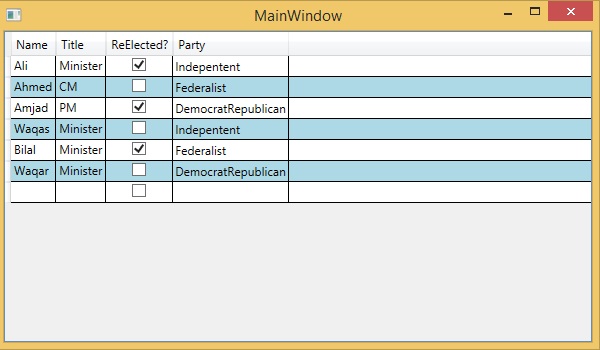
编译并执行上述代码后,将产生以下输出:
我们建议您执行上述示例代码并尝试其他一些属性和事件。