
- XAML 教程
- XAML - 首页
- XAML - 概述
- XAML - 环境设置
- 在 macOS 上编写 XAML 应用程序
- XAML 与 C# 代码
- XAML 与 VB.NET
- XAML - 构建块
- XAML - 控件
- XAML - 布局
- XAML - 事件处理
- XAML - 数据绑定
- XAML - 标记扩展
- XAML - 依赖属性
- XAML - 资源
- XAML - 模板
- XAML - 样式
- XAML - 触发器
- XAML - 调试
- XAML - 自定义控件
- XAML 有用资源
- XAML - 快速指南
- XAML - 有用资源
- XAML - 讨论
XAML - RichEditBox
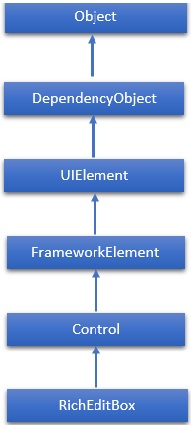
RichEditBox 是一种富文本编辑控件,支持格式化文本、超链接和其他富内容。WPF 项目不支持此控件。因此它将在 Windows 应用中实现。RichEditBox 类的层次继承如下:
属性
| 序号 | 属性和描述 |
|---|---|
| 1 | AcceptsReturn 获取或设置一个值,该值指示 RichEditBox 是否允许并在按下 ENTER 或 RETURN 键时显示换行符或回车符。 |
| 2 | AcceptsReturnProperty 标识 AcceptsReturn 依赖属性。 |
| 3 | DesiredCandidateWindowAlignment 获取或设置一个值,该值指示输入法编辑器 (IME) 的首选对齐方式。 |
| 4 | DesiredCandidateWindowAlignmentProperty 标识 DesiredCandidateWindowAlignment 依赖属性。 |
| 5 | Document 获取一个对象,该对象允许访问 RichEditBox 中包含的文本的文本对象模型。 |
| 6 | Header 获取或设置控件标题的内容。 |
| 7 | HeaderProperty 标识 Header 依赖属性。 |
| 8 | HeaderTemplate 获取或设置用于显示控件标题内容的 DataTemplate。 |
| 9 | HeaderTemplateProperty 标识 HeaderTemplate 依赖属性。 |
| 10 | InputScope 获取或设置此 RichEditBox 使用的输入上下文。 |
| 11 | InputScopeProperty 标识 InputScope 依赖属性。 |
| 12 | IsColorFontEnabled 获取或设置一个值,该值确定是否以彩色渲染包含彩色图层的字体字形,例如 Segoe UI Emoji。 |
| 13 | IsColorFontEnabledProperty 标识 IsColorFontEnabled 依赖属性。 |
| 14 | IsReadOnly 获取或设置一个值,该值指示用户是否可以更改 RichEditBox 中的文本。 |
| 15 | IsReadOnlyProperty 标识 IsReadOnly 依赖属性。 |
| 16 | IsSpellCheckEnabled 获取或设置一个值,该值指示文本输入是否应与拼写检查引擎交互。 |
| 17 | IsSpellCheckEnabledProperty 标识 IsSpellCheckEnabled 依赖属性。 |
| 18 | IsTextPredictionEnabled 获取或设置一个值,该值指示是否为此 RichEditBox 启用文本预测功能(“自动完成”)。 |
| 19 | IsTextPredictionEnabledProperty 标识 IsTextPredictionEnabled 依赖属性。 |
| 20 | PlaceholderText 获取或设置在用户操作或其他操作更改值之前在控件中显示的文本。 |
| 21 | PlaceholderTextProperty 标识 PlaceholderText 依赖属性。 |
| 22 | PreventKeyboardDisplayOnProgrammaticFocus 获取或设置一个值,该值指示当控件以编程方式获得焦点时是否显示屏幕键盘。 |
| 23 | PreventKeyboardDisplayOnProgrammaticFocusProperty 标识 PreventKeyboardDisplayOnProgrammaticFocus 依赖属性。 |
| 24 | SelectionHighlightColor 获取或设置用于突出显示所选文本的画刷。 |
| 25 | SelectionHighlightColorProperty 标识 SelectionHighlightColor 依赖属性。 |
| 26 | TextAlignment 获取或设置一个值,该值指示文本在 RichEditBox 中如何对齐。 |
| 27 | TextAlignmentProperty 标识 TextAlignment 依赖属性。 |
| 28 | TextReadingOrder 获取或设置一个值,该值指示如何确定 RichEditBox 的阅读顺序。 |
| 29 | TextReadingOrderProperty 标识 TextReadingOrder 依赖属性。 |
| 30 | TextWrapping 获取或设置一个值,该值指示如果一行文本超出 RichEditBox 的可用宽度,则文本换行如何发生。 |
| 31 | TextWrappingProperty 标识 TextWrapping 依赖属性。 |
事件
| 序号 | 事件和描述 |
|---|---|
| 1 | CandidateWindowBoundsChanged 当输入法编辑器 (IME) 窗口打开、更新或关闭时发生。 |
| 2 | ContextMenuOpening 当系统处理显示上下文菜单的交互时发生。 |
| 3 | Paste 当文本粘贴到控件中时发生。 |
| 4 | SelectionChanged 当文本选择发生更改时发生。 |
| 5 | TextChanged 当 RichEditBox 中的内容发生更改时发生。 |
| 6 | TextChanging 当 RichEditBox 中的文本开始更改时发生。 |
| 7 | TextCompositionChanged 当通过输入法编辑器 (IME) 撰写的文本发生更改时发生。 |
| 8 | TextCompositionEnded 当用户停止通过输入法编辑器 (IME) 撰写文本时发生。 |
| 9 | TextCompositionStarted 当用户开始通过输入法编辑器 (IME) 撰写文本时发生。 |
方法
| 序号 | 方法和描述 |
|---|---|
| 1 | OnManipulationCompleted 在 ManipulationCompleted 事件发生之前调用。(继承自 Control) |
| 2 | OnManipulationDelta 在 ManipulationDelta 事件发生之前调用。(继承自 Control) |
| 3 | OnManipulationInertiaStarting 在 ManipulationInertiaStarting 事件发生之前调用。(继承自 Control) |
| 4 | OnManipulationStarted 在 ManipulationStarted 事件发生之前调用。(继承自 Control) |
| 5 | OnManipulationStarting 在 ManipulationStarting 事件发生之前调用。(继承自 Control) |
| 6 | OnMaximumChanged 当 Maximum 属性更改时调用。(继承自 RangeBase) |
| 7 | OnMinimumChanged 当 Minimum 属性更改时调用。(继承自 RangeBase) |
| 8 | OnValueChanged 触发 ValueChanged 路由事件。(继承自 RangeBase) |
| 9 | SetBinding 使用提供的绑定对象将绑定附加到 FrameworkElement。(继承自 FrameworkElement) |
| 10 | SetValue 设置 DependencyObject 上依赖属性的局部值。(继承自 DependencyObject) |
| 11 | StartDragAsync 启动拖放操作。(继承自 UIElement) |
| 12 | UnregisterPropertyChangedCallback 取消先前通过调用 RegisterPropertyChangedCallback 注册的更改通知。(继承自 DependencyObject) |
示例
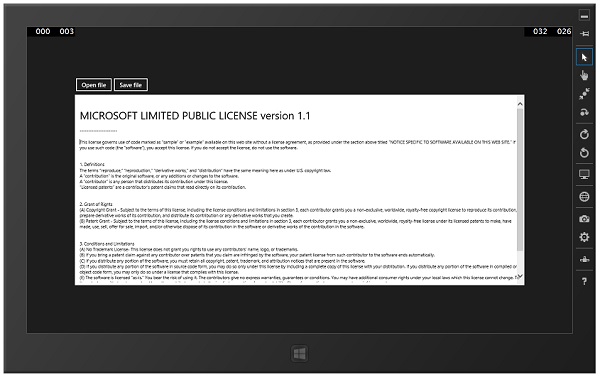
以下示例演示如何在 RichEditBox 中打开和保存 RTF 文件。以下是创建和初始化两个按钮和一个具有某些属性和事件的 RichEditBox 的 XAML 代码。
<Page x:Class = "XAMLRichEditBox.MainPage"
   xmlns = "http://schemas.microsoft.com/winfx/2006/xaml/presentation"
   xmlns:x = "http://schemas.microsoft.com/winfx/2006/xaml"
   xmlns:local = "using:XAMLRichEditBox"
   xmlns:d = "http://schemas.microsoft.com/expression/blend/2008"
   xmlns:mc = "http://schemas.openxmlformats.org/markup-compatibility/2006"
   mc:Ignorable = "d">

   <Grid Background = "{ThemeResource ApplicationPageBackgroundThemeBrush}">
      <Grid Margin = "120">
         <Grid.RowDefinitions>
            <RowDefinition Height="50"/>
            <RowDefinition/>
         </Grid.RowDefinitions>

         <StackPanel Orientation = "Horizontal">
            <Button Content = "Open file" Click = "OpenButton_Click"/>
            <Button Content = "Save file" Click = "SaveButton_Click"/>
         </StackPanel>

         <RichEditBox x:Name = "editor" Grid.Row = "1"/>
      </Grid>
   </Grid>

</Page>
以下是针对不同事件和文件处理的 C# 实现:
using System;
using System.Collections.Generic;
using System.IO; using System.Linq;
using System.Runtime.InteropServices.WindowsRuntime;

using Windows.Foundation;
using Windows.Foundation.Collections;

using Windows.Storage;
using Windows.Storage.Pickers;
using Windows.Storage.Provider;

using Windows.UI.ViewManagement;
using Windows.UI.Xaml;
using Windows.UI.Xaml.Controls;
using Windows.UI.Xaml.Controls.Primitives;
using Windows.UI.Xaml.Data;
using Windows.UI.Xaml.Input;
using Windows.UI.Xaml.Media;
using Windows.UI.Xaml.Navigation;

// The Blank Page item template is documented at
http://go.microsoft.com/fwlink/?LinkId=234238

namespace XAMLRichEditBox {
   /// <summary>
      /// An empty page that can be used on its own or navigated to within a Frame.
   /// </summary>

   public sealed partial class MainPage : Page {
      public MainPage() {
         this.InitializeComponent();
      }
      private async void OpenButton_Click(object sender, RoutedEventArgs e) {
         // Open a text file.
         Windows.Storage.Pickers.FileOpenPicker open = new
            Windows.Storage.Pickers.FileOpenPicker();
         open.SuggestedStartLocation =
            Windows.Storage.Pickers.PickerLocationId.DocumentsLibrary;
         open.FileTypeFilter.Add(".rtf");
         Windows.Storage.StorageFile file = await open.PickSingleFileAsync();

         if (file != null) {
            Windows.Storage.Streams.IRandomAccessStream randAccStream = await
               file.OpenAsync(Windows.Storage.FileAccessMode.Read);

            // Load the file into the Document property of the RichEditBox.
            editor.Document.LoadFromStream(Windows.UI.Text.TextSetOptions.FormatRtf, randAccStream);
         }
      }
      private async void SaveButton_Click(object sender, RoutedEventArgs e) {
         if (((ApplicationView.Value != ApplicationViewState.Snapped) ||
            ApplicationView.TryUnsnap())) {

            FileSavePicker savePicker = new FileSavePicker();
            savePicker.SuggestedStartLocation = PickerLocationId.DocumentsLibrary;

            // Dropdown of file types the user can save the file as
            savePicker.FileTypeChoices.Add("Rich Text", new List <string>() { ".rtf" });

            // Default file name if the user does not type one in or select a file to replace
            savePicker.SuggestedFileName = "New Document";

            StorageFile file = await savePicker.PickSaveFileAsync();

            if (file != null) {
               // Prevent updates to the remote version of the file until we
               //finish making changes and call
               CompleteUpdatesAsync. CachedFileManager.DeferUpdates(file);

               // write to file
               Windows.Storage.Streams.IRandomAccessStream randAccStream = await
                  file.OpenAsync(Windows.Storage.FileAccessMode.ReadWrite);

               editor.Document.SaveToStream(Windows.UI.Text.TextGetOptions.FormatRtf, randAccStream);

               // Let Windows know that we're finished changing the file so the
               // other app can update the remote version of the file.

               FileUpdateStatus status = await CachedFileManager.CompleteUpdatesAsync(file);

               if (status != FileUpdateStatus.Complete) {
                  Windows.UI.Popups.MessageDialog
                     errorBox = new Windows.UI.Popups.MessageDialog(
                     "File " + file.Name + " couldn't be saved.");

                  await errorBox.ShowAsync();
               }
            }
         }
      }
   }
}
编译并执行上述代码后,将产生以下输出。您可以使用此应用程序打开、编辑和保存任何 RTF 文件。
我们建议您执行上述示例代码并尝试其他一些属性和事件。