
- Electron 教程
- Electron - 首页
- Electron - 概述
- Electron - 安装
- Electron 如何工作?
- Electron - Hello World
- Electron - 构建 UI
- Electron - 文件处理
- Electron - 原生 Node 库
- 进程间通信 (IPC)
- Electron - 系统对话框
- Electron - 菜单
- Electron - 系统托盘
- Electron - 通知
- Electron - Webview
- Electron - 音频和视频捕获
- Electron - 定义快捷方式
- Electron - 环境变量
- Electron - 调试
- Electron - 打包应用
- Electron - 资源
- Electron 有用资源
- Electron - 快速指南
- Electron - 有用资源
- Electron - 讨论
Electron - 通知
Electron 仅为 MacOS 提供原生通知 API。因此,我们不会使用该 API,而是会使用一个名为 node-notifier 的 npm 模块。它允许我们在 Windows、MacOS 和 Linux 上向用户发送通知。
使用以下命令在应用文件夹中安装 node-notifier 模块 −
$ npm install --save node-notifier
现在让我们创建一个有按钮的应用,每当我们点击该按钮时,它就会生成一条通知。
创建一个新的 main.js 文件,并输入以下代码 −
const {app, BrowserWindow} = require('electron')
const url = require('url')
const path = require('path')

let win

function createWindow() {
   win = new BrowserWindow({width: 800, height: 600})
   win.loadURL(url.format ({
      pathname: path.join(__dirname, 'index.html'),
      protocol: 'file:',
      slashes: true
   }))
}

app.on('ready', createWindow)
现在让我们创建将触发通知的网页和脚本。使用以下代码创建一个新的 index.html 文件 −
<!DOCTYPE html>
<html>
   <head>
      <meta charset = "UTF-8">
      <title>Menus</title>
   </head>

   <body>
      <button type = "button" id = "notify" name = "button">
         Click here to trigger a notification!</button>
      <script type = "text/javascript">
         const notifier = require('node-notifier')
         const path = require('path');

         document.getElementById('notify').onclick = (event) => {
            notifier.notify ({
               title: 'My awesome title',
               message: 'Hello from electron, Mr. User!',
               icon: path.join('','/home/ayushgp/Desktop/images.png'),  // Absolute path
                  (doesn't work on balloons)
               sound: true,  // Only Notification Center or Windows Toasters
               wait: true    // Wait with callback, until user action is taken
               against notification

            }, function (err, response) {
               // Response is response from notification
            });

            notifier.on('click', function (notifierObject, options) {
               console.log("You clicked on the notification")
            });

            notifier.on('timeout', function (notifierObject, options) {
               console.log("Notification timed out!")
            });
         }
      </script>
   </body>
</html>
notify 方法允许我们传入一个 objectwith 信息,如标题、消息、缩略图等,这些信息有助于我们自定义通知。我们还可以为通知设置一些事件侦听器。
现在,使用以下命令运行该应用 −
$ electron ./main.js
当您点击我们创建的按钮时,您将看到一个来自您操作系统的原生通知,如下图所示 −
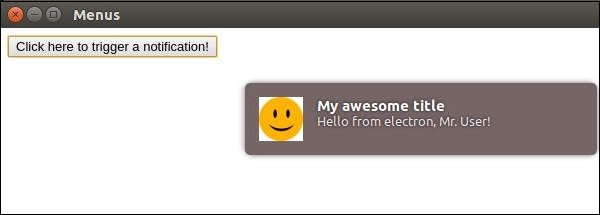
我们还处理了以下事件:用户点击通知或通知超时。如果应用在后台运行,这些方法有助于我们使应用更具交互性。
广告