
- Electron 教程
- Electron - 首页
- Electron - 概述
- Electron - 安装
- Electron 的工作原理?
- Electron - Hello World
- Electron - 构建UI
- Electron - 文件处理
- Electron - 原生 Node 库
- 进程间通信 (IPC)
- Electron - 系统对话框
- Electron - 菜单
- Electron - 系统托盘
- Electron - 通知
- Electron - webview
- Electron - 音频和视频捕捉
- Electron - 定义快捷键
- Electron - 环境变量
- Electron - 调试
- Electron - 打包应用
- Electron - 资源
- Electron 有用资源
- Electron - 快速指南
- Electron - 有用资源
- Electron - 讨论
Electron - webview
webview 标签用于在 Electron 应用中嵌入“访客”内容,例如网页。此内容包含在 webview 容器中。应用中嵌入的页面控制此内容的显示方式。
webview 在与你的应用不同的进程中运行。为确保安全,防止恶意内容,webview 不具备与你的网页相同的权限。这可以保护你的应用免受嵌入内容的攻击。你的应用与嵌入页面的所有交互都是异步的。
让我们来看一个例子,了解如何在 Electron 应用中嵌入外部网页。我们将在应用的右侧嵌入 tutorialspoint 网页。创建一个名为 main.js 的新文件,内容如下:
const {app, BrowserWindow} = require('electron')
const url = require('url')
const path = require('path')

let win

function createWindow() {
   win = new BrowserWindow({width: 800, height: 600})
   win.loadURL(url.format ({
      pathname: path.join(__dirname, 'index.html'),
      protocol: 'file:',
      slashes: true
   }))
}

app.on('ready', createWindow)
现在我们已经设置了主进程,让我们创建将嵌入 tutorialspoint 网页的 HTML 文件。创建一个名为 index.html 的文件,内容如下:
<!DOCTYPE html>
<html>
   <head>
      <meta charset = "UTF-8">
      <title>Menus</title>
   </head>

   <body>
      <div>
         <div>
            <h2>We have the website embedded below!</h2>
         </div>
         <webview id = "foo" src = "https://tutorialspoint.com/" style =
            "width:400px; height:480px;">
            <div class = "indicator"></div>
         </webview>
      </div>

      <script type = "text/javascript">
         // Event handlers for loading events.
         // Use these to handle loading screens, transitions, etc
         onload = () => {
            const webview = document.getElementById('foo')
            const indicator = document.querySelector('.indicator')

            const loadstart = () => {
               indicator.innerText = 'loading...'
            }

            const loadstop = () => {
               indicator.innerText = ''
            }

            webview.addEventListener('did-start-loading', loadstart)
            webview.addEventListener('did-stop-loading', loadstop)
         }
      </script>
   </body>
</html>
使用以下命令运行应用:
$ electron ./main.js
上述命令将生成以下输出:
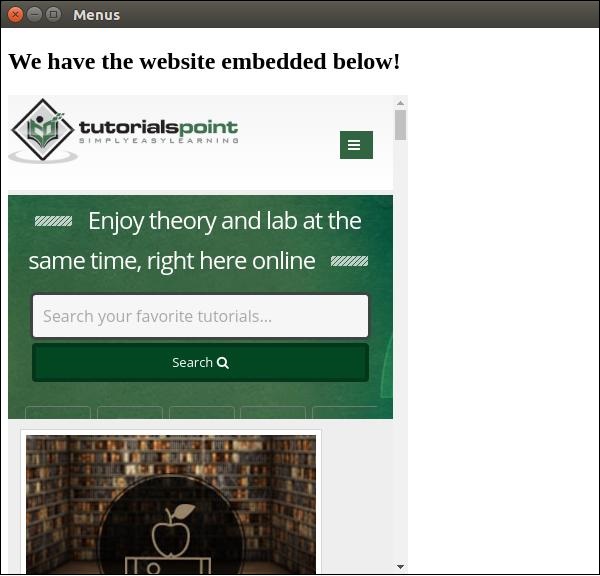
webview 标签也可以用于其他资源。webview 元素会发出一些事件,这些事件在官方文档中有列出。你可以使用这些事件来改进功能,具体取决于 webview 中发生的事情。
无论何时嵌入来自互联网的脚本或其他资源,都建议使用 webview。这是推荐的做法,因为它具有极大的安全优势,并且不会妨碍正常的行为。
广告