
 数据结构
数据结构 网络
网络 RDBMS
RDBMS 操作系统
操作系统 Java
Java MS Excel
 iOS
iOS HTML
HTML CSS
CSS 安卓
安卓 Python
 C 编程
C 编程 C++
C++ C#
C# MongoDB
 MySQL
MySQL JavaScript
 PHP
PHP 物理学
物理学 化学
化学 生物
生物 数学
数学 英语
英语 经济
经济 心理学
心理学 社会科学
社会科学 时装研究
时装研究 法律研究
法律研究HTML DOM console.warn() 方法
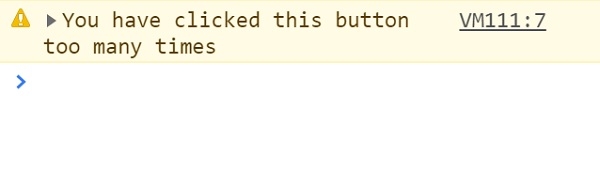
HTML DOM console.warn() 方法用于在控制台中显示警告消息。在某些浏览器中,这些警告在控制台日志中有一个小小的惊叹号。console.warn() 方法不会中断代码执行。开发人员可以使用 console.warn() 方法向用户发出有关某些用户操作的警告。
语法
以下是 console.warn() 方法的语法 −
console.warn(message)
此处,message 是必需参数,类型为字符串或对象。它将在控制台中显示为一个警告。
示例
我们来看一个 console.warn() 方法的示例 −
<!DOCTYPE html>
<html>
<body>
<h1>console.warn() Method</h1>
<p>Click the below button more than 4 times</p>
<button onclick="warning()" type="button">CLICK</button>
<script>
   var i=0;
   function warning(){
      i++;
      if(i>4)
      console.warn("You have clicked this button too many times");
   }
</script>
<p>Press F12 key to view the warning message in the console.</p>
</body>
</html>
输出
将生成以下输出 −
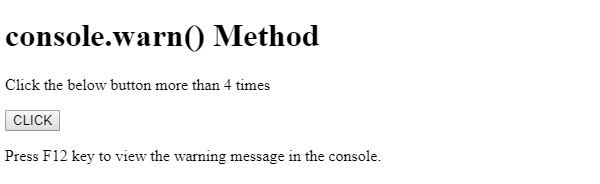
在连续点击 CLICK 按钮 4 次以上并查看控制台标签中的输出时。
在上例中 −
我们创建了一个按钮 CLICK ,用户点击后,该按钮将执行 warning() 方法。
<button onclick="warning()" type="button">CLICK</button>
warning() 方法会增加变量 i。如果变量 i 大于 4,则执行 console.warn(msg) 方法,该方法将 msg 参数显示为警告 −
var i=0;
function warning(){
   i++;
   if(i>4)
   console.warn("You have clicked this button too many times");
}

更新于: 08-Aug-2019
143 阅读次数

广告