
 数据结构
数据结构 网络
网络 RDBMS
RDBMS 操作系统
操作系统 Java
Java MS Excel
 iOS
iOS HTML
HTML CSS
CSS Android
 Python
 C 编程
C 编程 C++
C++ C#
C# MongoDB
 MySQL
MySQL Javascript
 PHP
PHP 物理
物理 化学
化学 生物
生物 数学
数学 英语
英语 经济学
经济学 心理学
心理学 社会学
社会学 时尚学
时尚学 法学
法学HTML DOM console.groupEnd() 方法
HTML DOM console.groupEnd() 方法用于指示消息组的结束。它退出控制台中的当前消息组。
语法
以下列示了 console.groupEnd() 方法的语法 −
console.groupEnd()
示例
让我们来看一下 HTML DOM console.groupEnd() 方法的示例 −
<!DOCTYPE html>
<html>
<body>
<h1>console.groupEnd() Method</h1>
<p>Press F12 key to view the message in the console view.</p>
<button type="button" onclick="groupMessage()">GROUP</button>
<button type="button" onclick="EndGroup()">END GROUP</button>
<script>
   function groupMessage(){
      console.group();
      console.log("This message will be inside a group!");
      console.log("This message will also be inside a group!");
   }
   function EndGroup(){
      console.groupEnd();
      console.log("We are now outside the group");
      console.log("This message will be outside the group!");
   }
</script>
</body>
</html>
输出
它会生成以下输出 −
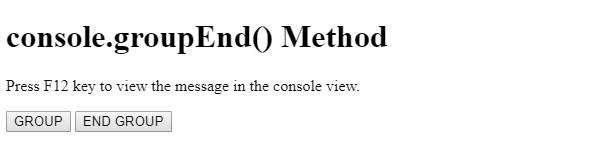
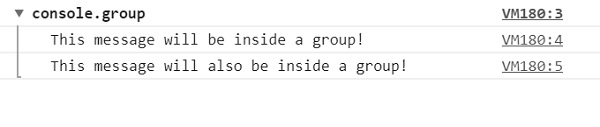
在点击 GROUP 按钮并在开发者选项中查看控制台视图时 −
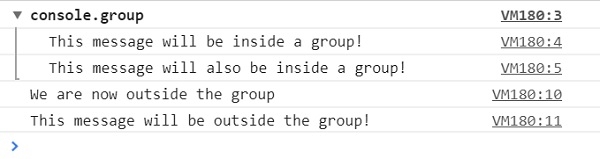
在点击 END GROUP 按钮并在开发者选项中查看控制台视图时 −
在上述示例中 −
我们创建了两个按钮 GROUP 和 END GROUP,在用户点击时它们将执行 groupMessage() 和 EndGroup() 方法 −
<button type="button" onclick="groupMessage()">GROUP</button>
<button type="button" onclick="EndGroup()">END GROUP</button>
groupMessage() 方法内部有 console.group() 方法,说明在该点之后写入的所有消息都将显示在消息组中 −
function groupMessage(){
   console.group();
   console.log("This message will be inside a group!");
   console.log("This message will also be inside a group!");
}
EndGroup() 方法内部有 console.groupEnd() 方法,说明在该点之后写入的所有消息都将显示在消息组外部。如果之前不存在消息组,则它不会引发错误 −
function EndGroup(){
   console.groupEnd();
   console.log("We are now outside the group");
   console.log("This message will be outside the group!");
}

更新于: 08-Aug-2019
61 次浏览

广告