
 数据结构
数据结构 网络
网络 关系数据库管理系统
 操作系统
操作系统 Java
Java MS Excel
 iOS
iOS HTML
HTML CSS
CSS Android
 Python
 C 编程
C 编程 C++
C++ C#
C# MongoDB
 MySQL
MySQL Javascript
 PHP
PHP 物理
物理 化学
化学 生物
生物 数学
数学 英语
英语 经济学
经济学 心理学
心理学 社会学
社会学 时尚研究
时尚研究 法律研究
法律研究HTML DOM insertAdjacentHTML() 方法
HTML DOM insertAdjacentHTML() 方法将文本字符串作为 HTML 插入到指定位置。
语法
以下是语法 −
使用 positionString 和 HTML 代码参数调用 insertAdjacentHTML()
node.insertAdjacentHTML(“positionString”, “htmlString”)
位置字符串
此处“positionString”可以是以下内容 −
| positionString | 说明 |
|---|---|
| afterbegin | 它在节点元素开头后插入 htmlString |
| afterend | 它在节点元素后插入 htmlString |
| beforebegin | 它在节点元素前插入 htmlString |
| beforeend | 它在节点元素结束前插入 htmlString |
html 字符串
并且“htmlString”可以是以下内容 −
| positionString | <span>new span</span> 或 <p>This is a new paragraph</p> 或任何其他有效的 html 代码 |
示例
让我们看一个 InsertAdjacentHTML() 方法的示例 −
<!DOCTYPE html>
<html>
<head>
<title>insertAdjacentHTML()</title>
<style>
   form {
      width:70%;
      margin: 0 auto;
      text-align: center;
   }
   * {
      padding: 2px;
      margin:5px;
   }
   input[type="button"] {
      border-radius: 10px;
   }
</style>
</head>
<body>
<form>
<fieldset>
<legend>insertAdjacentHTML( )</legend>
<h1>Family Tree</h1>
<span id="GrandFather">Grand Father --></span>
<span id="Father">Father --></span>
<span id="Myself">Myself</span>
<input type="button" onclick="rectifyTree()" value="Son is born">
</fieldset>
</form>
<script>
   function rectifyTree() {
      var MSpan = document.getElementById("Myself");
      MSpan.insertAdjacentHTML("afterend", "<span id='Son'>-->Son</span>");
   }
</script>
</body>
</html>
输出
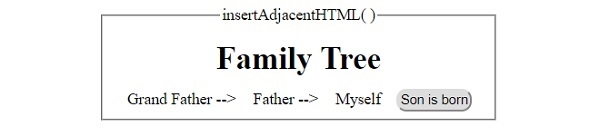
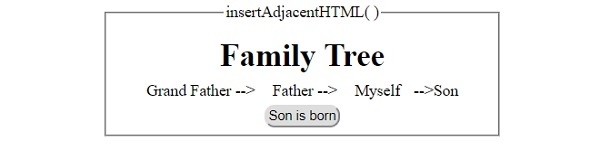
这将产生以下输出 −
在单击“Son is born”(儿子出生)按钮之前 −
在单击“Son is born”(儿子出生)按钮之后 −

更新日期:30-7-2019
227 次浏览

广告