
- JasmineJS 教程
- JasmineJS - 首页
- JasmineJS - 概述
- JasmineJS - 设置环境
- JasmineJS - 编写正文和执行
- JasmineJS - BDD 体系结构
- JasmineJS - 测试基本模块
- JasmineJS - 匹配器
- JasmineJS - 跳过块
- JasmineJS - 等值检查
- JasmineJS - 布尔值检查
- JasmineJS - 顺序检查
- JasmineJS - 空值检查
- JasmineJS - 不等值检查
- JasmineJS - 非数字检查
- JasmineJS - 异常检查
- JasmineJS - beforeEach()
- JasmineJS - afterEach()
- JasmineJS - 间谍
- JasmineJS 实用资源
- JasmineJS - 快速指南
- JasmineJS - 实用资源
- JasmineJS - 讨论
JasmineJS - 跳过块
Jasmine 还允许开发人员跳过一个或多个测试用例。这些技术既可以应用于规范级别,也可以应用于套件级别。根据应用的级别,这个块分别称为跳过规范和跳过套件。
在以下示例中,我们将学习如何使用“x”字符跳过特定的规范或套件。
跳过规范
我们将使用“x”在it语句前面修改之前的示例。
describe('This custom matcher example ', function() {

   beforeEach(function() {
      // We should add custom matched in beforeEach() function.

      jasmine.addMatchers({
         validateAge: function() {
            return {
               compare: function(actual,expected) {
                 var result = {};
                 result.pass = (actual > = 13 && actual < = 19);
                 result.message = 'sorry u are not a teen ';
                 return result;
               }
            };
         }
      });
   });

   it('Lets see whether u are teen or not', function() {
      var myAge = 14;
      expect(myAge).validateAge();
   });

   xit('Lets see whether u are teen or not ', function() {
      //Skipping this Spec
      var yourAge = 18;
   });
});
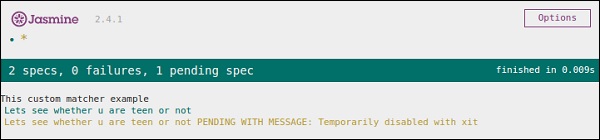
如果我们运行这段 JavaScript 代码,我们会在浏览器中收到以下输出结果。Jasmine 自身会通知用户,具体的it块已被用 “xit” 暂时禁用。
跳过套件
同样地,我们可以禁用 describe 块,以便实现跳过套件技术。在以下示例中,我们将学习跳过套件块的过程。
xdescribe('This custom matcher example ', function() {

   //Skipping the entire describe  block
   beforeEach(function() {

      // We should add custom matched in beforeEach() function.
      jasmine.addMatchers({
         validateAge: function() {
            return {
               compare: function(actual,expected) {
                 var result = {};
                 result.pass = (actual >=13 && actual<=19);
                 result.message ='sorry u are not a teen ';
                 return result;
               }
            };
         }
      });
   });

   it('Lets see whether u are teen or not', function() {
      var myAge = 14;
      expect(myAge).validateAge();
   });

   it('Lets see whether u are teen or not ', function() {
      var yourAge = 18;
      expect(yourAge).validateAge();
   });
});
以上代码会生成以下屏幕截图作为输出。
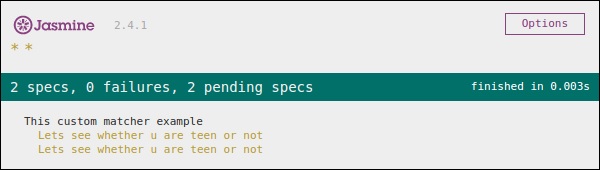
正如我们在消息栏中看到的那样,它显示了两个处于待定状态的规范块,这意味着这两个规范块使用“x”字符被禁用。在下一章中,我们将讨论不同类型的 Jasmine 测试场景。
广告