
- Microsoft Dynamics CRM 教程
- Microsoft CRM - 首页
- Microsoft CRM - 概述
- Microsoft CRM - 环境
- Microsoft CRM - 功能模块
- Microsoft CRM - 实体与记录
- Microsoft CRM - 字段
- Microsoft CRM - 表单
- Microsoft CRM - 搜索
- Microsoft CRM - Web 资源
- JScript Web 资源
- HTML Web 资源
- Microsoft CRM - 工作流流程
- Microsoft CRM - 插件
- Microsoft CRM - 插件注册
- Microsoft CRM - Web 服务
- Microsoft CRM - 解决方案
- Microsoft CRM 有用资源
- Microsoft CRM - 快速指南
- Microsoft CRM - 有用资源
- Microsoft CRM - 讨论
Microsoft Dynamics CRM - Web 服务
Microsoft Dynamics CRM 提供两种重要的 Web 服务,用于从外部应用程序访问 CRM 并调用 Web 方法以执行常见的业务数据操作,例如在 CRM 中创建、删除、更新和查找。
考虑以下场景:
您有一个外部 .NET 应用程序,需要与 CRM 通信。例如,当您的外部应用程序注册新客户时,您可能希望在 CRM 中插入一个联系人记录。
或者,您可能希望在 CRM 中搜索记录并在您的外部应用程序中显示搜索结果。
在这种情况下,您可以使用 CRM 公开的 Web 服务在您的应用程序中使用它们,并在 CRM 中执行创建、删除、更新和查找操作。
IDiscoveryService Web 服务
此 Web 服务返回指定用户所属的组织列表以及每个组织的 URL 端点。
IOrganizationService Web 服务
此 Web 服务是用于访问 CRM 中的数据和元数据的主要 Web 服务。IOrganizationService 使用两个重要的程序集 – **Microsoft.Xrm.Sdk.dll** 和 **Microsoft.Crm.Sdk.Proxy.dll**。这些程序集可以在 **Bin** 文件夹内的 CRM SDK 包中找到。
Microsoft.Xrm.Sdk.dll
此程序集定义了核心 xRM 方法和类型,包括用于简化与 Microsoft Dynamics CRM 连接的代理类、身份验证方法和服务契约。
Microsoft.Crm.Sdk.Proxy.dll
此程序集定义了非核心消息的请求和响应,以及与组织数据一起使用所需的枚举。以下是这两个程序集支持的命名空间。
每个程序集都支持某些消息,这些消息将用于处理存储在任何实体中的数据。可以在以下链接中找到它们支持的消息的完整列表:
**支持的 xRM 消息** - https://msdn.microsoft.com/en-us/library/gg334698.aspx
**支持的 CRM 消息** - https://msdn.microsoft.com/en-us/library/gg309482.aspx
IOrganizationService Web 服务方法
**IOrganizationService** 提供八种方法,允许您对系统和自定义实体以及组织元数据执行所有常见操作。
| 序号 | 方法和描述 |
|---|---|
| 1 | IOrganizationService.Create 创建记录。 |
| 2 | IOrganizationService.Update 更新现有记录。 |
| 3 | IOrganizationService.Retrieve 检索记录。 |
| 4 | IOrganizationService.RetrieveMultiple 检索记录集合。 |
| 5 | IOrganizationService.Delete 删除记录。 |
| 6 | IOrganizationService.Associate 创建记录之间的链接。 |
| 7 | IOrganizationService.Disassociate 删除记录之间的链接。 |
| 8 | IOrganizationService.Execute 用于常见的记录处理以及专门的处理,例如案例解决、重复检测等。 |
Web 服务示例
为了了解 Web 服务在 CRM 中的工作方式,我们将研究 CRM SDK 提供的一个示例。在此示例中,我们将使用 CRM **IOrganizationService** Web 服务创建一个新的帐户记录、更新它,然后最终删除它。
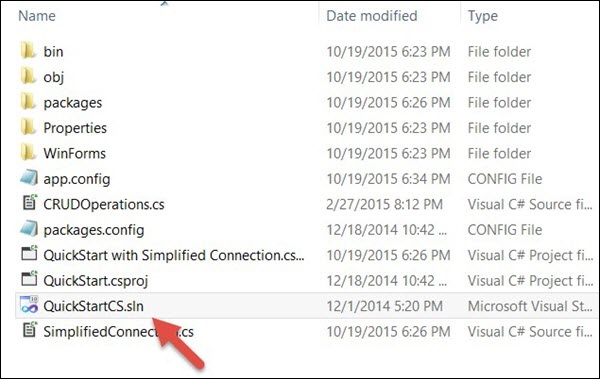
**步骤 1** - 打开您解压 CRM SDK 的文件夹。现在通过浏览到以下位置打开 QuickStartCS.sln 解决方案:SDK\SampleCode\CS\QuickStart
**步骤 2** - 我们将探索使用 **简化连接** 项目的 **QuickStart**。打开此项目中的 **app.config**。默认情况下,此文件中的 **connectionStrings** 部分将被注释。
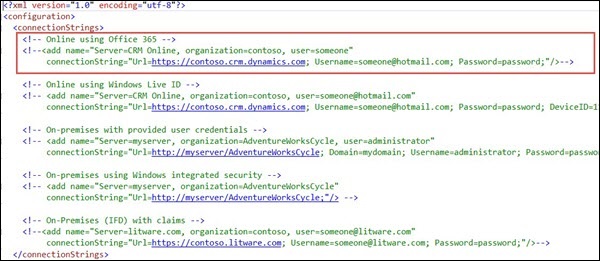
从中取消第一个连接字符串键的注释并编辑以下三个细节:
**Url** - 指定您的 CRM 实例的 URL。在我们的例子中,由于我们使用的是 CRM 的在线版本,您必须提及该 URL。
**用户名** - 您的 CRM Online 用户名。
**密码** - 您的 CRM Online 密码。

**步骤 3** - 打开此项目中的 **SimplifiedConnection.cs** 文件及其内部的 Run 方法。
public void Run(StringconnectionString, boolpromptforDelete) {
   try {

      // Establish a connection to the organization web service using CrmConnection.
      Microsoft.Xrm.Client.CrmConnection connection =
         CrmConnection.Parse(connectionString);

      // Obtain an organization service proxy.
      // The using statement assures that the service proxy will be properly disposed.
      using(_orgService = new OrganizationService(connection)) {

         //Create any entity records this sample requires.
         CreateRequiredRecords();

         // Obtain information about the logged on user from the web service.
         Guid userid = ((WhoAmIResponse)_orgService.Execute(new WhoAmIRequest())).UserId;
         SystemUser systemUser = (SystemUser)_orgService.Retrieve("systemuser",userid,
            new ColumnSet(newstring[]{"firstname","lastname"}));

         Console.WriteLine("Logged on user is {0} {1}.",
            systemUser.FirstName,systemUser.LastName);

         // Retrieve the version of Microsoft Dynamics CRM.
         RetrieveVersionRequest versionRequest = new RetrieveVersionRequest();
         RetrieveVersionResponse versionResponse =
            (RetrieveVersionResponse)_orgService.Execute(versionRequest);
         Console.WriteLine("Microsoft Dynamics CRM version {0}.",
            versionResponse.Version);

         // Instantiate an account object. Note the use of option set
         enumerations defined in OptionSets.cs.

         // Refer to the Entity Metadata topic in the SDK documentation to
         determine which attributes must

         // be set for each entity.
         Account account = new Account{Name = "Fourth Coffee"};
         account.AccountCategoryCode = new OptionSetValue(
            (int)AccountAccountCateg oryCode.PreferredCustomer);
         account.CustomerTypeCode = new OptionSetValue(
            (int)AccountCustomerTypeCod e.Investor);

         // Create an account record named Fourth Coffee.
         _accountId = _orgService.Create(account);
         Console.Write("{0} {1} created, ",account.LogicalName,account.Name);

         // Retrieve the several attributes from the new account.
         ColumnSet cols = new ColumnSet(
            new String[]{"name","address1_postalcode","lastusedincampaign"});
         Account retrievedAccount =
            (Account)_orgService.Retrieve("account", _accountId, cols);
         Console.Write("retrieved, ");

         // Update the postal code attribute.
         retrievedAccount.Address1_PostalCode = "98052";

         // The address 2 postal code was set accidentally, so set it to null.
         retrievedAccount.Address2_PostalCode = null;

         // Shows use of a Money value.
         retrievedAccount.Revenue = new Money(5000000);

         // Shows use of a Boolean value.
         retrievedAccount.CreditOnHold = false;

         // Update the account record.
         _orgService.Update(retrievedAccount);
         Console.WriteLine("and updated.");

         // Delete any entity records this sample created.
         DeleteRequiredRecords(promptforDelete);
      }
   }
   // Catch any service fault exceptions that Microsoft Dynamics CRM throws.
   catch(FaultException<microsoft.xrm.sdk.organizationservicefault>) {

      // You can handle an exception here or pass it back to the calling method.
      throw;
   }
}
**步骤 4** - 此方法基本上演示了使用 CRM Web 服务的所有 CRUD 操作。代码首先创建一个组织实例,然后创建一个帐户记录,更新创建的记录,然后最终删除它。让我们看一下这段代码的重要组成部分。要在此代码运行时查看 CRM 中的即时更改,您可以逐步调试此代码(如下所述),并同时查看 CRM 中的更改。
**步骤 4.1** - 使用我们在 **步骤 2** 中修改的连接字符串建立与组织的连接。
Microsoft.Xrm.Client.CrmConnection connection = CrmConnection.Parse(connectionString);
**步骤 4.2** - 获取 CRM 组织 Web 服务的代理实例。
_orgService = new OrganizationService(connection)
**步骤 4.3** - 创建一个新的帐户实体对象并设置其名称、AccountCategoryCode 和 CustomerTypeCode。
Account account = new Account{Name = "Fifth Coffee"};
account.AccountCategoryCode = new OptionSetValue(
   (int)AccountAccountCategoryCode.P referredCustomer);
account.CustomerTypeCode = new OptionSetValue(
   (int)AccountCustomerTypeCode.Investor);
**步骤 4.4** - 使用组织服务的 Create 方法创建新记录。
_accountId = _orgService.Create(account);
如果您导航到 CRM,您将看到一个新创建的帐户记录。

**步骤 4.5** - 创建帐户后,服务将使用 Retrieve Web 服务方法从 CRM 检索回记录。
ColumnSet cols = new ColumnSet(new String[]{
   "name","address1_postalcode","lastusedincampaign"});
Account retrievedAccount =
   (Account)_orgService.Retrieve("account", _accountId, cols);
**步骤 4.6** - 获取检索到的记录后,您可以设置记录的更新值。
retrievedAccount.Address1_PostalCode = "98052";
retrievedAccount.Address2_PostalCode = null;
retrievedAccount.Revenue = new Money(5000000);
retrievedAccount.CreditOnHold = false;
**步骤 4.7** - 设置记录的更新值后,使用 Update Web 服务方法将记录更新回 CRM 数据库。
_orgService.Update(retrievedAccount);
如果您在 CRM 中打开该记录,您将看到这些值已在那里更新。
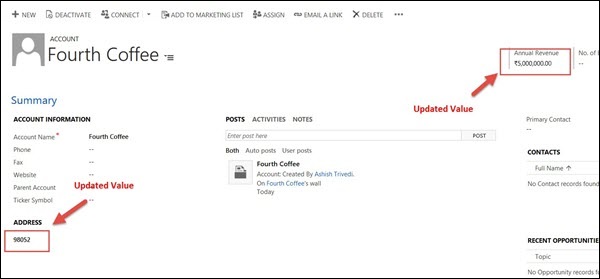
**步骤 4.8** - 最后,使用 Delete Web 服务方法删除记录。
_orgService.Delete(Account.EntityLogicalName, _accountId);
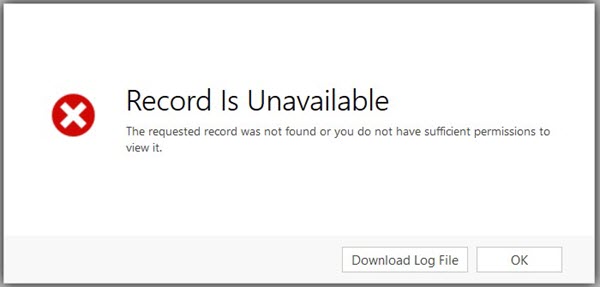
如果您现在刷新 CRM 中的同一记录,您将看到该记录不再可用,因为它已被删除。
结论
在本章中,我们处理了 CRM 提供的两个重要的 Web 服务,以及如何从外部应用程序使用这些 Web 服务执行各种 CRUD 操作的工作示例。