
- ReactJS 教程
- ReactJS - 首页
- ReactJS - 简介
- ReactJS - 路线图
- ReactJS - 安装
- ReactJS - 特性
- ReactJS - 优点与缺点
- ReactJS - 架构
- ReactJS - 创建 React 应用
- ReactJS - JSX
- ReactJS - 组件
- ReactJS - 嵌套组件
- ReactJS - 使用新创建的组件
- ReactJS - 组件集合
- ReactJS - 样式
- ReactJS - 属性 (props)
- ReactJS - 使用属性创建组件
- ReactJS - props 验证
- ReactJS - 构造函数
- ReactJS - 组件生命周期
- ReactJS - 事件管理
- ReactJS - 创建一个事件感知组件
- ReactJS - 在 Expense Manager 应用中引入事件
- ReactJS - 状态管理
- ReactJS - 状态管理 API
- ReactJS - 无状态组件
- ReactJS - 使用 React Hooks 进行状态管理
- ReactJS - 使用 React Hooks 进行组件生命周期管理
- ReactJS - 布局组件
- ReactJS - 分页
- ReactJS - Material UI
- ReactJS - Http 客户端编程
- ReactJS - 表单编程
- ReactJS - 受控组件
- ReactJS - 非受控组件
- ReactJS - Formik
- ReactJS - 条件渲染
- ReactJS - 列表
- ReactJS - Keys
- ReactJS - 路由
- ReactJS - Redux
- ReactJS - 动画
- ReactJS - Bootstrap
- ReactJS - 地图
- ReactJS - 表格
- ReactJS - 使用 Flux 管理状态
- ReactJS - 测试
- ReactJS - CLI 命令
- ReactJS - 构建和部署
- ReactJS - 示例
- Hooks
- ReactJS - Hooks 简介
- ReactJS - 使用 useState
- ReactJS - 使用 useEffect
- ReactJS - 使用 useContext
- ReactJS - 使用 useRef
- ReactJS - 使用 useReducer
- ReactJS - 使用 useCallback
- ReactJS - 使用 useMemo
- ReactJS - 自定义 Hooks
- ReactJS 高级
- ReactJS - 可访问性
- ReactJS - 代码分割
- ReactJS - 上下文
- ReactJS - 错误边界
- ReactJS - 转发 Refs
- ReactJS - 碎片
- ReactJS - 高阶组件
- ReactJS - 集成其他库
- ReactJS - 优化性能
- ReactJS - Profiler API
- ReactJS - 端口
- ReactJS - 无 ES6 ECMAScript 的 React
- ReactJS - 无 JSX 的 React
- ReactJS - 调和
- ReactJS - Refs 和 DOM
- ReactJS - 渲染 Props
- ReactJS - 静态类型检查
- ReactJS - 严格模式
- ReactJS - Web Components
- 其他概念
- ReactJS - 日期选择器
- ReactJS - Helmet
- ReactJS - 内联样式
- ReactJS - PropTypes
- ReactJS - BrowserRouter
- ReactJS - DOM
- ReactJS - 走马灯
- ReactJS - 图标
- ReactJS - 表单组件
- ReactJS - 参考 API
- ReactJS 有用资源
- ReactJS - 快速指南
- ReactJS - 有用资源
- ReactJS - 讨论
ReactJS - 属性 (props)
React 允许开发者使用属性创建动态和高级组件。每个组件都可以拥有类似于 HTML 属性的属性,并且每个属性的值都可以使用属性 (props) 在组件内部访问。
例如,具有名称属性的 Hello 组件可以通过 this.props.name 变量在组件内部访问。
<Hello name="React" />
// value of name will be "Hello* const name = this.props.name
React 属性支持不同类型的属性值。它们如下所示:
- 字符串
- 数字
- 日期时间
- 数组
- 列表
- 对象
使用 Props
当我们需要在组件中使用不可变数据时,我们只需将 props 添加到 reactDOM.render() 函数(在 main.js 中)并将其在组件内部使用即可。
App.jsx
import React from 'react';

class App extends React.Component {
   render() {
      return (
         <div>
            <h1>{this.props.headerProp}</h1>
            <h2>{this.props.contentProp}</h2>
         </div>
      );
   }
}
export default App;
main.js
import React from 'react';
import ReactDOM from 'react-dom';
import App from './App.jsx';

ReactDOM.render(<App headerProp = "Header from props..." contentProp = "Content
   from props..."/>, document.getElementById('app'));

export default App;
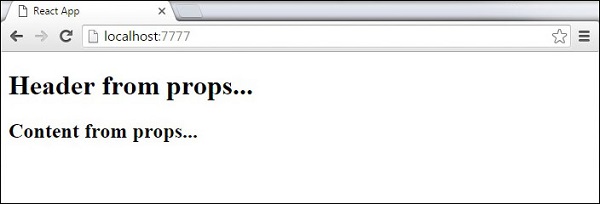
这将产生以下结果。
默认 Props
您还可以直接在组件构造函数上设置默认属性值,而不是将其添加到 reactDom.render() 元素中。
App.jsx
import React from 'react';

class App extends React.Component {
   render() {
      return (
         <div>
            <h1>{this.props.headerProp}</h1>
            <h2>{this.props.contentProp}</h2>
         </div>
      );
   }
}
App.defaultProps = {
   headerProp: "Header from props...",
   contentProp:"Content from props..."
}
export default App;
main.js
import React from 'react';
import ReactDOM from 'react-dom';
import App from './App.jsx';

ReactDOM.render(<App/>, document.getElementById('app'));
输出与之前相同。
状态与 Props
以下示例展示了如何在应用中组合 状态和 props。我们在父组件中设置状态,并使用 props 将其向下传递到组件树中。在 render 函数内部,我们设置了子组件中使用的 headerProp 和 contentProp。
App.jsx
import React from 'react';

class App extends React.Component {
   constructor(props) {
      super(props);
      this.state = {
         header: "Header from props...",
         content: "Content from props..."
      }
   }
   render() {
      return (
         <div>
            <Header headerProp = {this.state.header}/>
            <Content contentProp = {this.state.content}/>
         </div>
      );
   }
}
class Header extends React.Component {
   render() {
      return (
         <div>
            <h1>{this.props.headerProp}</h1>
         </div>
      );
   }
}
class Content extends React.Component {
   render() {
      return (
         <div>
            <h2>{this.props.contentProp}</h2>
         </div>
      );
   }
}
export default App;
main.js
import React from 'react';
import ReactDOM from 'react-dom';
import App from './App.jsx';

ReactDOM.render(<App/>, document.getElementById('app'));
结果将再次与前两个示例相同,唯一不同的是我们数据源,现在它最初来自 状态。当我们想要更新它时,我们只需要更新状态,所有子组件都将更新。有关这方面的更多信息,请参阅事件章节。
让我们在本节中逐一学习以下概念。
广告