
- WPF 教程
- WPF - 首页
- WPF - 概述
- WPF - 环境设置
- WPF - Hello World
- WPF - XAML 概述
- WPF - 元素树
- WPF - 依赖属性
- WPF - 路由事件
- WPF - 控件
- WPF - 布局
- WPF - 布局嵌套
- WPF - 输入
- WPF - 命令行
- WPF - 数据绑定
- WPF - 资源
- WPF - 模板
- WPF - 样式
- WPF - 触发器
- WPF - 调试
- WPF - 自定义控件
- WPF - 异常处理
- WPF - 本地化
- WPF - 交互
- WPF - 2D 图形
- WPF - 3D 图形
- WPF - 多媒体
- WPF 有用资源
- WPF - 快速指南
- WPF - 有用资源
- WPF - 讨论
WPF - 文本块
TextBlock 是一种轻量级控件,用于显示少量只读文本。TextBlock 类的层次继承如下:

TextBlock 类常用属性
| 序号 | 属性和描述 |
|---|---|
| 1 | ContentEnd 获取 TextBlock 中文本内容末尾的 TextPointer 对象。 |
| 2 | ContentStart 获取 TextBlock 中文本内容开头的 TextPointer 对象。 |
| 3 | IsTextSelectionEnabled 获取或设置一个值,该值指示是否在 TextBlock 中启用文本选择,可以通过用户操作或调用与选择相关的 API 来启用。 |
| 4 | IsTextSelectionEnabledProperty 标识 IsTextSelectionEnabled 依赖属性。 |
| 5 | LineHeight 获取或设置每行内容的高度。 |
| 6 | MaxLines 获取或设置在 TextBlock 中显示的最大文本行数。 |
| 7 | SelectedText 获取选定文本的文本范围。 |
| 8 | SelectionEnd 获取 TextBlock 中选定文本的结束位置。 |
| 9 | SelectionHighlightColor 获取或设置用于突出显示选定文本的画笔。 |
| 10 | SelectionStart 获取 TextBlock 中选定文本的起始位置。 |
| 11 | Text 获取或设置 TextBlock 的文本内容。 |
| 12 | TextAlignment 获取或设置一个值,该值指示文本内容的水平对齐方式。 |
| 13 | TextTrimming 获取或设置当内容超出内容区域时要使用的文本修剪行为。 |
| 14 | TextWrapping 获取或设置 TextBlock 如何换行文本。 |
TextBlock 类常用事件
| 序号 | 事件和描述 |
|---|---|
| 1 | ContextMenuOpening 当系统处理显示上下文菜单的交互时发生。 |
| 2 | SelectionChanged 当文本选择发生更改时发生。 |
TextBlock 类常用方法
| 序号 | 方法和描述 |
|---|---|
| 1 | Focus 使 TextBlock 获得焦点,就像它是一个常规的可获得焦点的控件一样。 |
| 2 | Select 选择 TextBlock 中的一段文本。 |
| 3 | SelectAll 选择 TextBlock 中的全部内容。 |
示例
- 让我们创建一个带有 WPFTextBlockControl 的新 WPF 项目。
- 从工具箱中拖动一个文本块。
- 从属性窗口更改文本块的背景颜色。
- 以下示例显示了在 XAML 应用程序中使用 TextBlock 的方法。
- 以下是创建具有某些属性的 TextBlock 的 XAML 代码。
<Window x:Class = "WPFTextBlockControl.MainWindow"
   xmlns = "http://schemas.microsoft.com/winfx/2006/xaml/presentation"
   xmlns:x = "http://schemas.microsoft.com/winfx/2006/xaml"
   xmlns:d = "http://schemas.microsoft.com/expression/blend/2008"
   xmlns:mc = "http://schemas.openxmlformats.org/markup-compatibility/2006"
   xmlns:local = "clr-namespace:WPFTextBlockControl"
   mc:Ignorable = "d" Title = "MainWindow" Height = "350" Width = "604">

   <Grid>
      <TextBlock FontFamily = "Verdana"
         LineStackingStrategy = "MaxHeight" LineHeight = "10" Width = "500"
         TextWrapping = "Wrap" Background = "#FFE2B1B1" Margin = "48,8,48,10">

         Use the <Run FontSize = "30">LineStackingStrategy</Run> property to determine how
            a line box is created for each line. A value of <Run FontSize = "20">MaxHeight</Run>
            specifies that the stack height is the smallest value that contains all the inline
            elements on that line when those elements are properly aligned. A value of <Run
            FontSize = "20"> BlockLineHeight</Run> specifies that the stack height is
            determined by the block element LineHeight property value.
      </TextBlock>
   </Grid>

</Window>
编译并执行以上代码后,将产生以下输出:
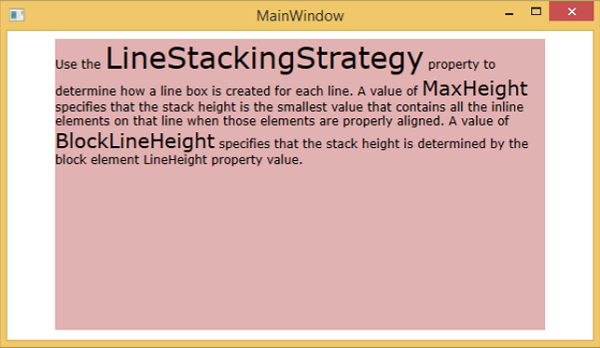
我们建议您执行以上示例代码,并尝试 TextBlock 类的其他属性和事件。