- GWT 教程
- GWT - 首页
- GWT - 概述
- GWT - 环境搭建
- GWT - 应用
- GWT - 创建应用
- GWT - 部署应用
- GWT - 使用 CSS 样式
- GWT - 基本部件
- GWT - 表单部件
- GWT - 复杂部件
- GWT - 布局面板
- GWT - 事件处理
- GWT - 自定义部件
- GWT - UIBinder
- GWT - RPC 通信
- GWT - JUnit 集成
- GWT - 调试应用
- GWT - 国际化
- GWT - History 类
- GWT - 书签支持
- GWT - 日志框架
- GWT 有用资源
- GWT - 问答
- GWT - 快速指南
- GWT - 有用资源
- GWT - 讨论
GWT - 国际化
GWT 提供三种国际化 GWT 应用的方法,我们将演示静态字符串国际化,这是项目中最常用的方法。
| 序号 | 技术与描述 |
|---|---|
| 1 |
静态字符串国际化 此技术最为普遍,运行时开销极小;对于翻译常量字符串和参数化字符串都非常高效;实现最简单。 静态字符串国际化使用标准 Java 属性文件来存储翻译后的字符串和参数化消息,并创建强类型 Java 接口来检索其值。 |
| 2 |
动态字符串国际化 此技术非常灵活,但比静态字符串国际化慢。宿主页面包含本地化字符串,因此当我们添加新的语言环境时,不需要重新编译应用程序。如果 GWT 应用程序要与现有的服务器端本地化系统集成,则应使用此技术。 |
| 3 |
可本地化接口 此技术是三种技术中最强大的。实现 Localizable 允许我们创建自定义类型的本地化版本。这是一种高级国际化技术。 |
GWT 应用国际化的工作流程
步骤 1 - 创建属性文件
创建包含应用程序中要使用的消息的属性文件。在我们的示例中,我们创建了一个 **HelloWorldMessages.properties** 文件。
enterName = Enter your name
clickMe = Click Me
applicationTitle = Application Internationalization Demonstration
greeting = Hello {0}
创建包含特定于语言环境的翻译值的属性文件。在我们的示例中,我们创建了一个 **HelloWorldMessages_de.properties** 文件。此文件包含德语翻译。_de 指定德语语言环境,我们将在应用程序中支持德语。
如果使用 Eclipse 创建属性文件,则将文件的编码更改为 UTF-8。选择文件,然后右键单击以打开其属性窗口。选择文本文件编码为 **其他 UTF-8**。应用并保存更改。
enterName = Geben Sie Ihren Namen
clickMe = Klick mich
applicationTitle = Anwendung Internationalisierung Demonstration
greeting = Hallo {0}
步骤 2 - 将 i18n 模块添加到模块描述符 XML 文件
更新模块文件 **HelloWorld.gwt.xml** 以包含对德语语言环境的支持
<?xml version = "1.0" encoding = "UTF-8"?>
<module rename-to = 'helloworld'>
   ...
   <extend-property name = "locale" values="de" />
   ...
</module>
步骤 3 - 创建与属性文件等效的接口
通过扩展 GWT 的 Messages 接口来创建 HelloWorldMessages.java 接口,以包含对国际化的支持。它应该包含与属性文件中的键相同的函数名。占位符将被字符串参数替换。
public interface HelloWorldMessages extends Messages {

   @DefaultMessage("Enter your name")
   String enterName();

   @DefaultMessage("Click Me")
   String clickMe();

   @DefaultMessage("Application Internalization Demonstration")
   String applicationTitle();

   @DefaultMessage("Hello {0}")
   String greeting(String name);
}
步骤 4 - 在 UI 组件中使用消息接口。
在 **HelloWorld** 中使用 **HelloWorldMessages** 对象获取消息。
public class HelloWorld implements EntryPoint {

   /* create an object of HelloWorldMessages interface
      using GWT.create() method */
   private HelloWorldMessages messages =
   GWT.create(HelloWorldMessages.class);

   public void onModuleLoad() {
   ...
      Label titleLabel = new Label(messages.applicationTitle());
      //Add title to the application
      RootPanel.get("gwtAppTitle").add(titleLabel);
   ...
   }
}
国际化 -完整示例
此示例将引导您完成简单的步骤,以演示 GWT 应用程序的国际化功能。
按照以下步骤更新我们在《GWT - 创建应用》章节中创建的 GWT 应用程序:
| 步骤 | 描述 |
|---|---|
| 1 | 创建一个名为 *HelloWorld* 的项目,放在 *com.tutorialspoint* 包下,如《GWT - 创建应用》章节中所述。 |
| 2 | 修改 *HelloWorld.gwt.xml*、*HelloWorld.css*、*HelloWorld.html* 和 *HelloWorld.java*,如下所述。保持其余文件不变。 |
| 3 | 编译并运行应用程序以验证已实现逻辑的结果。 |
以下是修改后的模块描述符 **src/com.tutorialspoint/HelloWorld.gwt.xml** 的内容。
<?xml version = "1.0" encoding = "UTF-8"?>
<module rename-to = 'helloworld'>
  <!-- Inherit the core Web Toolkit stuff.                        -->
  <inherits name = 'com.google.gwt.user.User'/>

  <!-- Inherit the default GWT style sheet.                       -->
  <inherits name = 'com.google.gwt.user.theme.clean.Clean'/>

  <!-- Specify the app entry point class.                         -->
  <entry-point class = 'com.tutorialspoint.client.HelloWorld'/>
  <extend-property name = "locale" values="de" />
  <!-- Specify the paths for translatable code                    -->
  <source path = 'client'/>
  <source path = 'shared'/>

</module>
以下是修改后的样式表文件 **war/HelloWorld.css** 的内容。
body {
   text-align: center;
   font-family: verdana, sans-serif;
}

h1 {
   font-size: 2em;
   font-weight: bold;
   color: #777777;
   margin: 40px 0px 70px;
   text-align: center;
}
以下是修改后的 HTML 宿主文件 **war/HelloWorld.html** 的内容。
<html>
   <head>
      <title>Hello World</title>
      <link rel = "stylesheet" href = "HelloWorld.css"/>
      <script language = "javascript" src = "helloworld/helloworld.nocache.js">
      </script>
   </head>
   <body>

      <h1 id = "gwtAppTitle"></h1>
      <div id = "gwtContainer"></div>

   </body>
</html>
现在在 **src/com.tutorialspoint/client** 包中创建 HelloWorldMessages.properties 文件,并将以下内容放入其中
enterName = Enter your name
clickMe = Click Me
applicationTitle = Application Internationalization Demonstration
greeting = Hello {0}
现在在 **src/com.tutorialspoint/client** 包中创建 HelloWorldMessages_de.properties 文件,并将以下内容放入其中
enterName = Geben Sie Ihren Namen
clickMe = Klick mich
applicationTitle = Anwendung Internationalisierung Demonstration
greeting = Hallo {0}
现在在 **src/com.tutorialspoint/client** 包中创建 HelloWorldMessages.java 类,并将以下内容放入其中
package com.tutorialspoint.client;
import com.google.gwt.i18n.client.Messages;

public interface HelloWorldMessages extends Messages {
   @DefaultMessage("Enter your name")
   String enterName();

   @DefaultMessage("Click Me")
   String clickMe();

   @DefaultMessage("Application Internationalization Demonstration")
   String applicationTitle();

   @DefaultMessage("Hello {0}")
   String greeting(String name);
}
让我们使用以下 **src/com.tutorialspoint/HelloWorld.java** Java 文件的内容,我们将用它来演示 GWT 代码的国际化功能。
package com.tutorialspoint.client;

import com.google.gwt.core.client.EntryPoint;
import com.google.gwt.core.client.GWT;

import com.google.gwt.event.dom.client.ClickEvent;
import com.google.gwt.event.dom.client.ClickHandler;
import com.google.gwt.event.dom.client.KeyCodes;
import com.google.gwt.event.dom.client.KeyUpEvent;
import com.google.gwt.event.dom.client.KeyUpHandler;

import com.google.gwt.user.client.Window;
import com.google.gwt.user.client.ui.Button;
import com.google.gwt.user.client.ui.DecoratorPanel;
import com.google.gwt.user.client.ui.HasHorizontalAlignment;
import com.google.gwt.user.client.ui.HorizontalPanel;
import com.google.gwt.user.client.ui.Label;
import com.google.gwt.user.client.ui.RootPanel;
import com.google.gwt.user.client.ui.TextBox;
import com.google.gwt.user.client.ui.VerticalPanel;

public class HelloWorld implements EntryPoint {

   /* create an object of HelloWorldMessages interface
      using GWT.create() method */
   private HelloWorldMessages messages =
   GWT.create(HelloWorldMessages.class);

   public void onModuleLoad() {
      /*create UI */
      final TextBox txtName = new TextBox();
      txtName.setWidth("200");
      txtName.addKeyUpHandler(new KeyUpHandler() {
         @Override
         public void onKeyUp(KeyUpEvent event) {
            if(event.getNativeKeyCode() == KeyCodes.KEY_ENTER){
               Window.alert(getGreeting(txtName.getValue()));
            }
         }
      });
      Label lblName = new Label(messages.enterName() + ": ");

      Button buttonMessage = new Button(messages.clickMe() + "!");

      buttonMessage.addClickHandler(new ClickHandler() {
         @Override
         public void onClick(ClickEvent event) {
            Window.alert(getGreeting(txtName.getValue()));
         }
      });

      HorizontalPanel hPanel = new HorizontalPanel();
      hPanel.add(lblName);
      hPanel.add(txtName);

      VerticalPanel vPanel = new VerticalPanel();
      vPanel.setSpacing(10);
      vPanel.add(hPanel);
      vPanel.add(buttonMessage);
      vPanel.setCellHorizontalAlignment(buttonMessage,
      HasHorizontalAlignment.ALIGN_RIGHT);

      DecoratorPanel panel = new DecoratorPanel();
      panel.add(vPanel);
      Label titleLabel = new Label(messages.applicationTitle());
      //Add title to the application
      RootPanel.get("gwtAppTitle").add(titleLabel);
      // Add widgets to the root panel.
      RootPanel.get("gwtContainer").add(panel);
   }

   public String getGreeting(String name){
      return messages.greeting(name + "!");
   }
}
准备好所有更改后,让我们像在《GWT - 创建应用》章节中那样,在开发模式下编译并运行应用程序。如果应用程序一切正常,则会产生以下结果:
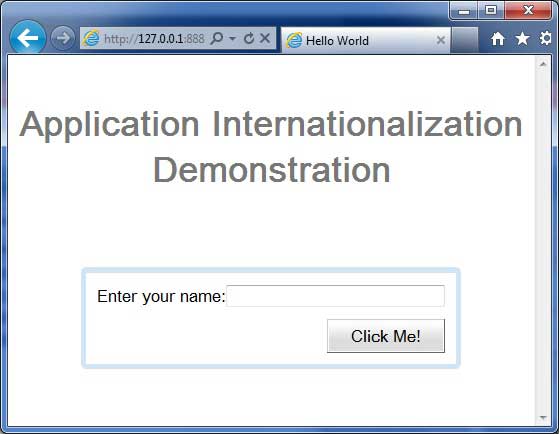
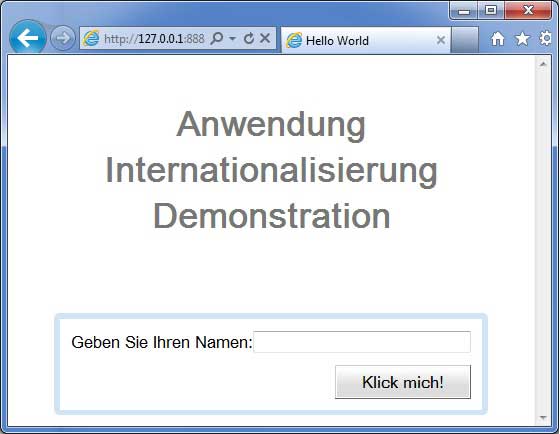
现在更新 URL 以包含 locale=de。设置 URL: *http://127.0.0.1:8888/HelloWorld.html?gwt.codesvr=127.0.0.1:9997&locale=de*。如果应用程序一切正常,则会产生以下结果: