- GWT 教程
- GWT - 首页
- GWT - 概述
- GWT - 环境搭建
- GWT - 应用
- GWT - 创建应用
- GWT - 部署应用
- GWT - 使用 CSS 样式
- GWT - 基本组件
- GWT - 表单组件
- GWT - 复杂组件
- GWT - 布局面板
- GWT - 事件处理
- GWT - 自定义组件
- GWT - UIBinder
- GWT - RPC 通信
- GWT - JUnit 集成
- GWT - 调试应用
- GWT - 国际化
- GWT - History 类
- GWT - 书签支持
- GWT - 日志框架
- GWT 有用资源
- GWT - 问答
- GWT - 快速指南
- GWT - 有用资源
- GWT - 讨论
GWT - RichTextArea 组件
介绍
RichTextArea 组件是一个富文本编辑器,允许复杂的样式和格式设置。由于一些浏览器不支持富文本编辑,而另一些浏览器只支持有限的功能子集,因此有两个格式化程序接口,可以通过 `getBasicFormatter()` 和 `getExtendedFormatter()` 访问。
完全不支持富文本编辑的浏览器这两个方法都将返回 `null`,而只支持基本功能的浏览器将为后者 `getExtendedFormatter()` 返回 `null`。
类声明
以下是 com.google.gwt.user.client.ui.RichTextArea 类的声明:
public class RichTextArea
   extends FocusWidget
      implements HasHTML, HasInitializeHandlers, HasSafeHtml
CSS 样式规则
以下默认 CSS 样式规则将应用于所有 TextBox 组件。您可以根据需要覆盖它。
.gwt-RichTextArea {}
类构造函数
| 序号 | 构造函数 & 描述 |
|---|---|
| 1 |
RichTextArea() 创建一个新的、空白的 RichTextArea 对象,没有样式表。 |
类方法
| 序号 | 函数名称 & 描述 |
|---|---|
| 1 |
HandlerRegistration addInitializeHandler(InitializeHandler handler) 添加一个 InitializeEvent 处理程序。 |
| 2 |
RichTextArea.BasicFormatter getBasicFormatter() 已弃用。请改用 `getFormatter()`。 |
| 3 |
RichTextArea.ExtendedFormatter getExtendedFormatter() 已弃用。请改用 `getFormatter()`。 |
| 4 |
RichTextArea.Formatter getFormatter() 获取富文本格式化接口。 |
| 5 |
java.lang.String getHTML() 获取此对象的 HTML 内容。 |
| 6 |
java.lang.String getText() 获取此对象的文本。 |
| 7 |
boolean isEnabled() 获取此组件是否启用。 |
| 8 |
protected void onAttach() 当组件附加到浏览器的文档时调用此方法。 |
| 9 |
protected void onDetach() 当组件从浏览器的文档中分离时调用此方法。 |
| 10 |
void setEnabled(boolean enabled) 设置此组件是否启用。 |
| 11 |
void setFocus(boolean focused) 显式地聚焦/取消聚焦此组件。 |
| 12 |
void setHTML(java.lang.String safeHtml) 使用安全 HTML 设置此对象的内容。 |
| 13 |
void setHTML(java.lang.String html) 使用 HTML 设置此对象的内容。 |
| 14 |
void setText(java.lang.String text) 设置此对象的文本。 |
继承的方法
此类继承自以下类的方法:
com.google.gwt.user.client.ui.UIObject
com.google.gwt.user.client.ui.Widget
com.google.gwt.user.client.ui.FocusWidget
java.lang.Object
RichTextBox 组件示例
此示例将引导您完成简单的步骤,以演示如何在 GWT 中使用 RichTextBox 组件。请按照以下步骤更新我们在GWT - 创建应用章节中创建的 GWT 应用:
| 步骤 | 描述 |
|---|---|
| 1 | 创建一个名为HelloWorld的项目,放在com.tutorialspoint包下,如GWT - 创建应用章节中所述。 |
| 2 | 修改HelloWorld.gwt.xml、HelloWorld.css、HelloWorld.html和HelloWorld.java,如下所述。保持其余文件不变。 |
| 3 | 编译并运行应用程序以验证已实现逻辑的结果。 |
以下是修改后的模块描述符src/com.tutorialspoint/HelloWorld.gwt.xml的内容。
<?xml version = "1.0" encoding = "UTF-8"?>
<module rename-to = 'helloworld'>
   <!-- Inherit the core Web Toolkit stuff.                        -->
   <inherits name = 'com.google.gwt.user.User'/>

   <!-- Inherit the default GWT style sheet.                       -->
   <inherits name = 'com.google.gwt.user.theme.clean.Clean'/>

   <!-- Specify the app entry point class.                         -->
   <entry-point class = 'com.tutorialspoint.client.HelloWorld'/>

   <!-- Specify the paths for translatable code                    -->
   <source path = 'client'/>
   <source path = 'shared'/>

</module>
以下是修改后的样式表文件war/HelloWorld.css的内容。
body {
   text-align: center;
   font-family: verdana, sans-serif;
}

h1 {
   font-size: 2em;
   font-weight: bold;
   color: #777777;
   margin: 40px 0px 70px;
   text-align: center;
}

.gwt-RichTextArea {
   padding:10px;
}
以下是修改后的 HTML 宿主文件war/HelloWorld.html的内容。
<html>
   <head>
      <title>Hello World</title>
      <link rel = "stylesheet" href = "HelloWorld.css"/>
      <script language = "javascript" src = "helloworld/helloworld.nocache.js">
      </script>
   </head>

   <body>
      <h1>RichTextArea Widget Demonstration</h1>
      <div id = "gwtContainer"></div>
   </body>
</html>
让我们来看一下 Java 文件src/com.tutorialspoint/HelloWorld.java的内容,它将演示 TextBox 组件的使用。
package com.tutorialspoint.client;

import com.google.gwt.core.client.EntryPoint;
import com.google.gwt.user.client.ui.RichTextArea;
import com.google.gwt.user.client.ui.RootPanel;
import com.google.gwt.user.client.ui.VerticalPanel;

public class HelloWorld implements EntryPoint {
   public void onModuleLoad() {
      //create RichTextArea elements
      RichTextArea richTextArea = new RichTextArea();

      richTextArea.setHeight("200");
      richTextArea.setWidth("200");

      //add text to text area
      richTextArea.setHTML("<b>Hello World!</b> <br/> <br/>" +
	  "<i>Be Happy!</i> </br> <br/> <u>Stay Cool!</u>");

      // Add text boxes to the root panel.
      VerticalPanel panel = new VerticalPanel();
      panel.add(richTextArea);

      RootPanel.get("gwtContainer").add(panel);
   }
}
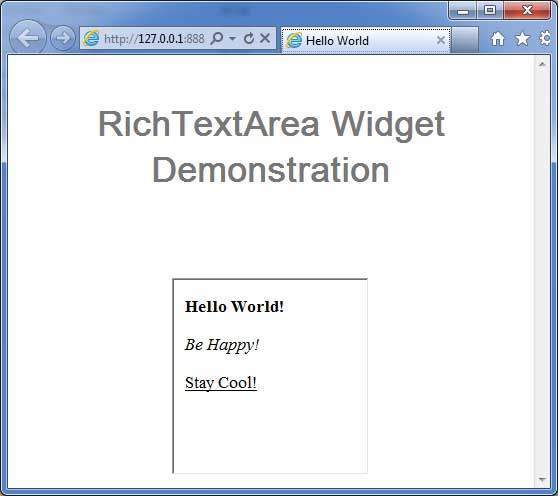
完成所有更改后,让我们像在GWT - 创建应用章节中一样,在开发模式下编译并运行应用程序。如果您的应用程序一切正常,这将产生以下结果: