
 数据结构
数据结构 网络
网络 关系型数据库管理系统
 操作系统
操作系统 Java
Java MS Excel
 iOS
iOS HTML
HTML CSS
CSS Android
 Python
 C 语言编程
 C++
C++ C#
C# MongoDB
 MySQL
MySQL Javascript
 PHP
PHP 物理学
物理学 化学
化学 生物学
生物学 数学
数学 英语
英语 经济学
经济学 心理学
心理学 社会学
社会学 服装设计
服装设计 法律研究
法律研究使用 Python 在统计学中展示 Nakagami 分布
在给定的问题陈述中,我们必须创建一个算法,以借助 Python 及其库来展示统计学中的 Nakagami 分布。因此,在本文中,我们将使用 Python 的 matplotlib、numpy 和 scipy 库来解决给定的问题。
什么是统计学中的 Nakagami 分布?
Nakagami 分布基本上是一个概率分布。它包含参数、样本数据集和概率分布的模型描述。此分布主要用于通信中,以模拟通过多个路径到达接收器的信号。
理解问题的逻辑
手头的问题是使用 Python 及其库来展示 Nakagami 分布。因此,我们将首先导入所有必要的库,导入后,我们将生成一个数据集,在此数据集上我们将创建 Nakagami 分布。然后,我们将计算概率密度函数,然后借助绘图方法绘制分布图。
算法
步骤 1 - 首先,我们将导入必要的库
from scipy.stats import nakagami
import numpy as nmp
import matplotlib.pyplot as pplt
步骤 2 - 然后我们将生成 x 的值
x = nmp.linspace(0, 8, 200)
步骤 3 - 下一步是定义 Nakagami 分布的参数
structure1, scale1 = 2, 4
structure2, scale2 = 2, 6
步骤 4 - 声明参数后,我们需要为每个参数计算概率密度函数(也称为 PDF 值)。在这里,我们将使用 Nakagami 的 pdf 函数来计算概率密度函数,并在其中传递参数的值。
prob_den_fun1 = nakagami.pdf(x, structure1, scale=scale1)
prob_den_fun2 = nakagami.pdf(x, structure2, scale=scale2)
步骤 5 - 现在,我们将借助 matplotlib 库的绘图函数绘制概率密度函数。
pplt.plot(x, prob_den_fun1, label='Structure={}, Scale={}'.format(structure1, scale1))
pplt.plot(x, prob_den_fun2, label='Structure={}, Scale={}'.format(structure2, scale2))
步骤 6 - 绘制 PDF 后,我们将向绘图添加标签,并使用 matplotlib 的 legend 函数来描述图形中的项目。
pplt.xlabel('x')
pplt.ylabel('Probability Density')
pplt.title('Nakagami Distribution')
pplt.legend()
步骤 7 - 最后,我们将使用 matplotlib 的 show 方法显示我们创建的绘图。
pplt.show()
示例
from scipy.stats import nakagami
import numpy as nmp
import matplotlib.pyplot as pplt

x = nmp.linspace(0, 8, 200)

structure1, scale1 = 2, 4
structure2, scale2 = 2, 6

prob_den_fun1 = nakagami.pdf(x, structure1, scale=scale1)
prob_den_fun2 = nakagami.pdf(x, structure2, scale=scale2)

pplt.plot(x, prob_den_fun1, label='Structure={}, Scale={}'.format(structure1, scale1))
pplt.plot(x, prob_den_fun2, label='Structure={}, Scale={}'.format(structure2, scale2))

pplt.xlabel('x')
pplt.ylabel('Probability Density')
pplt.title('Nakagami Distribution')
pplt.legend()
pplt.show()
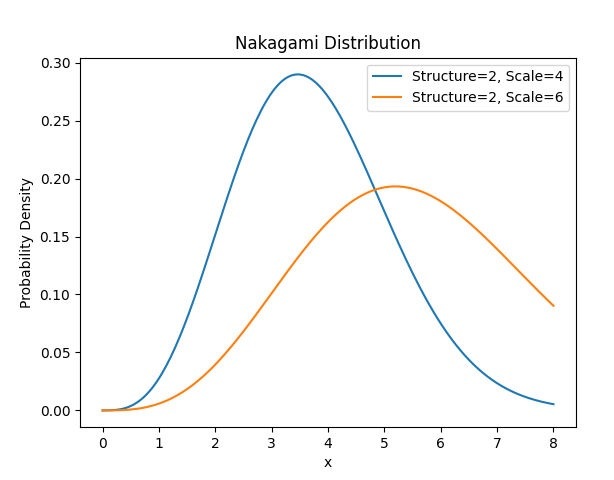
输出
结论
正如我们已经成功创建了代码来演示 scipy.stats、matplotlib 和 numpy 模块的使用,以使用不同参数集的概率密度函数或 PDF 来展示 Nakagami 分布。我们提供了简单高效的代码,具有 O(1) 的时间复杂度。在我们的代码中,我们可以根据需要调整参数并优化 Nakagami 分布,并且我们可以看到它如何反映形状和曲线。总的来说,该代码提供了一个简单有效的方法来展示 Nakagami 分布。

115 次查看
