
- WebdriverIO 教程
- WebdriverIO - 首页
- WebdriverIO - 简介
- WebdriverIO - 先决条件
- WebdriverIO - 架构
- WebdriverIO - 使用 NodeJS 入门
- WebdriverIO - NPM 安装
- WebdriverIO - VS Code 安装
- WebdriverIO - package.json
- WebdriverIO - Mocha 安装
- Selenium 独立服务器安装
- WebdriverIO - 配置文件生成
- WebdriverIO - VS Code 智能提示
- WebdriverIO - wdio.conf.js 文件
- WebdriverIO - XPath 定位器
- WebdriverIO - CSS 定位器
- WebdriverIO - 链接文本定位器
- WebdriverIO - ID 定位器
- WebdriverIO - 标签名定位器
- WebdriverIO - 类名定位器
- WebdriverIO - 名称定位器
- 断言的 Expect 语句
- WebdriverIO - 成功路径流程
- WebdriverIO - 通用浏览器命令
- WebdriverIO - 处理浏览器大小
- WebdriverIO - 浏览器导航命令
- 处理复选框和下拉列表
- WebdriverIO - 鼠标操作
- 处理子窗口/弹出窗口
- WebdriverIO - 隐藏元素
- WebdriverIO - 框架
- WebdriverIO - 拖放
- WebdriverIO - 双击
- WebdriverIO - Cookie
- WebdriverIO - 处理单选按钮
- Web元素上的 Chai 断言
- WebdriverIO - 多个窗口/标签页
- WebdriverIO - 滚动操作
- WebdriverIO - 警报
- WebdriverIO - 调试代码
- WebdriverIO - 捕获屏幕截图
- WebdriverIO - JavaScript 执行器
- WebdriverIO - 等待
- WebdriverIO - 并行运行测试
- WebdriverIO - 数据驱动测试
- 从命令行参数运行测试
- 使用 Mocha 选项执行测试
- 从 Allure 生成 HTML 报告
- WebdriverIO 有用资源
- WebdriverIO - 快速指南
- WebdriverIO - 有用资源
- WebdriverIO - 讨论
WebdriverIO - Cookie
我们可以使用 WebdriverIO 处理 Cookie。Cookie 有助于识别用户。它是一种有效的技术,用于在一次站点会话到另一次会话之间传递信息,或在两个连接的网站的会话之间传递信息。
Cookie 的方法
我们可以使用以下方法使用 WebdriverIO 添加、删除和获取 Cookie:
browser.setCookies
这用于为当前页面设置单个 Cookie 或多个 Cookie。要为页面设置 Cookie,我们必须首先启动并停留在该页面上。
语法
语法如下:
browser.setCookies(
   {
      cookie, cookie.name, cookie.value, cookie.path, cookie.domain,
      cookie.secure, cookie.httpOnly, cookie.expiry
   }
)
这里,cookie 是 Cookie 对象或对象数组,可以包含以下值:
cookie.name - 这是一个可选参数,指的是 Cookie 名称。
cookie.value - 这是一个可选参数,指的是 Cookie 值。
cookie.path - 这是一个可选参数,指的是 Cookie 路径。默认值为 /(如果在添加 Cookie 时未添加)。
cookie.domain - 这是一个可选参数,指的是 Cookie 域名。默认值为当前浏览上下文活动文档的 URL 域名(如果在添加 Cookie 时未添加)。
cookie.secure - 这是一个可选参数,用于检查 Cookie 是否安全。默认值为 false(如果在添加 Cookie 时未添加)。
cookie.httpOnly - 这是一个可选参数,用于检查 Cookie 是否为 HTTP 类型。默认值为 false(如果在添加 Cookie 时未添加)。
cookie.expiry.
browser.getCookies
这用于从现有页面获取 Cookie。如果将 Cookie 名称作为参数提供给此方法,则将获取该特定 Cookie。否则,将获取当前页面上的所有 Cookie。
语法
语法如下:
//to get a specific cookie
browser.getCookies(['Topic'])
或者,
//to get all cookies
browser.getCookies()
browser.deleteCookies
这用于从现有页面删除 Cookie。如果将 Cookie 名称作为参数提供给此方法,则将删除该特定 Cookie。否则,将删除当前页面上的所有 Cookie。
语法
语法如下:
//to delete a specific cookie
browser.deleteCookies(['Topic'])
或者,
//to delete all cookies
browser.deleteCookies()
首先,请按照“使用 WebdriverIO 的成功路径流程”一章中步骤 1 到 5 的操作,如下所示:
步骤 1 - 安装 NodeJS。有关如何执行此安装的详细信息,请参阅“使用 NodeJS 入门”一章。
步骤 2 - 安装 NPM。有关如何执行此安装的详细信息,请参阅“NPM 安装”一章。
步骤 3 - 安装 VS Code。有关如何执行此安装的详细信息,请参阅“VS Code 安装”一章。
步骤 4 - 创建配置文件。有关如何执行此安装的详细信息,请参阅“配置文件生成”一章。
步骤 5 - 创建一个规范文件。有关如何执行此安装的详细信息,请参阅“Mocha 安装”一章。
步骤 6 - 将以下代码添加到创建的 Mocha 规范文件中。
// test suite name
describe('Tutorialspoint application', function(){
   //test case
   it('Cookies', function(){
      // launch url
      browser.url('https://tutorialspoint.com/index.htm')
      //set cookies
      browser.setCookies([
         {name: 'topic1', value: 'WebdriverIO'},
         {name: 'topic2', value: 'Selenium'}
      ])
      //get a particular cookie
	   const t = browser.getCookies(['topic1'])
      console.log(t);
      //get all cookies
      const a = browser.getCookies()
      console.log(a);
      //delete a cookie with name topic2
      browser.deleteCookies(['topic2'])
      d = browser.getCookies()
      console.log(d)
      //delete all cookies
      browser.deleteCookies()
      m = browser.getCookies()
      console.log(m)
   });
});
运行配置文件 - wdio.conf.js 文件,使用以下命令:
npx wdio run wdio.conf.js
有关如何创建配置文件的详细信息,请参阅“wdio.conf.js 文件”和“配置文件生成”一章。
您的计算机上将显示以下屏幕:
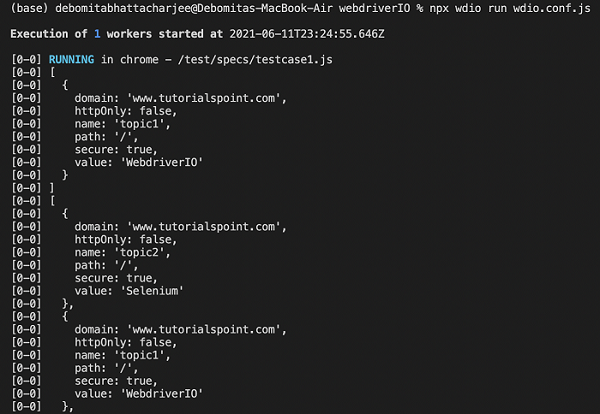
成功执行命令后,首先将名称为 topic1 的 Cookie 详细信息打印到控制台。然后,将名称为 topic1 和 topic2 的两个 Cookie 详细信息都显示出来。
您的计算机上将显示以下屏幕:

然后,我们删除了名称为 topic2 的 Cookie,因此其他 Cookie 打印到控制台。最后,在删除所有 Cookie 后,控制台打印一个空数组。