
- WebdriverIO 教程
- WebdriverIO - 首页
- WebdriverIO - 简介
- WebdriverIO - 前提条件
- WebdriverIO - 架构
- WebdriverIO - 使用 NodeJS 入门
- WebdriverIO - NPM 安装
- WebdriverIO - VS Code 安装
- WebdriverIO - package.json
- WebdriverIO - Mocha 安装
- Selenium 独立服务器安装
- WebdriverIO - 配置文件生成
- WebdriverIO - VS Code 智能提示
- WebdriverIO - wdio.conf.js 文件
- WebdriverIO - XPath 定位器
- WebdriverIO - CSS 定位器
- WebdriverIO - 链接文本定位器
- WebdriverIO - ID 定位器
- WebdriverIO - 标签名定位器
- WebdriverIO - 类名定位器
- WebdriverIO - 名称定位器
- 断言的 Expect 语句
- WebdriverIO - 成功路径流程
- WebdriverIO - 通用浏览器命令
- WebdriverIO - 处理浏览器尺寸
- WebdriverIO - 浏览器导航命令
- 处理复选框和下拉菜单
- WebdriverIO - 鼠标操作
- 处理子窗口/弹出窗口
- WebdriverIO - 隐藏元素
- WebdriverIO - 框架
- WebdriverIO - 拖放
- WebdriverIO - 双击
- WebdriverIO - Cookie
- WebdriverIO - 处理单选按钮
- Web元素上的 Chai 断言
- WebdriverIO - 多个窗口/标签页
- WebdriverIO - 滚动操作
- WebdriverIO - 警报
- WebdriverIO - 调试代码
- WebdriverIO - 捕获屏幕截图
- WebdriverIO - JavaScript 执行器
- WebdriverIO - 等待
- WebdriverIO - 并行运行测试
- WebdriverIO - 数据驱动测试
- 从命令行参数运行测试
- 使用 Mocha 选项执行测试
- 从 Allure 生成 HTML 报告
- WebdriverIO 有用资源
- WebdriverIO - 快速指南
- WebdriverIO - 有用资源
- WebdriverIO - 讨论
WebdriverIO - Mocha 安装
Mocha 是一个基于 JavaScript 的测试框架,构建在 Nodejs 之上。它使异步测试执行流程变得有趣且简单。Mocha 测试可以串行运行。
它能够生成准确且可定制的报告。此外,未捕获的异常可以轻松地与相应的测试用例关联。Mocha 的详细信息可以在以下链接中找到:
https://tutorialspoint.com/tesults/tesults_integrating_your_automated_tests.htm
要在 NPM 仓库中安装 Mocha 包,命令如下:
npm install mocha
您的计算机上将出现以下屏幕:
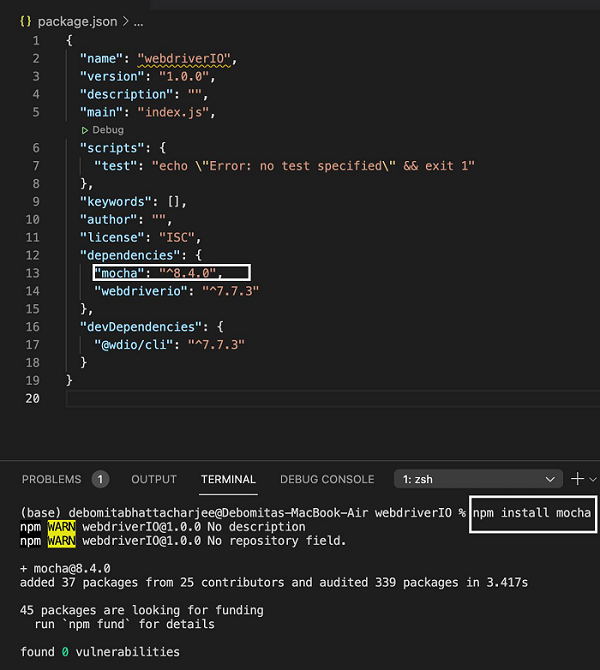
命令成功执行后,安装的 Mocha 版本将反映在 package.json 文件中。
广告