
- GWT 教程
- GWT - 首页
- GWT - 概述
- GWT - 环境设置
- GWT - 应用程序
- GWT - 创建应用程序
- GWT - 部署应用程序
- GWT - 使用 CSS 样式
- GWT - 基本控件
- GWT - 表单控件
- GWT - 复杂控件
- GWT - 布局面板
- GWT - 事件处理
- GWT - 自定义控件
- GWT - UIBinder
- GWT - RPC 通信
- GWT - JUnit 集成
- GWT - 调试应用程序
- GWT - 国际化
- GWT - History 类
- GWT - 书签支持
- GWT - 日志框架
- GWT 有用资源
- GWT - 常见问题解答
- GWT - 快速指南
- GWT - 有用资源
- GWT - 讨论
GWT - 文件上传控件
简介
FileUpload 控件封装了 HTML <input type = 'file'> 元素。如果要将此控件提交到服务器,则必须与 FormPanel 一起使用。
类声明
以下是 com.google.gwt.user.client.ui.FileUpload 类的声明:
public class FileUpload
   extends Widget
      implements HasName, HasChangeHandlers
CSS 样式规则
以下默认 CSS 样式规则将应用于所有 TextBox 控件。您可以根据需要覆盖它。
.gwt-FileUpload {}
类构造函数
| 序号 | 构造函数 & 描述 |
|---|---|
| 1 |
FileUpload() 构造一个新的文件上传控件。 |
| 2 |
FileUpload(Element element) 子类可以使用此构造函数显式使用现有元素。 |
类方法
| 序号 | 函数名称 & 描述 |
|---|---|
| 1 |
HandlerRegistration addChangeHandler(ChangeHandler handler) 添加 ChangeEvent 处理程序。 |
| 2 |
java.lang.String getFilename() 获取用户选择的文件名。 |
| 3 |
java.lang.String getName() 获取控件的名称。 |
| 4 |
boolean isEnabled() 获取此控件是否启用。 |
| 5 |
void onBrowserEvent(Event event) 每当收到浏览器事件时触发。 |
| 6 |
void setEnabled(boolean enabled) 设置此控件是否启用。 |
| 7 |
void setName(java.lang.String name) 设置控件的名称。 |
| 8 |
static FileUpload wrap(Element element) 创建一个 FileUpload 控件,包装现有的 <input type='file'> 元素。 |
继承的方法
此类继承以下类的的方法:
com.google.gwt.user.client.ui.UIObject
com.google.gwt.user.client.ui.Widget
java.lang.Object
FileUpload 控件示例
此示例将引导您完成简单的步骤,以展示如何在 GWT 中使用 FileUpload 控件。请按照以下步骤更新我们在GWT - 创建应用程序章节中创建的 GWT 应用程序:
| 步骤 | 描述 |
|---|---|
| 1 | 在GWT - 创建应用程序章节中说明的基础上,创建一个名为HelloWorld的项目,放在com.tutorialspoint包下。 |
| 2 | 修改HelloWorld.gwt.xml、HelloWorld.css、HelloWorld.html和HelloWorld.java,如下所述。保持其余文件不变。 |
| 3 | 编译并运行应用程序以验证已实现逻辑的结果。 |
以下是修改后的模块描述符src/com.tutorialspoint/HelloWorld.gwt.xml的内容。
<?xml version = "1.0" encoding = "UTF-8"?>
<module rename-to = 'helloworld'>
   <!-- Inherit the core Web Toolkit stuff.                        -->
   <inherits name = 'com.google.gwt.user.User'/>

   <!-- Inherit the default GWT style sheet.                       -->
   <inherits name = 'com.google.gwt.user.theme.clean.Clean'/>

   <!-- Specify the app entry point class.                         -->
   <entry-point class = 'com.tutorialspoint.client.HelloWorld'/>

   <!-- Specify the paths for translatable code                    -->
   <source path = 'client'/>
   <source path = 'shared'/>

</module>
以下是修改后的样式表文件war/HelloWorld.css的内容。
body {
   text-align: center;
   font-family: verdana, sans-serif;
}

h1 {
   font-size: 2em;
   font-weight: bold;
   color: #777777;
   margin: 40px 0px 70px;
   text-align: center;
}

.gwt-FileUpload {
   color: green;
}
以下是修改后的 HTML 宿主文件war/HelloWorld.html的内容。
<html>
   <head>
      <title>Hello World</title>
      <link rel = "stylesheet" href = "HelloWorld.css"/>
      <script language = "javascript" src = "helloworld/helloworld.nocache.js">
      </script>
   </head>

   <body>
      <h1>FileUpload Widget Demonstration</h1>
      <div id = "gwtContainer"></div>
   </body>
</html>
让我们看看 Java 文件src/com.tutorialspoint/HelloWorld.java的内容,它将演示 FileUpload 控件的使用。
package com.tutorialspoint.client;

import com.google.gwt.core.client.EntryPoint;
import com.google.gwt.event.dom.client.ClickEvent;
import com.google.gwt.event.dom.client.ClickHandler;
import com.google.gwt.user.client.Window;
import com.google.gwt.user.client.ui.Button;
import com.google.gwt.user.client.ui.FileUpload;
import com.google.gwt.user.client.ui.FormPanel;
import com.google.gwt.user.client.ui.FormPanel.SubmitCompleteEvent;
import com.google.gwt.user.client.ui.Label;
import com.google.gwt.user.client.ui.RootPanel;
import com.google.gwt.user.client.ui.VerticalPanel;

public class HelloWorld implements EntryPoint {
   public void onModuleLoad() {
      VerticalPanel panel = new VerticalPanel();
      //create a FormPanel
      final FormPanel form = new FormPanel();
      //create a file upload widget
      final FileUpload fileUpload = new FileUpload();
      //create labels
      Label selectLabel = new Label("Select a file:");
      //create upload button
      Button uploadButton = new Button("Upload File");
      //pass action to the form to point to service handling file
      //receiving operation.
      form.setAction("https://tutorialspoint.com/gwt/myFormHandler");
      // set form to use the POST method, and multipart MIME encoding.
      form.setEncoding(FormPanel.ENCODING_MULTIPART);
      form.setMethod(FormPanel.METHOD_POST);

      //add a label
      panel.add(selectLabel);
      //add fileUpload widget
      panel.add(fileUpload);
      //add a button to upload the file
      panel.add(uploadButton);
      uploadButton.addClickHandler(new ClickHandler() {
         @Override
         public void onClick(ClickEvent event) {
            //get the filename to be uploaded
            String filename = fileUpload.getFilename();
            if (filename.length() == 0) {
               Window.alert("No File Specified!");
            } else {
               //submit the form
               form.submit();
            }
         }
      });

      form.addSubmitCompleteHandler(new FormPanel.SubmitCompleteHandler() {
         @Override
         public void onSubmitComplete(SubmitCompleteEvent event) {
            // When the form submission is successfully completed, this
            //event is fired. Assuming the service returned a response
            //of type text/html, we can get the result text here
            Window.alert(event.getResults());
         }
      });
      panel.setSpacing(10);

      // Add form to the root panel.
      form.add(panel);

      RootPanel.get("gwtContainer").add(form);
   }
}
完成所有更改后,让我们像在GWT - 创建应用程序章节中一样,在开发模式下编译并运行应用程序。如果应用程序一切正常,则会产生以下结果:
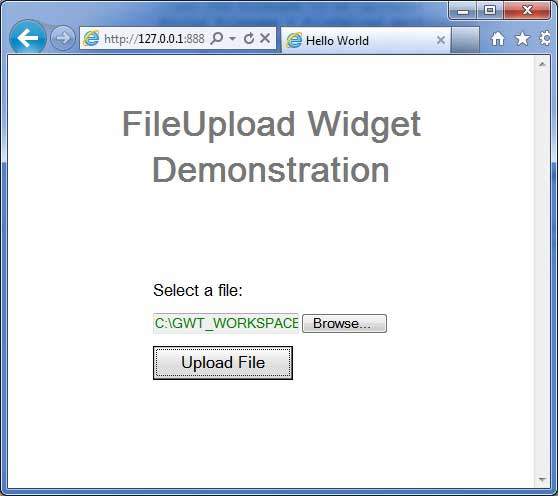
以下是演示文件上传服务器端功能的 Java 服务器页面代码片段。我们使用Common IO和Commons FileUpload库来为服务器端页面添加文件上传功能。文件将上传到服务器端 upload.jsp 所在位置的相对路径 uploadFiles 文件夹。
<%@page import = "org.apache.commons.fileupload.FileItemFactory"%>
<%@page import = "org.apache.commons.fileupload.disk.DiskFileItemFactory"%>
<%@page import = "org.apache.commons.fileupload.servlet.ServletFileUpload"%>
<%@page import = "org.apache.commons.fileupload.FileItem"%>
<%@page import = "org.apache.commons.io.FilenameUtils"%>
<%@page import = "java.util.List"%>
<%@page import = "java.util.Iterator"%>
<%@page import = "java.io.File"%>
<%@page import = "java.io.FileOutputStream"%>
<%@page import = "java.io.InputStream"%>

<%
   // Create a factory for disk-based file items
   FileItemFactory factory = new DiskFileItemFactory();
   // Create a new file upload handler
   ServletFileUpload upload = new ServletFileUpload(factory);
   try {
      // Parse the request
         List items = upload.parseRequest(request);

      // Process the uploaded items
         Iterator iter = items.iterator();

      while (iter.hasNext()) {
         FileItem item = (FileItem) iter.next();

         //handling a normal form-field
         if(item.isFormField()) {
            System.out.println("Got a form field");
            String name = item.getFieldName();
            String value = item.getString();
            System.out.print("Name:"+name+",Value:"+value);

         } else {

            //handling file loads
            System.out.println("Not form field");
            String fieldName = item.getFieldName();
            String fileName = item.getName();
            if (fileName != null) {
               fileName = FilenameUtils.getName(fileName);
            }

            String contentType = item.getContentType();
            boolean isInMemory = item.isInMemory();
            long sizeInBytes = item.getSize();
            System.out.print("Field Name:"+fieldName +",File Name:"+fileName);
            System.out.print("Content Type:"+contentType
               +",Is In Memory:"+isInMemory+",Size:"+sizeInBytes);

            byte[] data = item.get();
            fileName = getServletContext()
               .getRealPath( "/uploadedFiles/" + fileName);
            System.out.print("File name:" +fileName);
            FileOutputStream fileOutSt = new FileOutputStream(fileName);
            fileOutSt.write(data);
            fileOutSt.close();
            out.print("File Uploaded Successfully!");
         }
      }
   } catch(Exception e){
      out.print("File Uploading Failed!" + e.getMessage());
   }
%>