
- SciPy 教程
- SciPy - 主页
- SciPy - 简介
- SciPy - 环境设置
- SciPy - 基本功能
- SciPy - 集群
- SciPy - 常量
- SciPy - FFTpack
- SciPy - 集成
- SciPy - 插值
- SciPy - 输入和输出
- SciPy - 线性代数
- SciPy - 图像
- SciPy - 优化
- SciPy - 统计
- SciPy - CSGraph
- SciPy - 空间
- SciPy - ODR
- SciPy - 特殊包
- SciPy 有用资源
- SciPy - 参考
- SciPy - 快速指南
- SciPy - 有用资源
- SciPy - 讨论
SciPy - complete() 方法
SciPy complete() 方法对压缩距离矩阵执行完全连锁(最大点)的任务。
压缩矩阵本身就是个数组,它收集了用于处理数组的各种方法。此外,它将两个集群之间的距离定义为任意两点(第一个集群中的单个数据点和第二个集群中的任意单个数据点)之间的最远距离。
语法
以下是 SciPy complete() 方法的语法 −
complete(y)
参数
此方法接受一个参数 −
- y:此参数存储数组矩阵的距离。
返回值
此方法返回连锁矩阵(结果)。
示例 1
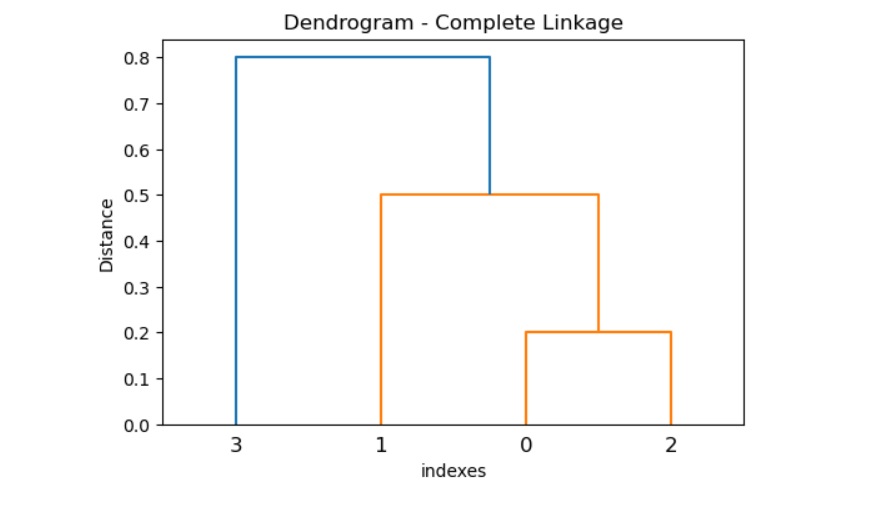
以下 SciPy complete() 方法展示如何在给定的距离矩阵上执行完全连锁聚类,并使用 dendrogram() 可视化输出。
import numpy as np
from scipy.cluster.hierarchy import complete, dendrogram
import matplotlib.pyplot as plt

# Distance matrix
y = np.array([0.5, 0.2, 0.3, 0.3, 0.8, 0.6])

# complete linkage clustering
result = complete(y)

# plot the dendrogram
plt.figure(figsize=(6, 4))
dendrogram(result)
plt.title('Dendrogram - Complete Linkage')
plt.xlabel('indexes')
plt.ylabel('Distance')
plt.show()
输出
以上代码产生以下结果 −
示例 2
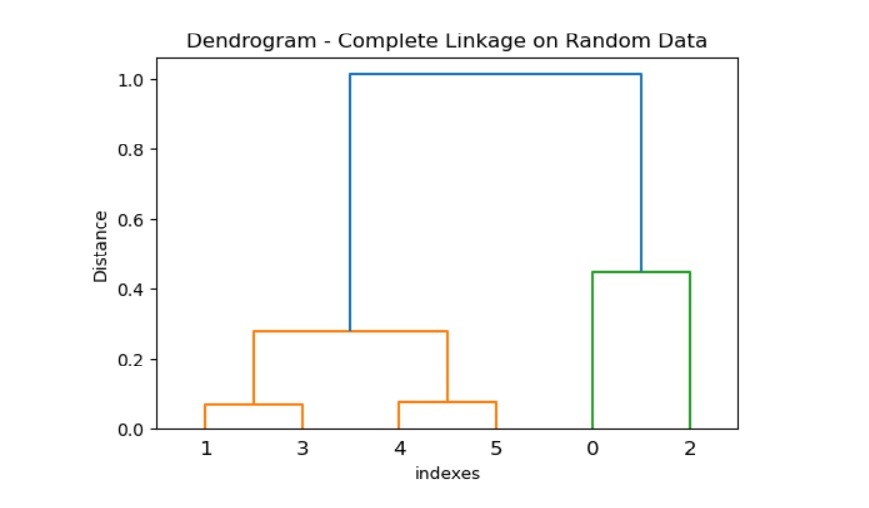
以下示例给出一个随机数据集,它允许使用距离矩阵并执行完全连锁聚类。然后,它使用该方法 dendrogram () 可视化层次聚类。
import numpy as np
from scipy.spatial.distance import pdist
from scipy.cluster.hierarchy import complete, dendrogram
import matplotlib.pyplot as plt

# random data
data = np.random.rand(6, 2)

# calculate the distance matrix
y = pdist(data, metric='euclidean')

# complete linkage clustering
result = complete(y)

# plot the dendrogram
plt.figure(figsize=(6, 4))
dendrogram(result)
plt.title('Dendrogram - Complete Linkage on Random Data')
plt.xlabel('indexes')
plt.ylabel('Distance')
plt.show()
输出
以上代码产生以下结果 −
示例 3
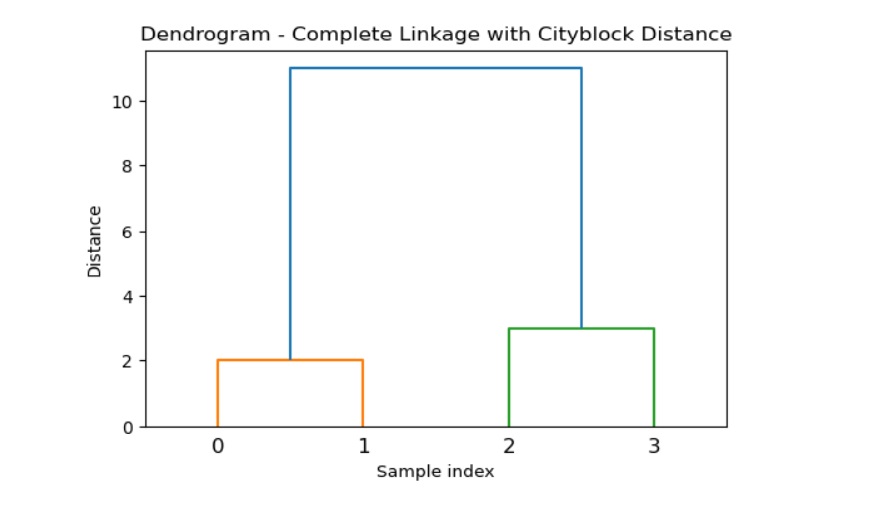
在示例中,我们将说明使用自定义距离度量进行完全连锁聚类任务。
import numpy as np
from scipy.spatial.distance import pdist
from scipy.cluster.hierarchy import complete, dendrogram
import matplotlib.pyplot as plt

# Sample data
data = np.array([[1, 3], [2, 4], [8, 6], [7, 8]])

# calculate the distance matrix using a custom metric
y = pdist(data, metric='cityblock')

# complete linkage clustering
result = complete(y)

# Plot the dendrogram
plt.figure(figsize=(6, 4))
dendrogram(result)
plt.title('Dendrogram - Complete Linkage with Cityblock Distance')
plt.xlabel('Sample index')
plt.ylabel('Distance')
plt.show()
输出
以上代码产生以下结果 −
scipy_reference.htm
广告