- Windows 10 开发教程
- Windows 10 - 家庭版
- Windows 10 - 简介
- Windows 10 – UWP
- Windows 10 – 第一个应用
- Windows 10 - 应用商店
- Windows 10 - XAML 控件
- Windows 10 - 数据绑定
- Windows 10 - XAML 性能
- Windows 10 - 自适应设计
- Windows 10 - 自适应 UI
- Windows 10 - 自适应代码
- Windows 10 - 文件管理
- Windows 10 - SQLite 数据库
- Windows 10 – 通信
- Windows 10 - 应用本地化
- Windows 10 - 应用生命周期
- Windows 10 - 后台执行
- Windows 10 - 应用服务
- Windows 10 - Web 平台
- Windows 10 - 连接体验
- Windows 10 - 导航
- Windows 10 - 网络
- Windows 10 - 云服务
- Windows 10 - 动态磁贴
- Windows 10 - 共享契约
- Windows 10 - 移植到 Windows
- Windows 10 有用资源
- Windows 10 - 快速指南
- Windows 10 - 有用资源
- Windows 10 - 讨论
Windows 10 开发 - 连接体验
众所周知,在 Windows 10 中,我们可以创建一个可在多个 Windows 10 设备上执行和运行的应用程序。假设我们有这些不同的设备,并且我们希望让它感觉就像一个应用程序,即使它在不同的设备上运行。
在通用 Windows 平台 (UWP) 中,您可以在所有 Windows 10 设备上运行单个应用程序,并且可以给用户一种它是一个应用程序的感觉。这被称为 **连接体验**。
连接体验的重要特性:
Windows 10 是迈向更个性化计算时代的第一步,在这个时代,您的应用程序、服务和内容可以轻松无缝地在设备之间移动。
通过连接体验,您可以轻松共享与该应用程序相关的数据和个人设置,并且它将在所有设备上可用。
在本章中,我们将学习:
这些共享数据或设置将存储在哪里,以便该应用程序可以在您的设备上使用。
如何识别用户;即在不同设备上使用同一应用程序的是同一个用户。
Windows 10 迈出了大胆的一步。当您使用 Microsoft 帐户 (MSA) 或企业 (工作) 帐户登录 Windows 10 时,假设:
对于 MSA 帐户,您可以免费访问 OneDrive;对于企业帐户,您可以访问 Active Directory (AD) 和 Azure Active Directory (AAD)(这是云版本)。
您可以访问不同的应用程序和资源。
设备和应用程序处于漫游状态和设置中。
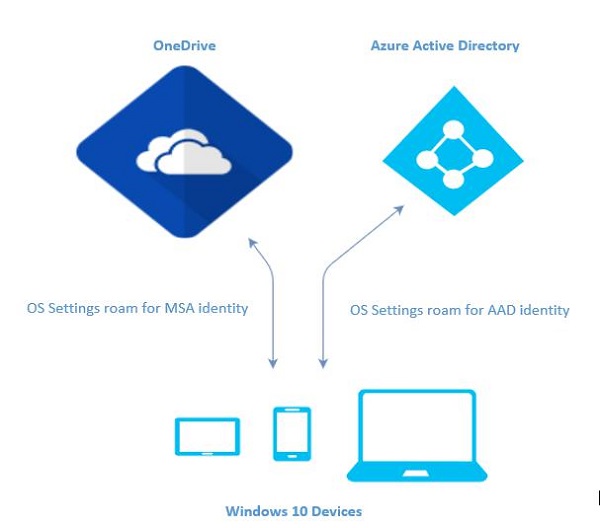
Windows 10 中的漫游
当您登录到电脑时,您可以设置一些首选项,例如锁定屏幕或背景颜色,或个性化您的各种设置。如果您有多台运行 Windows 10 的电脑或设备,则当您使用同一帐户登录其他设备时,一台设备上的首选项和设置将从云端同步。
在 Windows 10 中,当您设置或个性化应用程序设置后,这些设置将通过 UWP 中提供的漫游 API 进行漫游。当您在其他设备上再次运行同一应用程序时,它将首先检索设置并将这些设置应用于该设备上的应用程序。
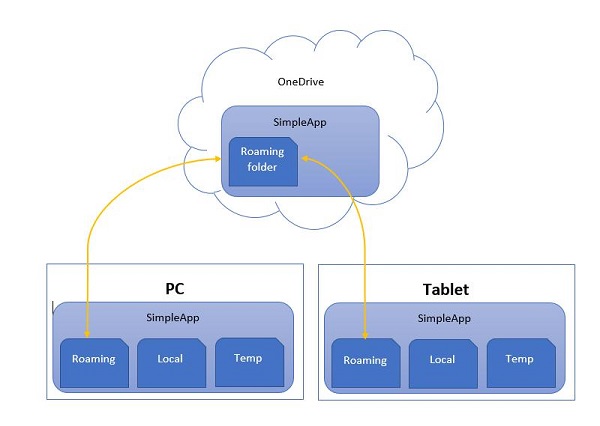
上传到云端的漫游数据限制为 100KB。如果超过此限制,则同步将停止,并将只像本地文件夹一样运行。
**RoamingSettings** API 以字典的形式公开,应用程序可以在其中保存数据。
Windows.Storage.ApplicationDataContainer roamingSettings =
   Windows.Storage.ApplicationData.Current.RoamingSettings;

// Retrivve value from RoamingSettings
var colorName = roamingSettings.Values["PreferredBgColor"].ToString();

// Set values to RoamingSettings
roamingSettings.Values["PreferredBgColor"] = "Green";
当 **RoamingSettings** 中的数据更改时,它会触发 **DataChanged** 事件,您可以在其中刷新设置。
Windows.Storage.ApplicationData.Current.DataChanged += RoamingDataChanged;

private void RoamingDataChanged(Windows.Storage.ApplicationData sender, object args) {
   // Something has changed in the roaming data or settings
}
让我们来看一个例子,在这个例子中,我们将设置应用程序的背景颜色,这些设置将通过 UWP 中提供的漫游 API 进行漫游。
以下是添加不同控件的 XAML 代码。
<Page
   x:Class = "RoamingSettingsDemo.Views.MainPage"
   xmlns = "http://schemas.microsoft.com/winfx/2006/xaml/presentation"
   xmlns:x = "http://schemas.microsoft.com/winfx/2006/xaml"
   xmlns:local = "using:RoamingSettingsDemo.Views"
   xmlns:d = "http://schemas.microsoft.com/expression/blend/2008"
   xmlns:mc = "http://schemas.openxmlformats.org/markup-compatibility/2006"
   mc:Ignorable = "d">

   <Grid x:Name = "MainGrid" Background = "{ThemeResource ApplicationPageBackgroundThemeBrush}">
      <Grid.RowDefinitions>
         <RowDefinition Height = "80" />
         <RowDefinition />
      </Grid.RowDefinitions>

      <StackPanel Orientation = "Horizontal" VerticalAlignment = "Top" Margin = "12,12,0,0">
         <TextBlock Style = "{StaticResource HeaderTextBlockStyle}"
            FontSize = "24" Text = "Connected Experience Demo" />
      </StackPanel>

      <Grid Grid.Row = "1" Margin = "0,80,0,0">
         <StackPanel Margin = "62,0,0,0">
            <TextBlock x:Name = "textBlock" HorizontalAlignment = "Left"
               TextWrapping = "Wrap" Text = "Choose your background color:"
               VerticalAlignment = "Top"/>

            <RadioButton x:Name = "BrownRadioButton" Content = "Brown"
               Checked = "radioButton_Checked" />

            <RadioButton x:Name = "GrayRadioButton" Content = "Gray"
               Checked = "radioButton_Checked"/>
         </StackPanel>
      </Grid>

   </Grid>

</Page>
以下是 **RoamingSettings** 和不同事件的 C# 实现。
using System;
using System.Collections.Generic;
using System.IO;
using System.Linq;
using System.Runtime.InteropServices.WindowsRuntime;

using Windows.Foundation;
using Windows.Foundation.Collections;

using Windows.UI;
using Windows.UI.Xaml;
using Windows.UI.Xaml.Controls;
using Windows.UI.Xaml.Controls.Primitives;
using Windows.UI.Xaml.Data;
using Windows.UI.Xaml.Input;
using Windows.UI.Xaml.Media;
using Windows.UI.Xaml.Navigation;

// The RoamingSettingsDemo Page item template is documented at
   http://go.microsoft.com/fwlink/?LinkId=234238

namespace RoamingSettingsDemo.Views {

   /// <summary>
      /// An empty page that can be used on its own or navigated to within a Frame.
   /// </summary>

   public sealed partial class MainPage : Page {

      public MainPage() {
         this.InitializeComponent();
      }

      protected override void OnNavigatedTo(NavigationEventArgs e) {
         SetBackgroundFromSettings();
         Windows.Storage.ApplicationData.Current.DataChanged += RoamingDataChanged;
      }

      protected override void OnNavigatedFrom(NavigationEventArgs e) {
         Windows.Storage.ApplicationData.Current.DataChanged -= RoamingDataChanged;
      }

      private void RoamingDataChanged(Windows.Storage.ApplicationData sender, object args) {

         // Something has changed in the roaming data or settings
         var ignore = Dispatcher.RunAsync(Windows.UI.Core.CoreDispatcherPriority.Normal,
            () ⇒ SetBackgroundFromSettings());
      }

      private void SetBackgroundFromSettings() {

         // Get the roaming settings
         Windows.Storage.ApplicationDataContainer roamingSettings =
            Windows.Storage.ApplicationData.Current.RoamingSettings;

         if (roamingSettings.Values.ContainsKey("PreferBrownBgColor")) {
            var colorName = roamingSettings.Values["PreferBrownBgColor"].ToString();

            if (colorName == "Gray") {
               MainGrid.Background = new SolidColorBrush(Colors.Gray);
               GrayRadioButton.IsChecked = true;
            } else if (colorName == "Brown") {
               MainGrid.Background = new SolidColorBrush(Colors.Brown);
               BrownRadioButton.IsChecked = true;
            }
         }

      }

      private void radioButton_Checked(object sender, RoutedEventArgs e){
         if (GrayRadioButton.IsChecked.HasValue &&
            (GrayRadioButton.IsChecked.Value == true)) {
               Windows.Storage.ApplicationData.Current.RoamingSettings.
                  Values["PreferBrownBgCo lor"] = "Gray";
         } else {
            Windows.Storage.ApplicationData.Current.RoamingSettings.
               Values["PreferBrownBgCo lor"] = "Brown";
         }

         SetBackgroundFromSettings();
      }

   }
}
编译并执行上述代码后,您将看到以下窗口。
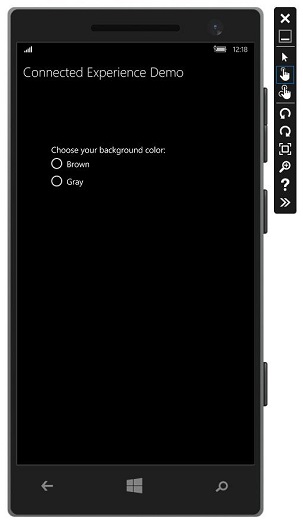
让我们选择灰色作为背景颜色并关闭此应用程序。
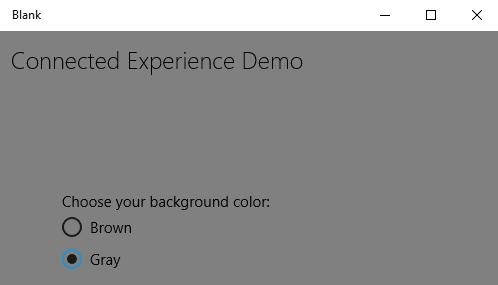
现在,当您在此设备或任何其他设备上运行此应用程序时,您将看到背景颜色已更改为灰色。这表明该应用程序已成功检索 **RoamingSettings** 中的背景颜色更改信息。