
- BabelJs 教程
- BabelJs - 首页
- BabelJs - 概述
- BabelJs - 环境搭建
- BabelJs - 命令行界面 (CLI)
- BabelJs - ES6 代码执行
- BabelJs - 使用 Babel 6 进行项目设置
- BabelJs - 使用 Babel 7 进行项目设置
- 将 ES6 特性转换为 ES5
- 将 ES6 模块转换为 ES5
- 将 ES7 特性转换为 ES5
- 将 ES8 特性转换为 ES5
- BabelJs - Babel 插件
- BabelJs - Babel Polyfill
- BabelJs - Babel 命令行界面 (CLI)
- BabelJs - Babel 预设
- Babel 与 Webpack 的结合使用
- Babel 与 JSX 的结合使用
- Babel 与 Flow 的结合使用
- BabelJS 与 Gulp 的结合使用
- BabelJs - 示例
- BabelJs 有用资源
- BabelJs - 快速指南
- BabelJs - 有用资源
- BabelJs - 讨论
BabelJS - 将 ES6 特性转换为 ES5
本章我们将了解 ES6 新增的功能特性。我们还将学习如何使用 BabelJS 将这些特性编译成 ES5。
以下是本章将讨论的各种 ES6 特性:
- Let + Const
- 箭头函数
- 类
- Promise
- 生成器
- 解构
- 迭代器
- 模板字面量
- 增强型对象
- 默认参数、剩余参数和扩展运算符
Let + Const
Let 声明了一个 JavaScript 块作用域局部变量。请考虑以下示例以了解 let 的用法。
示例
let a = 1;
if (a == 1) {
   let a = 2;
   console.log(a);
}
console.log(a);
输出
2
1
第一个控制台输出 2 的原因是a 使用let再次声明,并且仅在if块中可用。使用 let 声明的任何变量都仅在其声明的块内可用。我们使用 let 两次声明了变量 a,但这不会覆盖 a 的值。
这就是 var 和 let 关键字的区别。当您使用 var 声明变量时,该变量将在函数的作用域内可用,如果声明为全局变量,则其行为将类似于全局变量。
如果使用 let 声明变量,则该变量在块作用域内可用。如果在 if 语句内声明,则它仅在 if 块内可用。这同样适用于 switch、for 循环等。
现在我们将了解使用 babeljs 进行 ES5 代码转换。
让我们运行以下命令来转换代码:
npx babel let.js --out-file let_es5.js
let 关键字从 es6 到 es5 的输出如下:
使用 ES6 的 Let
let a = 1;
if (a == 1) {
   let a = 2;
   console.log(a);
}
console.log(a);
使用 babel 转换为 ES5
"use strict";

var a = 1;
if (a == 1) {
   var _a = 2;
   console.log(_a);
}
console.log(a);
如果您看到 ES5 代码,let 关键字将被var关键字替换。此外,if 块内的变量被重命名为_a,以获得与使用let关键字声明时相同的效果。
Const
在本节中,我们将学习 ES6 和 ES5 中 const 关键字的工作原理。const 关键字也在作用域内可用;如果在作用域外,则会抛出错误。一旦赋值,const 声明的变量的值就不能更改。让我们考虑以下示例来了解 const 关键字的用法。
示例
let a =1;
if (a == 1) {
   const age = 10;
}
console.log(age);
输出
Uncaught ReferenceError: age is not defined at:5:13
上述输出抛出一个错误,因为 const age 在 if 块内定义,并且在 if 块内可用。
我们将了解使用 BabelJS 转换为 ES5 的过程。
ES6
let a =1;
if (a == 1) {
   const age = 10;
}
console.log(age);
命令
npx babel const.js --out-file const_es5.js
使用 BabelJS 转换为 ES6
"use strict";

var a = 1;
if (a == 1) {
   var _age = 10;
}
console.log(age);
在 ES5 中,const 关键字将被 var 关键字替换,如上所示。
箭头函数
箭头函数比变量表达式具有更短的语法。它也称为胖箭头函数或 lambda 函数。该函数没有自己的 this 属性。在此函数中,省略了关键字 function。
示例
var add = (x,y) => {
   return x+y;
}

var k = add(3,6);
console.log(k);
输出
9
使用 BabelJS,我们将把上述代码转换为 ES5。
ES6 - 箭头函数
var add = (x,y) => {
   return x+y;
}

var k = add(3,6);
console.log(k);
命令
npx babel arrowfunction.js --out-file arrowfunction_es5.js
BabelJS - ES5
使用 Babel,箭头函数将转换为如下所示的变量表达式函数。
"use strict";

var add = function add(x, y) {
   return x + y;
};

var k = add(3, 6);
console.log(k);
类
ES6 带来了新的类特性。类类似于 ES5 中可用的基于原型的继承。class 关键字用于定义类。类就像特殊的函数,并且与函数表达式具有相似之处。它有一个构造函数,它在类内部调用。
示例
class Person {
   constructor(fname, lname, age, address) {
      this.fname = fname;
      this.lname = lname;
      this.age = age;
      this.address = address;
   }

   get fullname() {
      return this.fname +"-"+this.lname;
   }
}
var a = new Person("Siya", "Kapoor", "15", "Mumbai");
var persondet = a.fullname;
输出
Siya-Kapoor
ES6 - 类
class Person {
   constructor(fname, lname, age, address) {
      this.fname = fname;
      this.lname = lname;
      this.age = age;
      this.address = address;
   }

   get fullname() {
      return this.fname +"-"+this.lname;
   }
}
var a = new Person("Siya", "Kapoor", "15", "Mumbai");
var persondet = a.fullname;
命令
npx babel class.js --out-file class_es5.js
BabelJS - ES5
使用 babeljs 添加了额外的代码来确保类的功能与 ES5 中相同。BabelJs 确保功能与在 ES6 中一样。
"use strict";

var _createClass = function () {
   function defineProperties(target, props) {
      for (var i = 0; i < props.length; i++) {
         var descriptor = props[i];
         descriptor.enumerable = descriptor.enumerable || false;
         descriptor.configurable = true;
         if ("value" in descriptor) descriptor.writable = true;
         Object.defineProperty(target, descriptor.key, descriptor);
      }
   }
   return function (Constructor, protoProps, staticProps) {
      if (protoProps) defineProperties(Constructor.prototype, protoProps);
      if (staticProps) defineProperties(Constructor, staticProps);
      return Constructor;
   };
}();

function _classCallCheck(instance, Constructor) {
   if (!(instance instanceof Constructor)) {
      throw new TypeError("Cannot call a class as a function");
   }
}

var Person = function () {
   function Person(fname, lname, age, address) {
      _classCallCheck(this, Person);

      this.fname = fname;
      this.lname = lname;
      this.age = age;
      this.address = address;
   }

   _createClass(Person, [{
      key: "fullname",
      get: function get() {
         return this.fname + "-" + this.lname;
      }
   }]);

   return Person;
}();

var a = new Person("Siya", "Kapoor", "15", "Mumbai");
var persondet = a.fullname;
Promise
JavaScript Promise 用于管理代码中的异步请求。
它简化了操作并使代码保持整洁,因为您可以管理来自具有依赖性的异步请求的多个回调。Promise 提供了一种更好的处理回调函数的方法。Promise 是 ES6 的一部分。默认情况下,当您创建 Promise 时,Promise 的状态为等待中。
Promise 有三种状态:
- 等待中 (初始状态)
- 已完成 (成功完成)
- 已拒绝 (失败)
new Promise() 用于构造 Promise。Promise 构造函数带有一个参数,该参数是一个回调函数。回调函数有两个参数 - resolve 和 reject;
这两个都是内部函数。您编写的异步代码,即 Ajax 调用、图像加载、计时函数将进入回调函数。
如果回调函数中执行的任务成功,则调用 resolve 函数;否则,将使用错误详细信息调用 reject 函数。
以下代码行显示了一个 Promise 结构调用:
var _promise = new Promise (function(resolve, reject) {
   var success = true;
   if (success) {
      resolve("success");
   } else {
      reject("failure");
   }
});
_promise.then(function(value) {
   //once function resolve gets called it comes over here with the value passed in resolve
   console.log(value); //success
}).catch(function(value) {
   //once function reject gets called it comes over here with the value passed in reject
   console.log(value); // failure.
});
ES6 Promise 示例
let timingpromise = new Promise((resolve, reject) => {
   setTimeout(function() {
      resolve("Promise is resolved!");
   }, 1000);
});

timingpromise.then((msg) => {
   console.log(msg);
});
输出
Promise is resolved!
ES6 - Promise
let timingpromise = new Promise((resolve, reject) => {
   setTimeout(function() {
      resolve("Promise is resolved!");
   }, 1000);
});

timingpromise.then((msg) => {
   console.log(msg);
});
命令
npx babel promise.js --out-file promise_es5.js
BabelJS - ES5
"use strict";

var timingpromise = new Promise(function (resolve, reject) {
   setTimeout(function () {
      resolve("Promise is resolved!");
   }, 1000);
});

timingpromise.then(function (msg) {
   console.log(msg);
});
对于 Promise,转换后的代码没有变化。我们需要使用 babel-polyfill 才能使其在旧版浏览器上运行。babel-polyfill 的详细信息在 babel-polyfill 章节中解释。
生成器
生成器函数类似于普通的function。该函数具有特殊的语法 function*,其中 * 用于函数,以及yield关键字用于在函数内使用。这旨在根据需要暂停或启动函数。一旦执行开始,普通的函数就不能在中途停止。它要么执行整个函数,要么在遇到 return 语句时停止。生成器在这里的行为不同,您可以使用 yield 关键字暂停函数,并在需要时再次调用生成器来启动它。
示例
function* generatorfunction(a) {
   yield a;
   yield a +1 ;
}

let g = generatorfunction(8);
console.log(g.next());
console.log(g.next());
输出
{value: 8, done: false}
{value: 9, done: false}
ES6 - 生成器
function* generatorfunction(a) {
   yield a;
   yield a +1 ;
}

let g = generatorfunction(8);
console.log(g.next());
console.log(g.next());
命令
npx babel generator.js --out-file generator_es5.js
BabelJS - ES5
"use strict";

var _marked = /*#__PURE__*/regeneratorRuntime.mark(generatorfunction);

function generatorfunction(a) {
   return regeneratorRuntime.wrap(function generatorfunction$(_context) {
      while (1) {
         switch (_context.prev = _context.next) {
            case 0:
               _context.next = 2;
               return a;

            case 2:
               _context.next = 4;
               return a + 1;

            case 4:
            case "end":
               return _context.stop();
         }
      }
   }, _marked, this);
}

var g = generatorfunction(8);
console.log(g.next());
console.log(g.next());
迭代器
JavaScript 迭代器返回一个 JavaScript 对象,该对象具有值。该对象还有一个名为 done 的标志,其值为 true/false。如果它不是迭代器的结尾,则返回 false。让我们考虑一个示例,并查看迭代器在数组上的工作原理。
示例
let numbers = [4, 7, 3, 10];
let a = numbers[Symbol.iterator]();
console.log(a.next());
console.log(a.next());
console.log(a.next());
console.log(a.next());
console.log(a.next());
在上面的示例中,我们使用了数字数组,并使用Symbol.iterator作为索引在数组上调用了一个函数。
使用 next() 在数组上获得的输出如下:
{value: 4, done: false}
{value: 7, done: false}
{value: 3, done: false}
{value: 10, done: false}
{value: undefined, done: true}
输出给出一个对象,其中 value 和 done 作为属性。每次next()方法调用都从数组中返回下一个值,done 为 false。只有当数组中的元素完成时,done 的值才为 true。我们可以将其用于迭代数组。还有更多可用的选项,例如for-of循环,使用方法如下:
示例
let numbers = [4, 7, 3, 10];
for (let n of numbers) {
   console.log(n);
}
输出
4
7
3
10
当for-of 循环使用键时,它会提供如上所示的数组值的详细信息。我们将检查这两种组合,并查看 babeljs 如何将其转换为 es5。
示例
let numbers = [4, 7, 3, 10];
let a = numbers[Symbol.iterator]();
console.log(a.next());
console.log(a.next());
console.log(a.next());
console.log(a.next());
console.log(a.next());

let _array = [4, 7, 3, 10];
for (let n of _array) {
   console.log(n);
}
命令
npx babel iterator.js --out-file iterator_es5.js
输出
"use strict";

var numbers = [4, 7, 3, 10];
var a = numbers[Symbol.iterator]();
console.log(a.next());
console.log(a.next());
console.log(a.next());
console.log(a.next());
console.log(a.next());

var _array = [4, 7, 3, 10];
var _iteratorNormalCompletion = true;
var _didIteratorError = false;
var _iteratorError = undefined;

try {
   for (var _iterator = _array[Symbol.iterator](),
      _step; !(_iteratorNormalCompletion = (_step = _iterator.next()).done);
      _iteratorNormalCompletion = true) {
      var n = _step.value;

      console.log(n);
   }
} catch (err) {
   _didIteratorError = true;
   _iteratorError = err;
} finally {
   try {
      if (!_iteratorNormalCompletion && _iterator.return) {
         _iterator.return();
      }
   } finally {
      if (_didIteratorError) {
         throw _iteratorError;
      }
   }
}
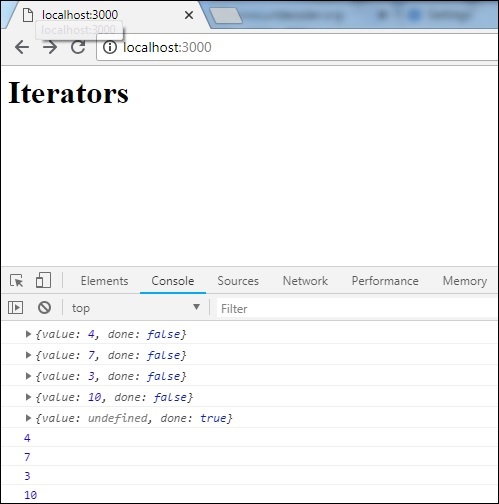
es5 中添加了for-of循环的更改。但是迭代器.next 保持不变。我们需要使用babel-polyfill才能使其在旧版浏览器中运行。Babel-polyfill 与 babel 一起安装,并且可以从 node_modules 中使用,如下所示:
示例
<html>
   <head>
      <script type="text/javascript" src="node_modules/babel-polyfill/dist/polyfill.min.js"></script>
      <script type="text/javascript" src="iterator_es5.js"></script>
   </head>
   <body>
      <h1>Iterators</h1>
   </body>
</html>
输出
解构
解构属性的行为类似于 JavaScript 表达式,它从数组、对象中解包值。
以下示例将解释解构语法的用法。
示例
let x, y, rem;
[x, y] = [10, 20];

console.log(x);
console.log(y);
[x, y, ...rem] = [10, 20, 30, 40, 50];
console.log(rem);

let z = 0;
({ x, y } = (z) ? { x: 10, y: 20 } : { x: 1, y: 2 });
console.log(x);
console.log(y);
输出
10
20
[30, 40, 50]
1
2
以上代码行显示了如何将数组右侧的值分配给左侧的变量。带有...rem的变量获取数组中所有剩余的值。
我们还可以使用条件运算符将左侧对象的值分配如下:
({ x, y } = (z) ? { x: 10, y: 20 } : { x: 1, y: 2 });
console.log(x); // 1
console.log(y); // 2
让我们使用 babeljs 将其转换为 ES5:
命令
npx babel destructm.js --out-file destruct_es5.js
destruct_es5.js
"use strict";

var x = void 0,
   y = void 0,
   rem = void 0;
x = 10;
y = 20;

console.log(x);
console.log(y);
x = 10;
y = 20;
rem = [30, 40, 50];

console.log(rem);

var z = 0;

var _ref = z ? { x: 10, y: 20 } : { x: 1, y: 2 };

x = _ref.x;
y = _ref.y;

console.log(x);
console.log(y);
模板字面量
模板字面量是一种字符串字面量,它允许在其中使用表达式。它使用反引号 (``) 而不是单引号或双引号。当我们在字符串中说表达式时,这意味着我们可以在字符串中使用变量、调用函数等。
示例
let a = 5;
let b = 10;
console.log(`Using Template literal : Value is ${a + b}.`);
console.log("Using normal way : Value is " + (a + b));
输出
Using Template literal : Value is 15.
Using normal way : Value is 15
ES6 - 模板字面量
let a = 5;
let b = 10;
console.log(`Using Template literal : Value is ${a + b}.`);
console.log("Using normal way : Value is " + (a + b));
命令
npx babel templateliteral.js --out-file templateliteral_es5.js
BabelJS - ES5
"use strict";

var a = 5;
var b = 10;
console.log("Using Template literal : Value is " + (a + b) + ".");

console.log("Using normal way : Value is " + (a + b));
增强型对象字面量
在 es6 中,添加到对象字面量的新的特性非常好用。我们将介绍 ES5 和 ES6 中对象字面量的几个示例:
示例
ES5
var red = 1, green = 2, blue = 3;
var rgbes5 = {
   red: red,
   green: green,
   blue: blue
};
console.log(rgbes5); // {red: 1, green: 2, blue: 3}

ES6
let rgbes6 = {
   red,
   green,
   blue
};
console.log(rgbes6); // {red: 1, green: 2, blue: 3}
如果您看到上面的代码,ES5 和 ES6 中的对象有所不同。在 ES6 中,如果变量名与键相同,则我们不必指定键值。
让我们看看使用 babel 进行编译到 ES5 的过程。
ES6-增强型对象字面量
const red = 1, green = 2, blue = 3;
let rgbes5 = {
   red: red,
   green: green,
   blue: blue
};
console.log(rgbes5);

let rgbes6 = {
   red,
   green,
   blue
};
console.log(rgbes6);

let brand = "carbrand";
const cars = {
   [brand]: "BMW"
}
console.log(cars.carbrand);  //"BMW"
命令
npx babel enhancedobjliteral.js --out-file enhancedobjliteral_es5.js
BabelJS - ES5
"use strict";

function _defineProperty(obj, key, value) {
   if (key in obj) {
      Object.defineProperty(obj, key, {
         value: value, enumerable: true, configurable: true, writable: true
      });
   } else { obj[key] = value; } return obj;
}

var red = 1,
   green = 2,
   blue = 3;
var rgbes5 = {
   red: red,
   green: green,
   blue: blue
};
console.log(rgbes5);

var rgbes6 = {
   red: red,
   green: green,
   blue: blue
};
console.log(rgbes6);

var brand = "carbrand";
var cars = _defineProperty({}, brand, "BMW");

console.log(cars.carbrand); //"BMW"
默认参数、剩余参数和扩展运算符
在本节中,我们将讨论默认参数、剩余参数和扩展运算符。
默认参数
使用 ES6,我们可以对函数参数使用默认参数,如下所示:
示例
let add = (a, b = 3) => {
   return a + b;
}

console.log(add(10, 20));  // 30
console.log(add(10));      // 13
让我们使用 babel 将上述代码转换为 ES5。
命令
npx babel default.js --out-file default_es5.js
BabelJS - ES5
"use strict";

var add = function add(a) {
   var b = arguments.length > 1 >> arguments[1] !== undefined ? arguments[1] : 3;
   return a + b;
};

console.log(add(10, 20));
console.log(add(10));
剩余参数
剩余参数以三个点 (...) 开头,如下例所示:
示例
let add = (...args) => {
   let sum = 0;
   args.forEach(function (n) {
      sum += n;
   });
   return sum;
};

console.log(add(1, 2));    // 3
console.log(add(1, 2, 5, 6, 6, 7));   //27
在上面的函数中,我们将 n 个参数传递给函数 add。如果在 ES5 中添加所有这些参数,我们必须依赖 arguments 对象来获取参数的详细信息。使用 ES6,rest 帮助使用三个点定义参数,如上所示,我们可以遍历它并获得数字的总和。
注意 - 使用三个点,即剩余参数时,不能使用其他参数。
示例
let add = (...args, value) => {    //syntax error
   let sum = 0;
   args.forEach(function (n) {
      sum += n;
   });
   return sum;
};
上面的代码将给出语法错误。
编译到 es5 的结果如下:
命令
npx babel rest.js --out-file rest_es5.js
Babel -ES5
"use strict";

var add = function add() {
   for (var _len = arguments.length, args = Array(_len), _key = 0; _key < _len; _key++) {
      args[_key] = arguments[_key];
   }

   var sum = 0;
   args.forEach(function (n) {
      sum += n;
   });
   return sum;
};

console.log(add(1, 2));
console.log(add(1, 2, 5, 6, 6, 7));
扩展运算符
扩展运算符也像剩余参数一样有三个点。以下是一个工作示例,它显示了如何使用扩展运算符。
示例
let add = (a, b, c) => {
   return a + b + c;
}
let arr = [11, 23, 3];
console.log(add(...arr));   //37
现在让我们看看使用 babel 如何转换上面的代码:
命令
npx babel spread.js --out-file spread_es5.js
Babel-ES5
"use strict";

var add = function add(a, b, c) {
   return a + b + c;
};
var arr = [11, 23, 3];
console.log(add.apply(undefined, arr));
Proxy
Proxy 是一个对象,您可以在其中为属性查找、赋值、枚举、函数调用等操作定义自定义行为。
语法
var a = new Proxy(target, handler);
target 和 handler 都是对象。
target 是一个对象,也可以是另一个代理元素。
handler 将是一个对象,其属性为函数,这些函数在调用时将提供行为。
让我们尝试通过一个示例来了解这些特性:
示例
let handler = {
   get: function (target, name) {
      return name in target ? target[name] : "invalid key";
   }
};

let o = {
   name: 'Siya Kapoor',
   addr: 'Mumbai'
}

let a = new Proxy(o, handler);
console.log(a.name);
console.log(a.addr);
console.log(a.age);
我们在上面的示例中定义了 target 和 handler,并将其与 proxy 一起使用。Proxy 返回带有键值对的对象。
输出
Siya Kapoor
Mumbai
invalid key
现在让我们看看如何使用Babel将上述代码转换为ES5。
命令
npx babel proxy.js --out-file proxy_es5.js
Babel-ES5
'use strict';

var handler = {
   get: function get(target, name) {
      return name in target ? target[name] : "invalid key";
   }
};

var o = {
   name: 'Siya Kapoor',
   addr: 'Mumbai'
};

var a = new Proxy(o, handler);
console.log(a.name);
console.log(a.addr);
console.log(a.age);