
- 科尔多瓦教程
- 科尔多瓦 - 主页
- 科尔多瓦 - 概述
- 科尔多瓦 - 环境设置
- 科尔多瓦 - 第一个应用程序
- 科尔多瓦 - Config.xml 文件
- 科尔多瓦 - 存储
- 科尔多瓦 - 事件
- 科尔多瓦 - 返回按钮
- 科尔多瓦 - 插件管理器
- 科尔多瓦 - 电池状态
- 科尔多瓦 - 相机
- 科尔多瓦 - 联系人
- 科尔多瓦 - 设备
- 科尔多瓦 - 加速度计
- 科尔多瓦 - 设备方向
- 科尔多瓦 - 对话框
- 科尔多瓦 - 文件系统
- 科尔多瓦 - 文件传输
- 科尔多瓦 - 地理位置
- 科尔多瓦 - 全球化
- 科尔多瓦 - 应用内浏览器
- 科尔多瓦 - 媒体
- 科尔多瓦 - 媒体捕获
- 科尔多瓦 - 网络信息
- 科尔多瓦 - 启动屏幕
- 科尔多瓦 - 振动
- 科尔多瓦 - 白名单
- 科尔多瓦 - 最佳实践
- 科尔多瓦实用资源
- 科尔多瓦 - 快速指南
- 科尔多瓦 - 实用资源
- 科尔多瓦 - 讨论
科尔多瓦 - 设备方向
指南针用于显示相对于地理北极点的方向。
步骤 1 - 安装设备方向插件
打开命令提示符窗口并运行以下命令。
C:\Users\username\Desktop\CordovaProject>cordova plugin
   add cordova-plugindevice-orientation
步骤 2 - 添加按钮
此插件类似于加速插件。现在让我们在 index.html 中创建两个按钮。
<button id = "getOrientation">GET ORIENTATION</button>
<button id = "watchOrientation">WATCH ORIENTATION</button>
步骤 3 - 添加事件侦听器
现在,我们将事件侦听器添加到 index.js 中的 onDeviceReady 函数内部。
document.getElementById("getOrientation").addEventListener("click", getOrientation);
document.getElementById("watchOrientation").addEventListener("click", watchOrientation);
步骤 4 - 创建函数
我们将创建两个函数;第一个函数将生成当前加速度,另一个函数将检查方向变化。你可以看到,我们再次使用 frequency 选项来监视每三秒发生的更改。
function getOrientation() {
   navigator.compass.getCurrentHeading(compassSuccess, compassError);

   function compassSuccess(heading) {
      alert('Heading: ' + heading.magneticHeading);
   };

   function compassError(error) {
      alert('CompassError: ' + error.code);
   };
}

function watchOrientation(){
   var compassOptions = {
      frequency: 3000
   }
   var watchID = navigator.compass.watchHeading(compassSuccess,
      compassError, compassOptions);

   function compassSuccess(heading) {
      alert('Heading: ' + heading.magneticHeading);

      setTimeout(function() {
         navigator.compass.clearWatch(watchID);
      }, 10000);
   };

   function compassError(error) {
      alert('CompassError: ' + error.code);
   };
}
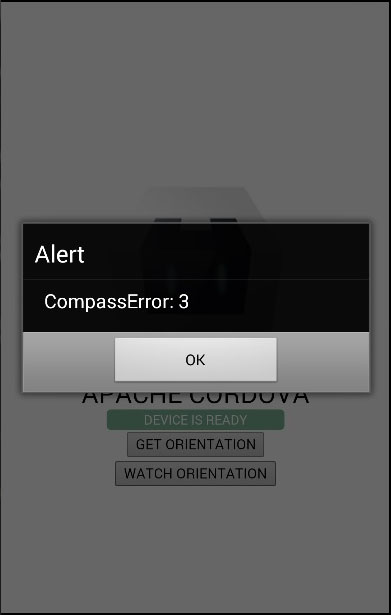
由于指南针插件几乎与加速插件相同,因此我们这次将向你展示错误代码。某些设备没有指南针工作所需的磁性传感器。如果你的设备没有它,将显示以下错误。
广告