
- Adobe Flex 教程
- Flex - 首页
- Flex - 概述
- Flex - 环境
- Flex - 应用
- Flex - 创建应用程序
- Flex - 部署应用程序
- Flex - 生命周期阶段
- Flex - 使用 CSS 样式化
- Flex - 使用皮肤样式化
- Flex - 数据绑定
- Flex - 基本控件
- Flex - 表单控件
- Flex - 复杂控件
- Flex - 布局面板
- Flex - 可视化效果
- Flex - 事件处理
- Flex - 自定义控件
- Flex - RPC 服务
- Flex - FlexUnit 集成
- Flex - 调试应用程序
- Flex - 国际化
- Flex - 打印支持
- Adobe Flex 资源
- Flex - 快速指南
- Flex - 有用资源
- Flex - 讨论
Flex - 向左擦除效果
介绍
WipeLeft 类定义了向左擦除的效果。组件的之前或之后状态必须是不可见的。
类声明
以下是mx.effects.WipeLeft类的声明:
public class WipeLeft
   extends MaskEffect
公共方法
| 序号 | 方法及描述 |
|---|---|
| 1 | WipeLeft(target:Object = null) 构造函数。 |
继承的方法
此类继承自以下类的方法:
- mx.effects.MaskEffect
- mx.effects.Effect
- flash.events.EventDispatcher
- Object
Flex 向左擦除效果示例
让我们按照以下步骤,通过创建一个测试应用程序来检查在 Flex 应用程序中使用 WipeLeft 效果:
| 步骤 | 描述 |
|---|---|
| 1 | 创建一个名为HelloWorld的项目,放在com.tutorialspoint.client包下,如Flex - 创建应用程序章节所述。 |
| 2 | 修改HelloWorld.mxml,如下所述。保持其余文件不变。 |
| 3 | 编译并运行应用程序,以确保业务逻辑按要求工作。 |
以下是修改后的 mxml 文件src/com.tutorialspoint/HelloWorld.mxml的内容。
<?xml version = "1.0" encoding = "utf-8"?>
<s:Application xmlns:fx = "http://ns.adobe.com/mxml/2009"
   xmlns:s = "library://ns.adobe.com/flex/spark"
   xmlns:mx = "library://ns.adobe.com/flex/mx
   width = "100%" height = "100%" minWidth = "500" minHeight = "500">

   <fx:Style source = "/com/tutorialspoint/client/Style.css" />
   <fx:Script>
      <![CDATA[
         protected function btnWipeLeft_clickHandler
           (event:MouseEvent):void {
            imageFlex.visible = true;
         }
      ]]>
   </fx:Script>

   <fx:Declarations>
      <mx:WipeLeft id = "wipeLeft" duration = "2000" />
   </fx:Declarations>

   <s:BorderContainer width = "630" height = "480" id = "mainContainer"
      styleName = "container">
      <s:VGroup width = "100%" height = "100%" gap = "50"
         horizontalAlign = "center" verticalAlign = "middle">
         <s:Label id = "lblHeader" text = "Effects Demonstration"
            fontSize = "40" color = "0x777777" styleName = "heading" />

         <s:Panel id = "wipeLeftPanel" title = "Using WipeLeft Effect"
            width = "500" height = "300" includeInLayout = "true" visible = "true">
            <s:layout>
               <s:VerticalLayout  gap = "10" verticalAlign = "middle"
                  horizontalAlign = "center" />
            </s:layout>

            <mx:Image id = "imageFlex" visible = "{false}"
               source = "https://tutorialspoint.com/images/flex-mini.png"
               showEffect = "{wipeLeft}" />
            <s:Button id = "btnWipeLeft" label = "Wipe Left"
               click = "btnWipeLeft_clickHandler(event)" />
          </s:Panel>
       </s:VGroup>
    </s:BorderContainer>
</s:Application>
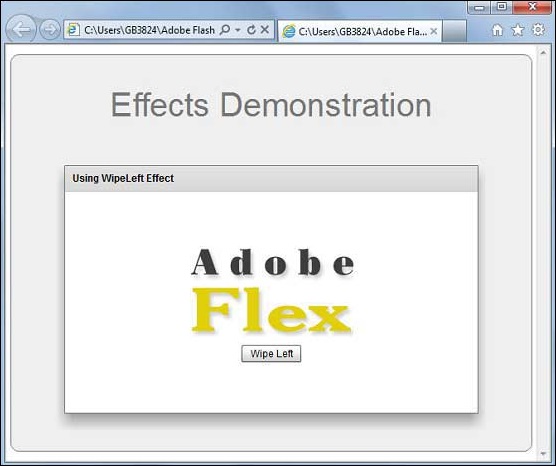
完成所有更改后,让我们像在Flex - 创建应用程序章节中那样,以普通模式编译并运行应用程序。如果应用程序一切正常,则会产生以下结果:[ 在线试用 ]
flex_visual_effects.htm
广告