
- Plotly 教程
- Plotly - 首页
- Plotly - 简介
- Plotly - 环境设置
- Plotly - 在线和离线绘图
- 在 Jupyter Notebook 中内联绘图
- Plotly - 包结构
- Plotly - 导出为静态图像
- Plotly - 图例
- Plotly - 格式化轴和刻度
- Plotly - 子图和嵌入图
- Plotly - 条形图和饼图
- Plotly - 散点图、Scattergl 图和气泡图
- Plotly - 点图和表格
- Plotly - 直方图
- Plotly - 箱线图、小提琴图和等高线图
- Plotly - Distplots、密度图和误差条形图
- Plotly - 热力图
- Plotly - 极坐标图和雷达图
- Plotly - OHLC 图、瀑布图和漏斗图
- Plotly - 3D 散点图和曲面图
- Plotly - 添加按钮/下拉菜单
- Plotly - 滑块控件
- Plotly - FigureWidget 类
- Plotly 与 Pandas 和 Cufflinks
- Plotly 与 Matplotlib 和 Chart Studio
- Plotly 有用资源
- Plotly - 快速指南
- Plotly - 有用资源
- Plotly - 讨论
Plotly - 热力图
热力图(或热图)是一种图形化数据表示方法,其中矩阵中包含的各个值表示为颜色。热力图的主要目的是更好地可视化数据集中的位置/事件的体积,并帮助引导查看者关注数据可视化中最重要的区域。
由于热力图依赖于颜色来传达数值,因此它们最常用于显示数值的更概括视图。热力图用途广泛且高效,能够吸引人们的注意力,并发现趋势,因此它们在分析领域越来越受欢迎。
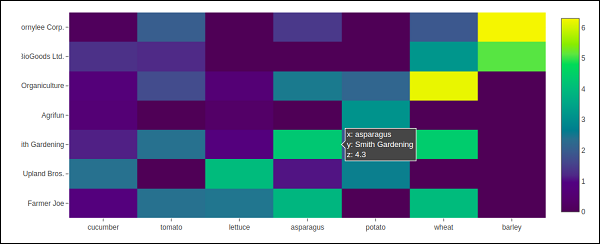
热力图天生具有自解释性。颜色越深,数量越大(值越高,分散度越紧密等)。Plotly 的 graph_objects 模块包含Heatmap() 函数。它需要 x、y 和z 属性。它们的值可以是列表、NumPy 数组或 Pandas 数据框。
在以下示例中,我们有一个 2D 列表或数组,它定义了要颜色编码的数据(不同农民的年产量,以吨为单位)。然后,我们还需要两个列表,分别列出农民的姓名和他们种植的蔬菜。
vegetables = [
   "cucumber",
   "tomato",
   "lettuce",
   "asparagus",
   "potato",
   "wheat",
   "barley"
]
farmers = [
   "Farmer Joe",
   "Upland Bros.",
   "Smith Gardening",
   "Agrifun",
   "Organiculture",
   "BioGoods Ltd.",
   "Cornylee Corp."
]
harvest = np.array(
   [
      [0.8, 2.4, 2.5, 3.9, 0.0, 4.0, 0.0],
      [2.4, 0.0, 4.0, 1.0, 2.7, 0.0, 0.0],
      [1.1, 2.4, 0.8, 4.3, 1.9, 4.4, 0.0],
      [0.6, 0.0, 0.3, 0.0, 3.1, 0.0, 0.0],
      [0.7, 1.7, 0.6, 2.6, 2.2, 6.2, 0.0],
      [1.3, 1.2, 0.0, 0.0, 0.0, 3.2, 5.1],
      [0.1, 2.0, 0.0, 1.4, 0.0, 1.9, 6.3]
   ]
)
trace = go.Heatmap(
   x = vegetables,
   y = farmers,
   z = harvest,
   type = 'heatmap',
   colorscale = 'Viridis'
)
data = [trace]
fig = go.Figure(data = data)
iplot(fig)
上述代码的输出如下所示:
广告