
- Pygame 教程
- Pygame - 首页
- Pygame - 概述
- Pygame - Hello World
- Pygame - 显示模式
- Pygame - Locals 模块
- Pygame - 颜色对象
- Pygame - 事件对象
- Pygame - 键盘事件
- Pygame - 鼠标事件
- Pygame - 绘制形状
- Pygame - 加载图片
- Pygame - 在窗口中显示文本
- Pygame - 移动图片
- Pygame - 使用数字小键盘移动
- Pygame - 使用鼠标移动
- Pygame - 移动矩形物体
- Pygame - 使用文本作为按钮
- Pygame - 图像变换
- Pygame - 音效对象
- Pygame - 混音通道
- Pygame - 播放音乐
- Pygame - 播放视频
- Pygame - 使用摄像头模块
- Pygame - 加载光标
- Pygame - 访问 CDROM
- Pygame - 精灵模块
- Pygame - PyOpenGL
- Pygame - 错误和异常
- Pygame 有用资源
- Pygame - 快速指南
- Pygame - 有用资源
- Pygame - 讨论
Pygame - 绘制形状
可以使用 pygame.draw 模块中的函数在游戏窗口上绘制各种形状,例如矩形、圆形、椭圆形、多边形和直线。
| 绘制矩形 | rect(surface, color, rect) |
| 绘制多边形 | polygon(surface, color, points) |
| 绘制圆形 | circle(surface, color, center, radius) |
| 绘制椭圆形 | ellipse(surface, color, rect) |
| 绘制椭圆弧 | arc(surface, color, rect, start_angle, stop_angle) |
| 绘制直线 | line(surface, color, start_pos, end_pos, width) |
示例
下面的示例使用这些函数绘制不同的形状:
import pygame

pygame.init()
screen = pygame.display.set_mode((400, 300))
done = False
red = (255,0,0)
green = (0,255,0)
blue = (0,0,255)
white = (255,255,255)
while not done:
   for event in pygame.event.get():
      if event.type == pygame.QUIT:
         done = True
   pygame.draw.rect(screen, red, pygame.Rect(100, 30, 60, 60))
   pygame.draw.polygon(screen, blue, ((25,75),(76,125),(275,200),(350,25),(60,280)))
   pygame.draw.circle(screen, white, (180,180), 60)
   pygame.draw.line(screen, red, (10,200), (300,10), 4)
   pygame.draw.ellipse(screen, green, (250, 200, 130, 80))
   pygame.display.update()
输出
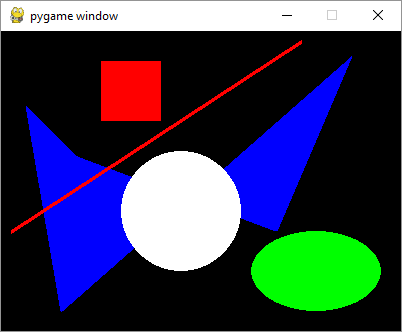
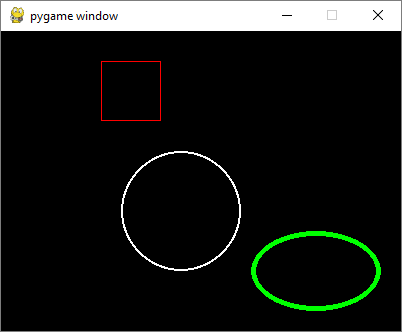
如果向函数添加一个可选的整型参数,则形状将以指定的颜色作为轮廓颜色绘制。数字对应于轮廓的厚度和形状内部的背景颜色。
pygame.draw.rect(screen, red, pygame.Rect(100, 30, 60, 60),1)
pygame.draw.circle(screen, white, (180,180), 60,2)
pygame.draw.ellipse(screen, green, (250, 200, 130, 80),5)
输出
广告