
- Pygame 教程
- Pygame - 首页
- Pygame - 概述
- Pygame - Hello World
- Pygame - 显示模式
- Pygame - Locals 模块
- Pygame - 颜色对象
- Pygame - 事件对象
- Pygame - 键盘事件
- Pygame - 鼠标事件
- Pygame - 绘制形状
- Pygame - 加载图像
- Pygame - 在窗口中显示文本
- Pygame - 移动图像
- Pygame - 使用数字小键盘移动
- Pygame - 使用鼠标移动
- Pygame - 移动矩形物体
- Pygame - 使用文本作为按钮
- Pygame - 图像变换
- Pygame - 音效对象
- Pygame - 混音器通道
- Pygame - 播放音乐
- Pygame - 播放视频
- Pygame - 使用摄像头模块
- Pygame - 加载光标
- Pygame - 访问 CDROM
- Pygame - 精灵模块
- Pygame - PyOpenGL
- Pygame - 错误和异常
- Pygame 有用资源
- Pygame - 快速指南
- Pygame - 有用资源
- Pygame - 讨论
Pygame - 图像变换
pygame.transform 模块包含许多函数的定义,用于操作从图像或文本块获得的 Surface 对象。Surface 对象的操作包括翻转、旋转、缩放、调整大小和缩放对象。
pygame.transform 模块中包含以下函数。
| flip() | 垂直和水平翻转 |
| scale() | 调整到新的分辨率 |
| rotate() | 旋转图像 |
| rotozoom() | 过滤缩放和旋转 |
| scale2x() | 专业的图像倍增 |
| smoothscale() | 平滑地将 surface 缩放至任意大小 |
| get_smoothscale_backend() | 返回正在使用的 smoothscale 滤波器版本 - 'GENERIC'、'MMX' 或 'SSE' |
| set_smoothscale_backend() | 将 smoothscale 滤波器版本设置为 - 'GENERIC'、'MMX' 或 'SSE' 之一 |
| chop() | 获取图像的副本,其中内部区域已移除 |
| laplacian() | 查找 surface 中的边缘 |
| average_surfaces() | 从多个 surface 中查找平均 surface。 |
| average_color() | 查找 surface 的平均颜色 |
| threshold() | 查找 surface 中哪些像素以及有多少像素在“search_color”或“search_surf”的阈值范围内。 |
让我们首先使用 flip() 函数,其语法如下:
flip(Surface, xbool, ybool)
此函数可以水平、垂直或同时翻转 surface 对象。方向由两个布尔参数决定。
要水平翻转图像,请使用以下命令:
pygame.transform.flip(img2,True, False)
要垂直翻转,请使用以下命令:
pygame.transform.flip(img2,False, True)
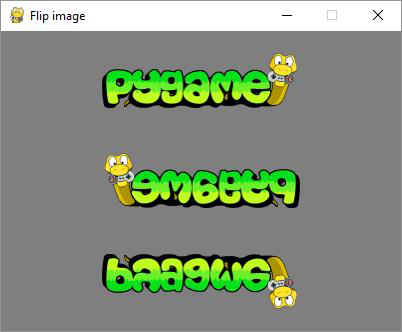
在下面的示例中,pygame 徽标图像正常显示,并沿两个方向翻转。首先从原始图像对象获取翻转后的 surface,获取其 Rect 对象,然后构建它。要渲染水平翻转的图像,
img1 = pygame.image.load('pygame.png')
img2=img1
img2=pygame.transform.flip(img2,True, False)
#inside event loop
rect2 = img2.get_rect()
   rect2.center = 200, 150
   screen.blit(img2, rect2)
示例
渲染原始 Pygame 徽标及其翻转图像的完整代码如下:
import pygame

pygame.init()
screen = pygame.display.set_mode((400, 300))
pygame.display.set_caption("Flip image")
img1 = pygame.image.load('pygame.png')
img2=img1
img3=img1
img2=pygame.transform.flip(img2,True, False)
img3=pygame.transform.flip(img3, False, True)
done = False
bg = (127,127,127)
while not done:
   for event in pygame.event.get():
      screen.fill(bg)
      rect1 = img1.get_rect()
      rect1.center = 200, 50
      screen.blit(img1, rect1)
      rect2 = img2.get_rect()
      rect2.center = 200, 150
      screen.blit(img2, rect2)
      rect3 = img3.get_rect()
      rect3.center = 200, 250
      screen.blit(img3, rect3)
      if event.type == pygame.QUIT:
         done = True
   pygame.display.update()
输出
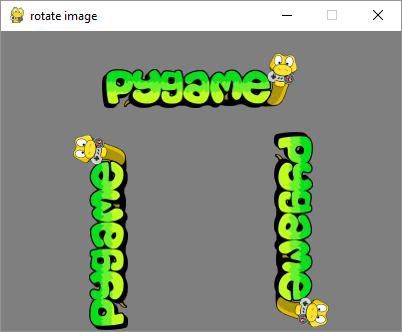
rotate() 函数采用以下参数:
rotate(Surface, angle)
示例
角度的负值会使 surface 顺时针旋转。
import pygame

pygame.init()
screen = pygame.display.set_mode((400, 300))
pygame.display.set_caption("rotate image")
img1 = pygame.image.load('pygame.png')
img2=img1
img3=img1
img2=pygame.transform.rotate(img2,90)
img3=pygame.transform.rotate(img3, -90)
done = False
bg = (127,127,127)
while not done:
   for event in pygame.event.get():
      screen.fill(bg)
      rect1 = img1.get_rect()
      rect1.center = 200, 50
      screen.blit(img1, rect1)
      rect2 = img2.get_rect()
      rect2.center = 100, 200
      screen.blit(img2, rect2)
      rect3 = img3.get_rect()
      rect3.center = 300,200
      screen.blit(img3, rect3)
      if event.type == pygame.QUIT:
         done = True
   pygame.display.update()
输出
示例
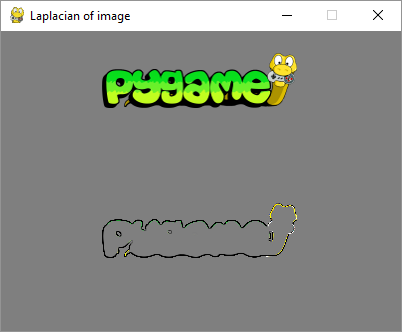
laplacian() 函数提取 surface 对象的轮廓。该函数只接受一个参数,即图像对象本身。
import pygame
pygame.init()
screen = pygame.display.set_mode((400, 300))
pygame.display.set_caption("Laplacian of image")
img1 = pygame.image.load('pygame.png')
img2=img1
img2=pygame.transform.laplacian(img2)
done = False
bg = (127,127,127)
while not done:
   for event in pygame.event.get():
      screen.fill(bg)
      rect1 = img1.get_rect()
      rect1.center = 200, 50
      screen.blit(img1, rect1)
      rect2 = img2.get_rect()
      rect2.center = 200, 200
      screen.blit(img2, rect2)

      if event.type == pygame.QUIT:
         done = True
   pygame.display.update()
输出
为了使 Surface 对象随着鼠标移动而移动,请根据图像中心计算 x、y 坐标。我们还计算中心与鼠标之间的距离 d。atan2(y, x) 数学函数允许找到旋转角度。我们需要将弧度转换为度数。根据鼠标与中心的距离,我们计算缩放参数。
mouse = event.pos
Pygame
54
x = mouse[0] - 200
y = mouse[1] - 150
d = math.sqrt(x ** 2 + y ** 2)
angle = math.degrees(-math.atan2(y, x))
scale = abs(5 * d / 400)
最后,我们使用 rotzoom() 函数,该函数执行组合旋转和缩放变换。
rotozoom(Surface, angle, scale)
示例
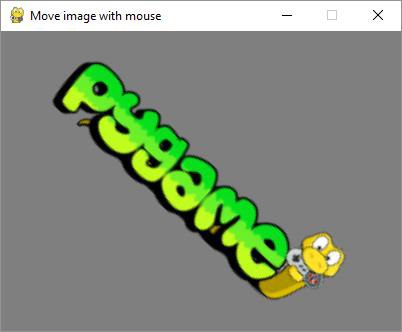
以下代码渲染可以根据鼠标移动旋转的 Pygame 徽标图像。
import pygame , math
from pygame.locals import *
pygame.init()
screen = pygame.display.set_mode((400, 300))
pygame.display.set_caption("Move image with mouse")
img1 = pygame.image.load('pygame.png')
done = False
bg = (127,127,127)
while not done:
   for event in pygame.event.get():
      screen.fill(bg)

      if event.type == pygame.QUIT:
         done = True
      if event.type == MOUSEMOTION:
         mouse = event.pos
         x = mouse[0] - 200
         y = mouse[1] - 150
         d = math.sqrt(x ** 2 + y ** 2)
         angle = math.degrees(-math.atan2(y, x))
         scale = abs(5 * d / 400)
         img2 = pygame.transform.rotozoom(img1, angle, scale)
         rect = img2.get_rect()
         rect.center = (200,150)
         screen.blit(img2, rect)
   pygame.display.update()
输出
运行上述代码,尝试沿显示窗口移动鼠标光标。图像将相应地旋转并缩小或放大。
广告