
- 设计模式教程
- 设计模式 - 首页
- 设计模式 - 概述
- 设计模式 - 工厂模式
- 抽象工厂模式
- 设计模式 - 单例模式
- 设计模式 - 建造者模式
- 设计模式 - 原型模式
- 设计模式 - 适配器模式
- 设计模式 - 桥接模式
- 设计模式 - 过滤器模式
- 设计模式 - 组合模式
- 设计模式 - 装饰器模式
- 设计模式 - 外观模式
- 设计模式 - 享元模式
- 设计模式 - 代理模式
- 责任链模式
- 设计模式 - 命令模式
- 设计模式 - 解释器模式
- 设计模式 - 迭代器模式
- 设计模式 - 中介者模式
- 设计模式 - 备忘录模式
- 设计模式 - 观察者模式
- 设计模式 - 状态模式
- 设计模式 - 空对象模式
- 设计模式 - 策略模式
- 设计模式 - 模板模式
- 设计模式 - 访问者模式
- 设计模式 - MVC 模式
- 业务代表模式
- 复合实体模式
- 数据访问对象模式
- 前端控制器模式
- 拦截过滤器模式
- 服务定位器模式
- 传输对象模式
- 设计模式资源
- 设计模式 - 问答
- 设计模式 - 快速指南
- 设计模式 - 有用资源
- 设计模式 - 讨论
设计模式 - 服务定位器模式
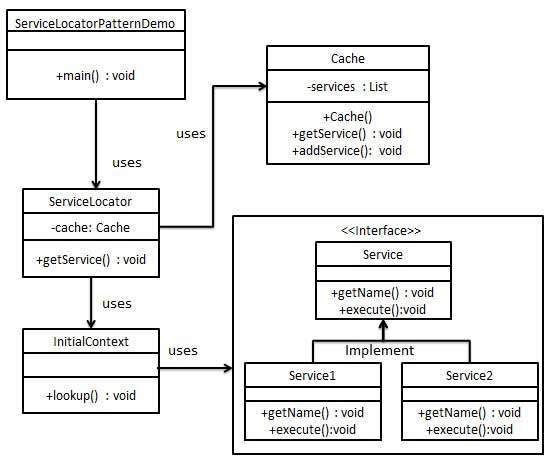
当我们希望使用 JNDI 查找来定位各种服务时,就会使用服务定位器设计模式。考虑到查找 JNDI 服务的高成本,服务定位器模式利用了缓存技术。首次需要服务时,服务定位器会在 JNDI 中查找并缓存服务对象。之后通过服务定位器查找相同服务时,将在其缓存中进行查找,这在很大程度上提高了应用程序的性能。以下是这种设计模式的实体。
服务 - 处理请求的实际服务。此类服务的引用需要在 JNDI 服务器中查找。
上下文/初始上下文 - JNDI 上下文包含用于查找目的的服务引用。
服务定位器 - 服务定位器是通过 JNDI 查找获取服务的单一联系点,并缓存服务。
缓存 - 用于存储服务引用以重复使用它们。
客户端 - 客户端是通过 ServiceLocator 调用服务的对象。
实现
我们将创建ServiceLocator、InitialContext、Cache、Service作为表示我们实体的各种对象。Service1和Service2表示具体服务。
我们的演示类ServiceLocatorPatternDemo在这里充当客户端,并将使用ServiceLocator来演示服务定位器设计模式。
步骤 1
创建 Service 接口。
Service.java
public interface Service {
   public String getName();
   public void execute();
}
步骤 2
创建具体服务。
Service1.java
public class Service1 implements Service {
   public void execute(){
      System.out.println("Executing Service1");
   }

   @Override
   public String getName() {
      return "Service1";
   }
}
Service2.java
public class Service2 implements Service {
   public void execute(){
      System.out.println("Executing Service2");
   }

   @Override
   public String getName() {
      return "Service2";
   }
}
步骤 3
创建用于 JNDI 查找的 InitialContext。
InitialContext.java
public class InitialContext {
   public Object lookup(String jndiName){

      if(jndiName.equalsIgnoreCase("SERVICE1")){
         System.out.println("Looking up and creating a new Service1 object");
         return new Service1();
      }
      else if (jndiName.equalsIgnoreCase("SERVICE2")){
         System.out.println("Looking up and creating a new Service2 object");
         return new Service2();
      }
      return null;
   }
}
步骤 4
创建缓存。
Cache.java
import java.util.ArrayList;
import java.util.List;

public class Cache {

   private List<Service> services;

   public Cache(){
      services = new ArrayList<Service>();
   }

   public Service getService(String serviceName){

      for (Service service : services) {
         if(service.getName().equalsIgnoreCase(serviceName)){
            System.out.println("Returning cached  " + serviceName + " object");
            return service;
         }
      }
      return null;
   }

   public void addService(Service newService){
      boolean exists = false;

      for (Service service : services) {
         if(service.getName().equalsIgnoreCase(newService.getName())){
            exists = true;
         }
      }
      if(!exists){
         services.add(newService);
      }
   }
}
步骤 5
创建服务定位器。
ServiceLocator.java
public class ServiceLocator {
   private static Cache cache;

   static {
      cache = new Cache();
   }

   public static Service getService(String jndiName){

      Service service = cache.getService(jndiName);

      if(service != null){
         return service;
      }

      InitialContext context = new InitialContext();
      Service service1 = (Service)context.lookup(jndiName);
      cache.addService(service1);
      return service1;
   }
}
步骤 6
使用ServiceLocator来演示服务定位器设计模式。
ServiceLocatorPatternDemo.java
public class ServiceLocatorPatternDemo {
   public static void main(String[] args) {
      Service service = ServiceLocator.getService("Service1");
      service.execute();
      service = ServiceLocator.getService("Service2");
      service.execute();
      service = ServiceLocator.getService("Service1");
      service.execute();
      service = ServiceLocator.getService("Service2");
      service.execute();
   }
}
步骤 7
验证输出。
Looking up and creating a new Service1 object
Executing Service1
Looking up and creating a new Service2 object
Executing Service2
Returning cached  Service1 object
Executing Service1
Returning cached  Service2 object
Executing Service2
广告