
- 设计模式教程
- 设计模式 - 首页
- 设计模式 - 概述
- 设计模式 - 工厂模式
- 抽象工厂模式
- 设计模式 - 单例模式
- 设计模式 - 建造者模式
- 设计模式 - 原型模式
- 设计模式 - 适配器模式
- 设计模式 - 桥接模式
- 设计模式 - 过滤器模式
- 设计模式 - 组合模式
- 设计模式 - 装饰器模式
- 设计模式 - 外观模式
- 设计模式 - 享元模式
- 设计模式 - 代理模式
- 责任链模式
- 设计模式 - 命令模式
- 设计模式 - 解释器模式
- 设计模式 - 迭代器模式
- 设计模式 - 中介者模式
- 设计模式 - 备忘录模式
- 设计模式 - 观察者模式
- 设计模式 - 状态模式
- 设计模式 - 空对象模式
- 设计模式 - 策略模式
- 设计模式 - 模板模式
- 设计模式 - 访问者模式
- 设计模式 - MVC模式
- 业务委托模式
- 组合实体模式
- 数据访问对象模式
- 前端控制器模式
- 拦截过滤器模式
- 服务定位器模式
- 传输对象模式
- 设计模式资源
- 设计模式 - 问答
- 设计模式 - 快速指南
- 设计模式 - 有用资源
- 设计模式 - 讨论
设计模式 - 传输对象模式
传输对象模式用于一次性地将具有多个属性的数据从客户端传递到服务器。传输对象也称为值对象。传输对象是一个简单的POJO类,具有getter/setter方法并且是可序列化的,以便它可以跨网络传输。它没有任何行为。服务器端业务类通常从数据库中获取数据并填充POJO,然后将其发送到客户端或按值传递。对于客户端,传输对象是只读的。客户端可以创建自己的传输对象并将其传递给服务器,以便一次性更新数据库中的值。以下是这种设计模式的实体。
业务对象 - 业务服务使用数据填充传输对象。
传输对象 - 只有设置/获取属性方法的简单POJO。
客户端 - 客户端向业务对象请求或发送传输对象。
实现
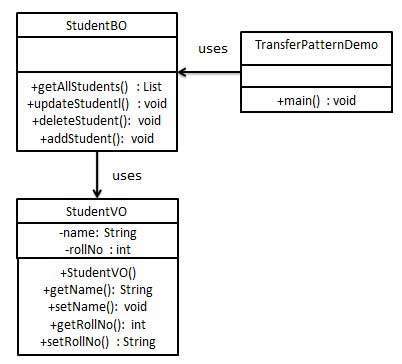
我们将创建一个名为StudentBO的业务对象和一个名为Student的传输对象来表示我们的实体。
我们的演示类TransferObjectPatternDemo在这里充当客户端,并将使用StudentBO和Student来演示传输对象设计模式。
步骤1
创建传输对象。
StudentVO.java
public class StudentVO {
   private String name;
   private int rollNo;

   StudentVO(String name, int rollNo){
      this.name = name;
      this.rollNo = rollNo;
   }

   public String getName() {
      return name;
   }

   public void setName(String name) {
      this.name = name;
   }

   public int getRollNo() {
      return rollNo;
   }

   public void setRollNo(int rollNo) {
      this.rollNo = rollNo;
   }
}
步骤2
创建业务对象。
StudentBO.java
import java.util.ArrayList;
import java.util.List;

public class StudentBO {

   //list is working as a database
   List<StudentVO> students;

   public StudentBO(){
      students = new ArrayList<StudentVO>();
      StudentVO student1 = new StudentVO("Robert",0);
      StudentVO student2 = new StudentVO("John",1);
      students.add(student1);
      students.add(student2);
   }
   public void deleteStudent(StudentVO student) {
      students.remove(student.getRollNo());
      System.out.println("Student: Roll No " + student.getRollNo() + ", deleted from database");
   }

   //retrive list of students from the database
   public List<StudentVO> getAllStudents() {
      return students;
   }

   public StudentVO getStudent(int rollNo) {
      return students.get(rollNo);
   }

   public void updateStudent(StudentVO student) {
      students.get(student.getRollNo()).setName(student.getName());
      System.out.println("Student: Roll No " + student.getRollNo() +", updated in the database");
   }
}
步骤3
使用StudentBO来演示传输对象设计模式。
TransferObjectPatternDemo.java
public class TransferObjectPatternDemo {
   public static void main(String[] args) {
      StudentBO studentBusinessObject = new StudentBO();

      //print all students
      for (StudentVO student : studentBusinessObject.getAllStudents()) {
         System.out.println("Student: [RollNo : " + student.getRollNo() + ", Name : " + student.getName() + " ]");
      }

      //update student
      StudentVO student = studentBusinessObject.getAllStudents().get(0);
      student.setName("Michael");
      studentBusinessObject.updateStudent(student);

      //get the student
      student = studentBusinessObject.getStudent(0);
      System.out.println("Student: [RollNo : " + student.getRollNo() + ", Name : " + student.getName() + " ]");
   }
}
步骤4
验证输出。
Student: [RollNo : 0, Name : Robert ]
Student: [RollNo : 1, Name : John ]
Student: Roll No 0, updated in the database
Student: [RollNo : 0, Name : Michael ]
广告