
Java 教程
- Java - 首页
- Java - 概述
- Java - 历史
- Java - 特性
- Java 与 C++
- JVM - Java 虚拟机
- Java - JDK 与 JRE 与 JVM
- Java - Hello World 程序
- Java - 环境搭建
- Java - 基本语法
- Java - 变量类型
- Java - 数据类型
- Java - 类型转换
- Java - Unicode 系统
- Java - 基本运算符
- Java - 注释
- Java - 用户输入
- Java - 日期与时间
Java 控制语句
- Java - 循环控制
- Java - 决策制定
- Java - If-else
- Java - Switch
- Java - For 循环
- Java - For-Each 循环
- Java - While 循环
- Java - do-while 循环
- Java - Break
- Java - Continue
面向对象编程
- Java - OOPs 概念
- Java - 对象与类
- Java - 类属性
- Java - 类方法
- Java - 方法
- Java - 变量作用域
- Java - 构造方法
- Java - 访问修饰符
- Java - 继承
- Java - 聚合
- Java - 多态
- Java - 重写
- Java - 方法重载
- Java - 动态绑定
- Java - 静态绑定
- Java - 实例初始化块
- Java - 抽象
- Java - 封装
- Java - 接口
- Java - 包
- Java - 内部类
- Java - 静态类
- Java - 匿名类
- Java - 单例类
- Java - 包装类
- Java - 枚举
- Java - 枚举构造方法
- Java - 枚举字符串
Java 内置类
Java 文件处理
Java 错误与异常
- Java - 异常
- Java - try-catch 块
- Java - try-with-resources
- Java - 多重捕获块
- Java - 嵌套 try 块
- Java - Finally 块
- Java - throw 异常
- Java - 异常传播
- Java - 内置异常
- Java - 自定义异常
Java 多线程
- Java - 多线程
- Java - 线程生命周期
- Java - 创建线程
- Java - 启动线程
- Java - 线程连接
- Java - 线程命名
- Java - 线程调度器
- Java - 线程池
- Java - 主线程
- Java - 线程优先级
- Java - 守护线程
- Java - 线程组
- Java - 关闭钩子
Java 同步
Java 网络编程
- Java - 网络编程
- Java - 套接字编程
- Java - URL 处理
- Java - URL 类
- Java - URLConnection 类
- Java - HttpURLConnection 类
- Java - Socket 类
- Java - 泛型
Java 集合
Java 接口
Java 数据结构
Java 集合算法
高级 Java
- Java - 命令行参数
- Java - Lambda 表达式
- Java - 发送邮件
- Java - Applet 基础
- Java - Javadoc 注释
- Java - 自动装箱和拆箱
- Java - 文件不匹配方法
- Java - REPL (JShell)
- Java - 多版本 Jar 文件
- Java - 私有接口方法
- Java - 内部类菱形运算符
- Java - 多分辨率图像 API
- Java - 集合工厂方法
- Java - 模块系统
- Java - Nashorn JavaScript
- Java - Optional 类
- Java - 方法引用
- Java - 函数式接口
- Java - 默认方法
- Java - Base64 编码解码
- Java - Switch 表达式
- Java - Teeing 收集器
- Java - 微基准测试
- Java - 文本块
- Java - 动态 CDS 归档
- Java - Z 垃圾收集器 (ZGC)
- Java - 空指针异常
- Java - 打包工具
- Java - 密封类
- Java - 记录类
- Java - 隐藏类
- Java - 模式匹配
- Java - 紧凑数字格式化
- Java - 垃圾回收
- Java - JIT 编译器
Java 杂项
- Java - 递归
- Java - 正则表达式
- Java - 序列化
- Java - 字符串
- Java - 进程 API 改进
- Java - Stream API 改进
- Java - 增强的 @Deprecated 注解
- Java - CompletableFuture API 改进
- Java - 流
- Java - Datetime Api
- Java 8 - 新特性
- Java 9 - 新特性
- Java 10 - 新特性
- Java 11 - 新特性
- Java 12 - 新特性
- Java 13 - 新特性
- Java 14 - 新特性
- Java 15 - 新特性
- Java 16 - 新特性
Java API 和框架
Java 类参考
- Java - Scanner
- Java - 数组
- Java - 字符串
- Java - Date
- Java - ArrayList
- Java - Vector
- Java - Stack
- Java - PriorityQueue
- Java - LinkedList
- Java - ArrayDeque
- Java - HashMap
- Java - LinkedHashMap
- Java - WeakHashMap
- Java - EnumMap
- Java - TreeMap
- Java - IdentityHashMap
- Java - HashSet
- Java - EnumSet
- Java - LinkedHashSet
- Java - TreeSet
- Java - BitSet
- Java - Dictionary
- Java - Hashtable
- Java - Properties
- Java - Collection
- Java - Array
Java 有用资源
Java - 异常
什么是 Java 中的异常?
异常(或异常事件)是在程序执行期间出现的问题。当异常发生时,程序的正常流程被打断,程序/应用程序异常终止,这是不推荐的,因此,这些异常需要被处理。
为什么发生异常?
异常可能由于多种原因发生。以下是发生异常的一些场景。
用户输入了无效数据。
需要打开的文件找不到。
网络连接在通信过程中断开或 JVM 内存不足。
其中一些异常是由用户错误引起的,另一些是由程序员错误引起的,还有一些是由以某种方式发生故障的物理资源引起的。
Java 异常类别
基于此,我们有以下几类异常。您需要了解它们才能知道 Java 中的异常处理是如何工作的。
- 受检异常
- 非受检异常
- 错误
Java 受检异常
受检异常是在编译时由编译器检查(通知)的异常,这些异常也称为编译时异常。这些异常不能简单地忽略,程序员应该注意(处理)这些异常。
示例:Java 中的受检异常
例如,如果您在程序中使用FileReader类从文件读取数据,如果其构造函数中指定的文件不存在,则会发生FileNotFoundException,编译器会提示程序员处理该异常。
import java.io.File;
import java.io.FileReader;

public class FilenotFound_Demo {

   public static void main(String args[]) {
      File file = new File("E://file.txt");
      FileReader fr = new FileReader(file);
   }
}
如果您尝试编译上述程序,您将获得以下异常。
输出
C:\>javac FilenotFound_Demo.java
FilenotFound_Demo.java:8: error: unreported exception FileNotFoundException; must be caught or declared to be thrown
      FileReader fr = new FileReader(file);
                      ^
1 error
注意 - 由于 FileReader 类的read()和close()方法抛出 IOException,您可以观察到编译器会通知处理 IOException,以及 FileNotFoundException。
Java 非受检异常
非受检异常是在执行时发生的异常。这些异常也称为运行时异常。这些包括编程错误,例如逻辑错误或 API 的不正确使用。运行时异常在编译时被忽略。
示例:Java 中的非受检异常
例如,如果您在程序中声明了一个大小为 5 的数组,并尝试调用数组的第 6 个元素,则会发生ArrayIndexOutOfBoundsException异常。
public class Unchecked_Demo {

   public static void main(String args[]) {
      int num[] = {1, 2, 3, 4};
      System.out.println(num[5]);
   }
}
如果您编译并执行上述程序,您将获得以下异常。
输出
Exception in thread "main" java.lang.ArrayIndexOutOfBoundsException: 5
	at Exceptions.Unchecked_Demo.main(Unchecked_Demo.java:8)
Java 错误
这些根本不是异常,而是超出用户或程序员控制范围的问题。在您的代码中通常会忽略错误,因为您很少能对错误做任何事情。例如,如果发生堆栈溢出,则会发生错误。它们在编译时也被忽略。
Java 异常层次结构
所有异常类都是 java.lang.Exception 类的子类型。异常类是Throwable 类的子类。除了异常类之外,还有另一个称为 Error 的子类,它派生自 Throwable 类。
错误是在发生严重故障时发生的异常情况,这些情况不会由 Java 程序处理。生成错误是为了指示运行时环境生成的错误。例如:JVM 内存不足。通常,程序无法从错误中恢复。
Exception 类有两个主要的子类:IOException 类和 RuntimeException 类。
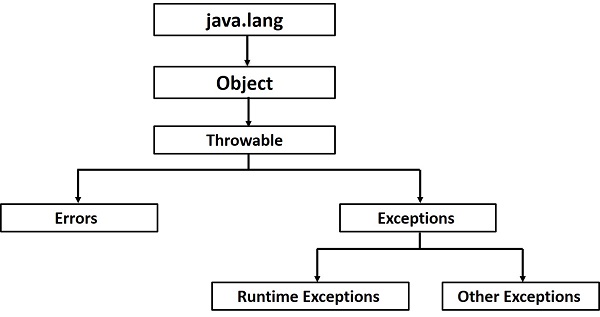
以下是Java内置异常中最常见的一些已检查异常和未检查异常的列表。Java的内置异常。
Java异常类方法
以下是Throwable类中一些重要方法的列表。
| 序号 | 方法及描述 |
|---|---|
| 1 | public String getMessage() 返回关于发生的异常的详细消息。此消息在Throwable构造函数中初始化。 |
| 2 | public Throwable getCause() 返回异常的原因,以Throwable对象表示。 |
| 3 | public String toString() 返回类的名称与getMessage()结果的连接。 |
| 4 | public void printStackTrace() 将toString()的结果以及堆栈跟踪打印到System.err(错误输出流)。 |
| 5 | public StackTraceElement [] getStackTrace() 返回一个包含堆栈跟踪中每个元素的数组。索引为0的元素表示调用堆栈的顶部,数组中的最后一个元素表示调用堆栈底部的调用方法。 |
| 6 | public Throwable fillInStackTrace() 用当前堆栈跟踪填充此Throwable对象的堆栈跟踪,并添加到堆栈跟踪中的任何先前信息。 |
捕获异常:Java中的异常处理
方法使用try和catch关键字的组合来捕获异常。try/catch块放置在可能生成异常的代码周围。try/catch块中的代码称为受保护代码,使用try/catch的语法如下所示:
语法
try {
   // Protected code
} catch (ExceptionName e1) {
   // Catch block
}
容易发生异常的代码放在try块中。当发生异常时,发生的异常由与其关联的catch块处理。每个try块都应该紧跟一个catch块或finally块。
catch语句涉及声明您尝试捕获的异常类型。如果在受保护的代码中发生异常,则检查try后面的catch块(或块)。如果发生的异常类型在catch块中列出,则异常将传递到catch块,就像参数传递到方法参数一样。
示例:演示异常处理
在以下示例中,声明了一个包含2个元素的数组。然后代码尝试访问数组的第3个元素,这将引发异常。
// File Name : ExcepTest.java
import java.io.*;

public class ExcepTest {

   public static void main(String args[]) {
      try {
         int a[] = new int[2];
         System.out.println("Access element three :" + a[3]);
      } catch (ArrayIndexOutOfBoundsException e) {
         System.out.println("Exception thrown  :" + e);
      }
      System.out.println("Out of the block");
   }
}
输出
Exception thrown  :java.lang.ArrayIndexOutOfBoundsException: 3
Out of the block
多个Catch块
try块后面可以跟多个catch块。多个catch块的语法如下所示:
语法
try {
   // Protected code
} catch (ExceptionType1 e1) {
   // Catch block
} catch (ExceptionType2 e2) {
   // Catch block
} catch (ExceptionType3 e3) {
   // Catch block
}
前面的语句演示了三个catch块,但在单个try之后可以有任意数量的catch块。如果在受保护的代码中发生异常,则异常将抛到列表中的第一个catch块。如果抛出的异常的数据类型与ExceptionType1匹配,则会在那里捕获它。如果不是,则异常传递到第二个catch语句。这种情况将持续下去,直到异常被捕获或贯穿所有catch,在这种情况下,当前方法将停止执行,并且异常将抛到调用堆栈上的前一个方法。
示例
以下代码段显示了如何使用多个try/catch语句。
try {
   file = new FileInputStream(fileName);
   x = (byte) file.read();
} catch (IOException i) {
   i.printStackTrace();
   return -1;
} catch (FileNotFoundException f) // Not valid! {
   f.printStackTrace();
   return -1;
}
捕获多种类型的异常
从Java 7开始,您可以使用单个catch块处理多个异常,此功能简化了代码。以下是如何执行此操作:
catch (IOException|FileNotFoundException ex) {
   logger.log(ex);
   throw ex;
Throws/Throw关键字
如果方法不处理已检查异常,则该方法必须使用throws关键字声明它。throws关键字出现在方法签名末尾。
您可以使用throw关键字抛出异常,无论是新实例化的异常还是刚刚捕获的异常。
尝试理解throws和throw关键字之间的区别,throws用于推迟已检查异常的处理,而throw用于显式调用异常。
以下方法声明它抛出一个RemoteException:
示例
import java.io.*;
public class className {

   public void deposit(double amount) throws RemoteException {
      // Method implementation
      throw new RemoteException();
   }
   // Remainder of class definition
}
方法可以声明它抛出多个异常,在这种情况下,异常以逗号分隔的列表形式声明。例如,以下方法声明它抛出一个RemoteException和一个InsufficientFundsException:
示例
import java.io.*;
public class className {

   public void withdraw(double amount) throws RemoteException,
      InsufficientFundsException {
      // Method implementation
   }
   // Remainder of class definition
}
Finally块
finally块位于try块或catch块之后。无论是否发生异常,finally块中的代码始终都会执行。
使用finally块,您可以运行任何您希望执行的清理类型语句,无论受保护代码中发生了什么。
finally块出现在catch块的末尾,并且具有以下语法:
语法
try {
   // Protected code
} catch (ExceptionType1 e1) {
   // Catch block
} catch (ExceptionType2 e2) {
   // Catch block
} catch (ExceptionType3 e3) {
   // Catch block
}finally {
   // The finally block always executes.
}
示例
public class ExcepTest {

   public static void main(String args[]) {
      int a[] = new int[2];
      try {
         System.out.println("Access element three :" + a[3]);
      } catch (ArrayIndexOutOfBoundsException e) {
         System.out.println("Exception thrown  :" + e);
      }finally {
         a[0] = 6;
         System.out.println("First element value: " + a[0]);
         System.out.println("The finally statement is executed");
      }
   }
}
输出
Exception thrown  :java.lang.ArrayIndexOutOfBoundsException: 3
First element value: 6
The finally statement is executed
请注意以下几点:
catch子句不能独立存在,必须与try语句一起使用。
在存在try/catch块时,不一定需要finally子句。
try块不能独立存在,必须与catch子句或finally子句一起使用。
try、catch、finally块之间不能存在任何代码。
Try-with-resources
通常,当我们使用任何资源(如流、连接等)时,我们必须使用finally块显式关闭它们。在下面的程序中,我们使用FileReader从文件中读取数据,并使用finally块关闭它。
示例
import java.io.File;
import java.io.FileReader;
import java.io.IOException;

public class ReadData_Demo {

   public static void main(String args[]) {
      FileReader fr = null;
      try {
         File file = new File("file.txt");
         fr = new FileReader(file); char [] a = new char[50];
         fr.read(a);   // reads the content to the array
         for(char c : a)
         System.out.print(c);   // prints the characters one by one
      } catch (IOException e) {
         e.printStackTrace();
      }finally {
         try {
            fr.close();
         } catch (IOException ex) {
            ex.printStackTrace();
         }
      }
   }
}
try-with-resources,也称为自动资源管理,是Java 7中引入的一种新的异常处理机制,它会自动关闭try catch块中使用的资源。
要使用此语句,您只需在括号内声明所需的资源,并且创建的资源将在块结束时自动关闭。以下是try-with-resources语句的语法。
语法
try(FileReader fr = new FileReader("file path")) {
   // use the resource
   } catch () {
      // body of catch
   }
}
以下是使用try-with-resources语句读取文件中的数据的程序。
示例
import java.io.FileReader;
import java.io.IOException;

public class Try_withDemo {

   public static void main(String args[]) {
      try(FileReader fr = new FileReader("E://file.txt")) {
         char [] a = new char[50];
         fr.read(a);   // reads the contentto the array
         for(char c : a)
         System.out.print(c);   // prints the characters one by one
      } catch (IOException e) {
         e.printStackTrace();
      }
   }
}
在使用try-with-resources语句时,需要注意以下几点。
要将类与try-with-resources语句一起使用,它必须实现AutoCloseable接口,并且它的close()方法会在运行时自动调用。
您可以在try-with-resources语句中声明多个类。
当您在try-with-resources语句的try块中声明多个类时,这些类将按相反的顺序关闭。
除了在括号内声明资源之外,其他所有内容都与try块的普通try/catch块相同。
try中声明的资源在try块开始之前立即实例化。
在try块中声明的资源隐式声明为final。
Java中的用户定义异常
您可以在Java中创建自己的异常。在编写自己的异常类时,请牢记以下几点:
所有异常都必须是Throwable的子类。
如果您想编写由Handle or Declare Rule自动执行的已检查异常,则需要扩展Exception类。
如果您想编写运行时异常,则需要扩展RuntimeException类。
语法
我们可以如下定义自己的异常类:
class MyException extends Exception {
}
您只需要扩展预定义的Exception类即可创建自己的异常。这些被认为是已检查异常。以下InsufficientFundsException类是一个用户定义的异常,它扩展了Exception类,使其成为已检查异常。异常类与任何其他类一样,包含有用的字段和方法。
示例:创建用户定义异常
// File Name InsufficientFundsException.java
import java.io.*;

public class InsufficientFundsException extends Exception {
   private double amount;

   public InsufficientFundsException(double amount) {
      this.amount = amount;
   }

   public double getAmount() {
      return amount;
   }
}
为了演示如何使用我们用户定义的异常,以下CheckingAccount类包含一个抛出InsufficientFundsException的withdraw()方法。
// File Name CheckingAccount.java
import java.io.*;

public class CheckingAccount {
   private double balance;
   private int number;

   public CheckingAccount(int number) {
      this.number = number;
   }

   public void deposit(double amount) {
      balance += amount;
   }

   public void withdraw(double amount) throws InsufficientFundsException {
      if(amount <= balance) {
         balance -= amount;
      }else {
         double needs = amount - balance;
         throw new InsufficientFundsException(needs);
      }
   }

   public double getBalance() {
      return balance;
   }

   public int getNumber() {
      return number;
   }
}
以下BankDemo程序演示了调用CheckingAccount的deposit()和withdraw()方法。
// File Name BankDemo.java
public class BankDemo {

   public static void main(String [] args) {
      CheckingAccount c = new CheckingAccount(101);
      System.out.println("Depositing $500...");
      c.deposit(500.00);

      try {
         System.out.println("\nWithdrawing $100...");
         c.withdraw(100.00);
         System.out.println("\nWithdrawing $600...");
         c.withdraw(600.00);
      } catch (InsufficientFundsException e) {
         System.out.println("Sorry, but you are short $" + e.getAmount());
         e.printStackTrace();
      }
   }
}
编译上述三个文件并运行BankDemo。这将产生以下结果:
输出
Depositing $500...

Withdrawing $100...

Withdrawing $600...
Sorry, but you are short $200.0
InsufficientFundsException
         at CheckingAccount.withdraw(CheckingAccount.java:25)
         at BankDemo.main(BankDemo.java:13)
常见的Java异常
在Java中,可以定义两类异常和错误。
JVM异常 - 这些是JVM专门或逻辑上抛出的异常/错误。例如:NullPointerException、ArrayIndexOutOfBoundsException、ClassCastException。
程序异常 - 这些异常由应用程序或API程序员显式抛出。例如:IllegalArgumentException、IllegalStateException。