
- ngx-bootstrap 教程
- ngx-bootstrap - 首页
- ngx-bootstrap - 概述
- ngx-bootstrap - 环境搭建
- ngx-bootstrap - 手风琴
- ngx-bootstrap - 警报
- ngx-bootstrap - 按钮
- ngx-bootstrap - 轮播图
- ngx-bootstrap - 折叠
- ngx-bootstrap - 日期选择器
- ngx-bootstrap - 下拉菜单
- ngx-bootstrap - 模态框
- ngx-bootstrap - 分页
- ngx-bootstrap - 气泡提示
- ngx-bootstrap - 进度条
- ngx-bootstrap - 评分
- ngx-bootstrap - 可排序
- ngx-bootstrap - 标签页
- ngx-bootstrap - 时间选择器
- ngx-bootstrap - 工具提示
- ngx-bootstrap - 自动完成
- ngx-bootstrap 有用资源
- ngx-bootstrap - 快速指南
- ngx-bootstrap - 有用资源
- ngx-bootstrap - 讨论
ngx-bootstrap - 轮播图
ngx-bootstrap 轮播图用于创建图像或文本幻灯片。
CarouselComponent
创建轮播图的基本元素。
选择器
carousel
输入
activeSlide − 数字,当前显示幻灯片的索引(从 0 开始)
indicatorsByChunk − 布尔值,默认值:false
interval − 数字,项目循环的延迟(毫秒)。如果为 false,轮播图将不会自动循环。
isAnimated − 布尔值,启用/禁用动画。动画不适用于多列表轮播图,默认值:false
itemsPerSlide − 数字,默认值:1
noPause − 布尔值
noWrap − 布尔值
pauseOnFocus − 布尔值
showIndicators − 布尔值
singleSlideOffset − 布尔值
startFromIndex − 数字,默认值:0
输出
activeSlideChange − 当活动幻灯片更改时发出。双向绑定 [(activeSlide)] 属性的一部分
slideRangeChange − 在多列表模式下,当活动幻灯片更改时发出
SlideComponent
选择器
slide
输入
active − 布尔值,当前幻灯片是否处于活动状态
示例
由于我们将使用轮播图,我们需要更新在ngx-bootstrap 按钮章节中使用的 app.module.ts 以使用CarouselModule。
更新 app.module.ts 以使用 CarouselModule。
app.module.ts
import { BrowserModule } from '@angular/platform-browser';
import { NgModule } from '@angular/core';
import { BrowserAnimationsModule } from '@angular/platform-browser/animations';
import { AppComponent } from './app.component';
import { TestComponent } from './test/test.component';
import { AccordionModule } from 'ngx-bootstrap/accordion';
import { AlertModule,AlertConfig } from 'ngx-bootstrap/alert';
import { ButtonsModule } from 'ngx-bootstrap/buttons';
import { FormsModule } from '@angular/forms';
import { CarouselModule } from 'ngx-bootstrap/carousel';

@NgModule({
   declarations: [
      AppComponent,
      TestComponent
   ],
   imports: [
      BrowserAnimationsModule,
      BrowserModule,
      AccordionModule,
      AlertModule,
      ButtonsModule,
      FormsModule,
      CarouselModule
   ],
   providers: [AlertConfig],
   bootstrap: [AppComponent]
})
export class AppModule { }
更新 test.component.html 以使用轮播图。
test.component.html
<div style="width: 500px; height: 500px;">
   <carousel [noWrap]="noWrapSlides" [showIndicators]="showIndicator">
      <slide *ngFor="let slide of slides; let index=index">
         <img [src]="slide.image" alt="image slide" style="display: block; width: 100%;">
         <div class="carousel-caption">
			<h4>Slide {{index}}</h4>
            <p>{{slide.text}}</p>
         </div>
      </slide>
   </carousel>
   <br/>
   <div>
      <div class="checkbox">
         <label><input type="checkbox" [(ngModel)]="noWrapSlides">Disable Slide Looping</label>
         <label><input type="checkbox" [(ngModel)]="showIndicator">Enable Indicator</label>
      </div>
   </div>
</div>
更新 test.component.ts 中相应的变量和方法。
test.component.ts
import { Component, OnInit } from '@angular/core';
import { CarouselConfig } from 'ngx-bootstrap/carousel';

@Component({
   selector: 'app-test',
   templateUrl: './test.component.html',
   providers: [
      { provide: CarouselConfig, useValue: { interval: 1500, noPause: false, showIndicators: true } }
   ],
   styleUrls: ['./test.component.css']
})
export class TestComponent implements OnInit {
   slides = [
      {image: 'assets/images/nature/1.jpg', text: 'First'},
      {image: 'assets/images/nature/2.jpg',text: 'Second'},
      {image: 'assets/images/nature/3.jpg',text: 'Third'}
   ];
   noWrapSlides = false;
   showIndicator = true;
   constructor() { }

   ngOnInit(): void {
   }
}
构建和运行
运行以下命令启动 Angular 服务器。
ng serve
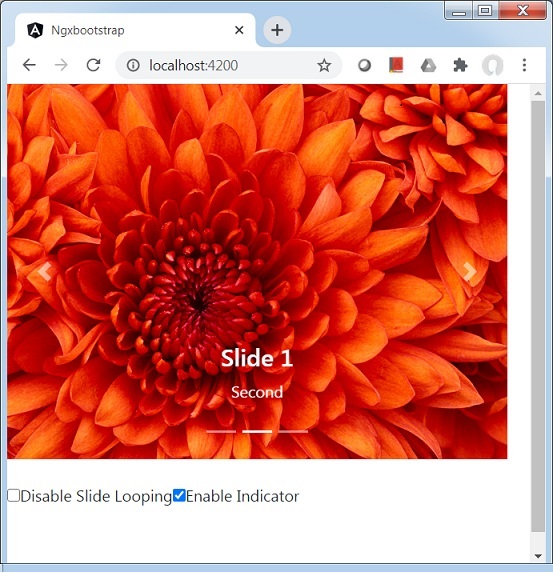
服务器启动并运行后,打开 https://:4200 并验证以下输出。
广告