- Ngx-Bootstrap 教程
- Ngx-Bootstrap - 首页
- Ngx-Bootstrap - 概述
- Ngx-Bootstrap - 环境设置
- Ngx-Bootstrap - 手风琴
- Ngx-Bootstrap - 警报
- Ngx-Bootstrap - 按钮
- Ngx-Bootstrap - 轮播
- Ngx-Bootstrap - 折叠
- Ngx-Bootstrap - 日期选择器
- Ngx-Bootstrap - 下拉菜单
- Ngx-Bootstrap - 模态框
- Ngx-Bootstrap - 分页
- Ngx-Bootstrap - 气泡提示
- Ngx-Bootstrap - 进度条
- Ngx-Bootstrap - 评分
- Ngx-Bootstrap - 可排序
- Ngx-Bootstrap - 标签页
- Ngx-Bootstrap - 时间选择器
- Ngx-Bootstrap - 工具提示
- Ngx-Bootstrap - 自动完成
- Ngx-Bootstrap 有用资源
- Ngx-Bootstrap - 快速指南
- Ngx-Bootstrap - 有用资源
- Ngx-Bootstrap - 讨论
Ngx-Bootstrap - 时间选择器
ngx-bootstrap 时间选择器组件提供了一个易于使用且高度可配置的时间选择器组件。
TimepickerComponent
选择器
timepicker
输入
arrowkeys − 布尔值,如果为 true,则可以使用键盘上的向上/向下箭头键更改小时和分钟的值。
disabled − 布尔值,如果为 true,则小时和分钟字段将被禁用。
hoursPlaceholder − 字符串,时间选择器中小时字段的占位符。
hourStep − 数字,小时更改步长。
max − 日期,用户可以选择的最大时间。
meridians − 字符串数组,基于区域设置的子午线标签。
min − 日期,用户可以选择的最小时间。
minutesPlaceholder − 字符串,时间选择器中分钟字段的占位符。
minuteStep − 数字,小时更改步长。
mousewheel − 布尔值,如果为 true,则小时和分钟输入内的滚动将更改时间。
readonlyInput − 布尔值,如果为 true,则小时和分钟字段将为只读。
secondsPlaceholder − 字符串,时间选择器中秒字段的占位符。
secondsStep − 数字,秒更改步长。
showMeridian − 布尔值,如果为 true,则将显示子午线按钮。
showMinutes − 布尔值,在时间选择器中显示分钟。
showSeconds − 布尔值,在时间选择器中显示秒。
showSpinners − 布尔值,如果为 true,则将显示输入上方的和下方的微调箭头。
输出
isValid − 如果值为有效日期,则发出 true。
示例
由于我们将使用时间选择器,因此我们需要更新 ngx-bootstrap 标签章节中使用的 app.module.ts 以使用TimepickerModule。
更新 app.module.ts 以使用 TimepickerModule。
app.module.ts
import { BrowserModule } from '@angular/platform-browser';
import { NgModule } from '@angular/core';
import { BrowserAnimationsModule } from '@angular/platform-browser/animations';
import { AppComponent } from './app.component';
import { TestComponent } from './test/test.component';
import { AccordionModule } from 'ngx-bootstrap/accordion';
import { AlertModule,AlertConfig } from 'ngx-bootstrap/alert';
import { ButtonsModule } from 'ngx-bootstrap/buttons';
import { FormsModule } from '@angular/forms';
import { CarouselModule } from 'ngx-bootstrap/carousel';
import { CollapseModule } from 'ngx-bootstrap/collapse';
import { BsDatepickerModule, BsDatepickerConfig } from 'ngx-bootstrap/datepicker';
import { BsDropdownModule,BsDropdownConfig } from 'ngx-bootstrap/dropdown';
import { PaginationModule,PaginationConfig } from 'ngx-bootstrap/pagination';
import { PopoverModule, PopoverConfig } from 'ngx-bootstrap/popover';
import { ProgressbarModule,ProgressbarConfig } from 'ngx-bootstrap/progressbar';
import { RatingModule, RatingConfig } from 'ngx-bootstrap/rating';
import { SortableModule, DraggableItemService } from 'ngx-bootstrap/sortable';
import { TabsModule, TabsetConfig } from 'ngx-bootstrap/tabs';
import { TimepickerModule } from 'ngx-bootstrap/timepicker';

@NgModule({
   declarations: [
      AppComponent,
      TestComponent
   ],
   imports: [
      BrowserAnimationsModule,
      BrowserModule,
      AccordionModule,
      AlertModule,
      ButtonsModule,
      FormsModule,
      CarouselModule,
      CollapseModule,
      BsDatepickerModule.forRoot(),
      BsDropdownModule,
      ModalModule,
      PaginationModule,
      PopoverModule,
      ProgressbarModule,
      RatingModule,
      SortableModule,
      TabsModule,
      TimepickerModule.forRoot()
   ],
   providers: [AlertConfig,
      BsDatepickerConfig,
      BsDropdownConfig,
      BsModalService,
      PaginationConfig,
      ProgressbarConfig,
      RatingConfig,
      DraggableItemService,
      TabsetConfig],
   bootstrap: [AppComponent]
})
export class AppModule { }
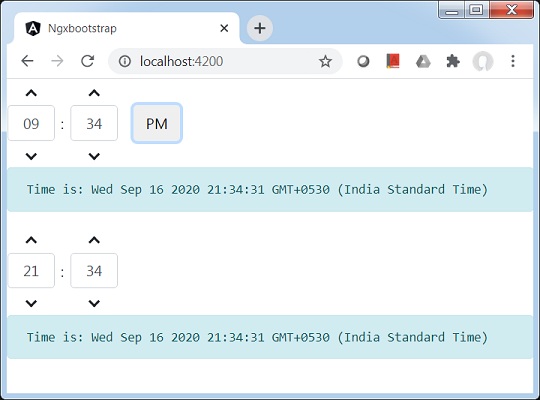
更新 test.component.html 以使用时间选择器组件。
test.component.html
<timepicker [(ngModel)]="time"></timepicker>
<pre class="alert alert-info">Time is: {{time}}</pre>

<timepicker [(ngModel)]="time" [showMeridian]="false"></timepicker>
<pre class="alert alert-info">Time is: {{time}}</pre>
更新 test.component.ts 以对应变量和方法。
test.component.ts
import { Component, OnInit } from '@angular/core';

@Component({
   selector: 'app-test',
   templateUrl: './test.component.html',
   styleUrls: ['./test.component.css']
})
export class TestComponent implements OnInit {
   time: Date = new Date();
   constructor() {}
   ngOnInit(): void {
   }
}
构建和运行
运行以下命令以启动 Angular 服务器。
ng serve
服务器启动并运行后。打开 https://:4200。点击“打开模态”按钮并验证以下输出。