
- Ngx-Bootstrap 教程
- Ngx-Bootstrap - 首页
- Ngx-Bootstrap - 概述
- Ngx-Bootstrap - 环境搭建
- Ngx-Bootstrap - 手风琴
- Ngx-Bootstrap - 警报
- Ngx-Bootstrap - 按钮
- Ngx-Bootstrap - 走马灯
- Ngx-Bootstrap - 折叠面板
- Ngx-Bootstrap - 日期选择器
- Ngx-Bootstrap - 下拉菜单
- Ngx-Bootstrap - 模态框
- Ngx-Bootstrap - 分页
- Ngx-Bootstrap - 气泡提示框
- Ngx-Bootstrap - 进度条
- Ngx-Bootstrap - 评分
- Ngx-Bootstrap - 可排序列表
- Ngx-Bootstrap - 标签页
- Ngx-Bootstrap - 时间选择器
- Ngx-Bootstrap - 工具提示
- Ngx-Bootstrap - 自动完成
- Ngx-Bootstrap 有用资源
- Ngx-Bootstrap - 快速指南
- Ngx-Bootstrap - 有用资源
- Ngx-Bootstrap - 讨论区
Ngx-Bootstrap - 模态框
ngx-bootstrap 模态框组件是一个灵活且高度可配置的对话框提示,提供多种默认设置,并可以使用最少的代码。
ModalDirective
选择器
[bsModal]
输入
config − ModalOptions,允许通过元素属性设置模态框配置
输出
onHidden − 当模态框已完成从用户视野中隐藏时触发此事件(将等待 CSS 过渡完成)。
onHide − 调用 hide 实例方法时立即触发此事件。
onShow − 调用 show 实例方法时立即触发此事件。
onShown − 当模态框已对用户可见时触发此事件(将等待 CSS 过渡完成)。
方法
show() − 允许手动打开模态框。
hide() − 允许手动关闭模态框。
toggle() − 允许手动切换模态框可见性。
showElement() − 显示对话框。
focusOtherModal() − 事件技巧。
示例
由于我们将使用模态框,我们需要更新在ngx-bootstrap 下拉菜单章节中使用的 app.module.ts 文件,以使用ModalModule 和 BsModalService。
更新 app.module.ts 以使用 ModalModule 和 BsModalService。
app.module.ts
import { BrowserModule } from '@angular/platform-browser';
import { NgModule } from '@angular/core';
import { BrowserAnimationsModule } from '@angular/platform-browser/animations';
import { AppComponent } from './app.component';
import { TestComponent } from './test/test.component';
import { AccordionModule } from 'ngx-bootstrap/accordion';
import { AlertModule,AlertConfig } from 'ngx-bootstrap/alert';
import { ButtonsModule } from 'ngx-bootstrap/buttons';
import { FormsModule } from '@angular/forms';
import { CarouselModule } from 'ngx-bootstrap/carousel';
import { CollapseModule } from 'ngx-bootstrap/collapse';
import { BsDatepickerModule, BsDatepickerConfig } from 'ngx-bootstrap/datepicker';
import { BsDropdownModule,BsDropdownConfig } from 'ngx-bootstrap/dropdown';
import { ModalModule, BsModalService } from 'ngx-bootstrap/modal';

@NgModule({
   declarations: [
      AppComponent,
      TestComponent
   ],
   imports: [
      BrowserAnimationsModule,
      BrowserModule,
      AccordionModule,
      AlertModule,
      ButtonsModule,
      FormsModule,
      CarouselModule,
      CollapseModule,
      BsDatepickerModule.forRoot(),
      BsDropdownModule,
      ModalModule
   ],
   providers: [AlertConfig, BsDatepickerConfig, BsDropdownConfig,BsModalService],
   bootstrap: [AppComponent]
})
export class AppModule { }
更新 test.component.html 以使用模态框。
test.component.html
<button type="button" class="btn btn-primary" (click)="openModal(template)">Open modal</button>

<ng-template #template>
   <div class="modal-header">
      <h4 class="modal-title pull-left">Modal</h4>
      <button type="button" class="close pull-right" aria-label="Close" (click)="modalRef.hide()">
         <span aria-hidden="true">×</span>
      </button>
   </div>
   <div class="modal-body">
      This is a sample modal dialog box.
   </div>
   <div class="modal-footer">
      <button type="button" class="btn btn-default" (click)="modalRef.hide()">Close</button>
   </div>
</ng-template>
更新 test.component.ts 以对应变量和方法。
test.component.ts
import { Component, OnInit, TemplateRef } from '@angular/core';
import { BsModalRef, BsModalService } from 'ngx-bootstrap/modal';

@Component({
   selector: 'app-test',
   templateUrl: './test.component.html',
   styleUrls: ['./test.component.css']
})
export class TestComponent implements OnInit {

   modalRef: BsModalRef;
   constructor(private modalService: BsModalService) {}

   openModal(template: TemplateRef<any>) {
      this.modalRef = this.modalService.show(template);
   }

   ngOnInit(): void {
   }
}
构建和运行
运行以下命令启动 Angular 服务器。
ng serve
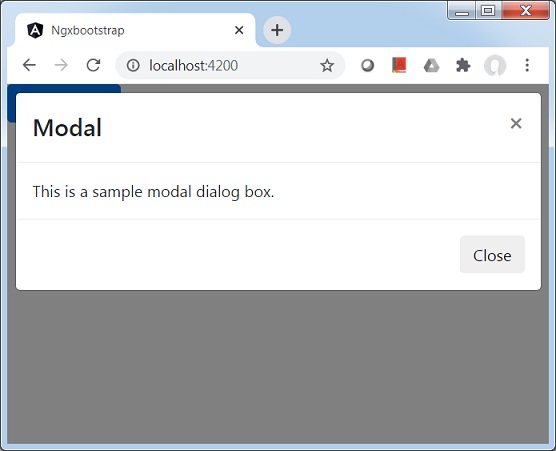
服务器启动并运行后,打开 https://:4200。点击“打开模态框”按钮并验证以下输出。
广告